Blog Options
Archive
<< September 2026 >>-
Monday 28
- From Data Selection to PDF: Combining FNC DataGrid, Chart and Popup Menu -
Thursday 24
- Server Hosting in TMS Sparkle: Console, Windows Service or Linux Daemon -
Wednesday 23
- Building a PKCS#12/PFX Exporter with TMS Crypto Pack: Inside TX509Certificate -
Tuesday 22
- Back to School: TMS Academic Products Now Support Delphi 13 Community Edition -
Monday 21
- TMS FNC Localization is now in open beta -
Thursday 17
- Keeping up with the latest changes in AI with TMS AI Studio 2.0 -
Tuesday 8
- Data Report with Filtering and Conditional Formatting -
Monday 7
- Filtering in Delphi: Building a Highlighting Property-Based Search -
Thursday 3
- Translate Your Delphi Application with Ease - Introducing TMS FNC Localization BETA -
Wednesday 2
- Make Your Data Speak: Conditional Formatting in TMS FNC Data Grid 2.0
- Hawk One: a voxel helicopter game written in Delphi with TMS WEB Core
- Delphi 13.2 support is here
- TMS FixInsight reaches End of Life
Authors
- Bernard Roussely (4)
- Wagner Landgraf (105)
- Dennis Röhner (2)
- Roman Yankovsky (2)
- Bart Holvoet (45)
- Aaron Decramer (86)
- Aäron Decramer (4)
- Pieter Scheldeman (143)
- Nancy Lescouhier (32)
- Adrian Gallero (35)
- Bruno Fierens (463)
- Marcos Douglas B. Santos (5)
- Bernard (4)
- Bradley Velghe (40)
- Andrew Simard (86)
- Holger Flick (15)
- Gjalt Vanhouwaert (54)
- Tunde Keller (39)
- Masiha Zemarai (117)
Blog
All Blog Posts | Next Post | Previous Post

 Using the new Windows Vista TaskDialog from Delphi & C++Builder
Wednesday, January 21, 2009
Introduction
Windows Vista introduces a new dialog to communicate with the user, called TaskDialog. In its most simple form, a TaskDialog is just a nicer looking MessageBox equivalent with options to customize the title and to add a description and content.Pre Windows Vista dialog boxes
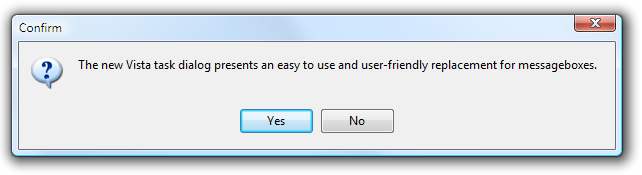 Windows Vista basic TaskDialog equivalent:
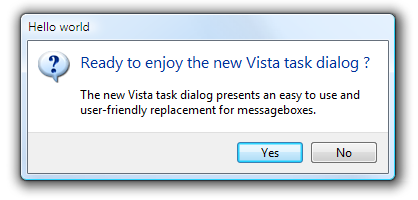 Other than the basic task dialog, Windows Vista offers many more
capabilities to extend the dialog with selectors for multiple possibilities,
verify checkbox, optionally hidden extra information, progressbars etc... These
extra capabilities will be discussed in a next article.
Other than the basic task dialog, Windows Vista offers many more
capabilities to extend the dialog with selectors for multiple possibilities,
verify checkbox, optionally hidden extra information, progressbars etc... These
extra capabilities will be discussed in a next article.Using the basic TaskDialog from Delphi
Using the TaskDialog from Delphi is simple. Windows Vista makes the TaskDialog available as a Win32 API call in the new COMCTL32.DLL v6. It is important to note that Windows Vista still ships with COMCTL32.DLL v5 as well and this is the default library an application uses from Delphi. To use COMCTL32.DLL v6 and thus also the TaskDialog API, make sure the manifest TXPManifest or TMS TWinXP component in your app.The TaskDialog API function is declared in the Windows Vista SDK as:
HRESULT TaskDialog(HWND hWndParent,
    HINSTANCE hInstance,
    PCWSTR pszWindowTitle,
    PCWSTR pszMainInstruction,
    PCWSTR pszContent,
    TASKDIALOG_COMMON_BUTTON_FLAGS dwCommonButtons,
    PCWSTR pszIcon,
    int *pnButton
);
this translates in Delphi to a function:
TaskDialog: function(HWND: THandle; hInstance:
THandle; cTitle, cDescription, cContent: pwidechar; Buttons: Integer; Icon:
integer; ResButton: pinteger): integer;
THandle; cTitle, cDescription, cContent: pwidechar; Buttons: Integer; Icon:
integer; ResButton: pinteger): integer;
A disadvantage of the new TaskDialog is that this will only work on Windows Vista. Earlier versions of the Windows operating system simply do not support it. We have therefore created a function to use the basic TaskDialog on Windows Vista that will fallback to the standard MessageDlg for older operating systems. This way, your application will have the latest user-interface appearance on Windows Vista and simultanously continue to work on older versions of Windows. The full code of this new TaskDialog method is included here below. An extra TaskMessage function is provided for replacing the Delphi ShowMessage as well.
const
TD_ICON_BLANK = 100;
TD_ICON_WARNING = 101;
TD_ICON_QUESTION = 102;
TD_ICON_ERROR = 103;
TD_ICON_INFORMATION = 104;
TD_ICON_BLANK_AGAIN = 105;
TD_ICON_SHIELD = 106;

TD_OK = 1;
TD_YES = 2;
TD_NO = 4;
TD_CANCEL = 8;
TD_RETRY = 16;
TD_CLOSE = 32;

DLGRES_OK = 1;
DLGRES_CANCEL = 2;
DLGRES_RETRY = 4;
DLGRES_YES = 6;
DLGRES_NO = 7;
DLGRES_CLOSE = 8;

function TaskDialog(AForm: TCustomForm; ATitle,
ADescription, AContent: string; Buttons,Icon: integer): integer;
var
  VerInfo: TOSVersioninfo;
  DLLHandle:
THandle;
  res: integer;
  wTitle,wDescription,wContent:
array[0..1024] of widechar;
  Btns:
TMsgDlgButtons;
  DlgType:
TMsgDlgType;
  TaskDialogProc:
function(HWND: THandle; hInstance: THandle; cTitle, cDescription, cContent:
pwidechar; Buttons: Integer; Icon: integer;
       ResButton: pinteger): integer; cdecl
stdcall;

begin
  Result := 0;

  VerInfo.dwOSVersionInfoSize := SizeOf(TOSVersionInfo);
  GetVersionEx(verinfo);

  if (verinfo.dwMajorVersion >= 6) then
  begin
    DLLHandle := LoadLibrary('comctl32.dll');
    if DLLHandle >= 32 then
    begin
      @TaskDialogProc := GetProcAddress(DLLHandle,'TaskDialog');

      if Assigned(TaskDialogProc) then
      begin
        StringToWideChar(ATitle, wTitle, sizeof(wTitle));
        StringToWideChar(ADescription, wDescription, sizeof(wDescription));
        StringToWideChar(AContent, wContent, sizeof(wContent));
        TaskDialogProc(AForm.Handle, 0, wTitle, wDescription, wContent, Buttons,Icon,@res);

        Result := mrOK;

        case res of
        DLGRES_CANCEL : Result := mrCancel;
        DLGRES_RETRY : Result := mrRetry;
        DLGRES_YES : Result := mrYes;
        DLGRES_NO : Result := mrNo;
        DLGRES_CLOSE : Result := mrAbort;
        end;
      end;
      FreeLibrary(DLLHandle);
    end;
  end
  else
  begin
    Btns := [];
    if Buttons and TD_OK = TD_OK then
      Btns := Btns + [MBOK];

    if Buttons and TD_YES = TD_YES then
      Btns := Btns + [MBYES];

    if Buttons and TD_NO = TD_NO then
      Btns := Btns + [MBNO];

    if Buttons and TD_CANCEL = TD_CANCEL then
      Btns := Btns + [MBCANCEL];

    if Buttons and TD_RETRY = TD_RETRY then
      Btns := Btns + [MBRETRY];

    if Buttons and TD_CLOSE = TD_CLOSE then
      Btns := Btns + [MBABORT];

    DlgType := mtCustom;

    case Icon of
    TD_ICON_WARNING : DlgType := mtWarning;
    TD_ICON_QUESTION : DlgType := mtConfirmation;
    TD_ICON_ERROR : DlgType := mtError;
    TD_ICON_INFORMATION: DlgType := mtInformation;
    end;

    Result := MessageDlg(AContent, DlgType, Btns, 0);
  end;
end;

procedure TaskMessage(AForm: TCustomForm; AMessage: string);
begin
  TaskDialog(AForm, '', '', AMessage, TD_OK, 0);
end;
This sample code snippet uses the new TaskDialog and TaskMessage functions:
 if TaskDialog(self, 'Hello world','Ready to enjoy the new Vista task dialog ?',
   'The new Vista task dialog presents an easy to use and user-friendly replacement for messageboxes.',

   TD_YES + TD_NO, TD_ICON_QUESTION) = mrYes then
     TaskMessage(self,'yes');
With these basic functions, it is simple to make your Delphi applications already a little more Vista ready. In follow-up articles, the extended capabilities for TaskDialogs will be discussed as well as other new Windows Vista capabilities that become available for Delphi developers.
Bruno Fierens

This blog post has not received any comments yet.
All Blog Posts | Next Post | Previous Post