Blog
All Blog Posts | Next Post | Previous Post

 Classify and Route Customer Mail with AI in Delphi
Thursday, October 29, 2026
In the introduction to AI Mail Desk we met Brightline Motors, a car dealership that lets an AI do the first pass over its mailbox. This post covers the core of that idea: getting mail out of Gmail and Outlook, asking an LLM what each mail is about, and turning the answer into a handler, a priority and a reply.
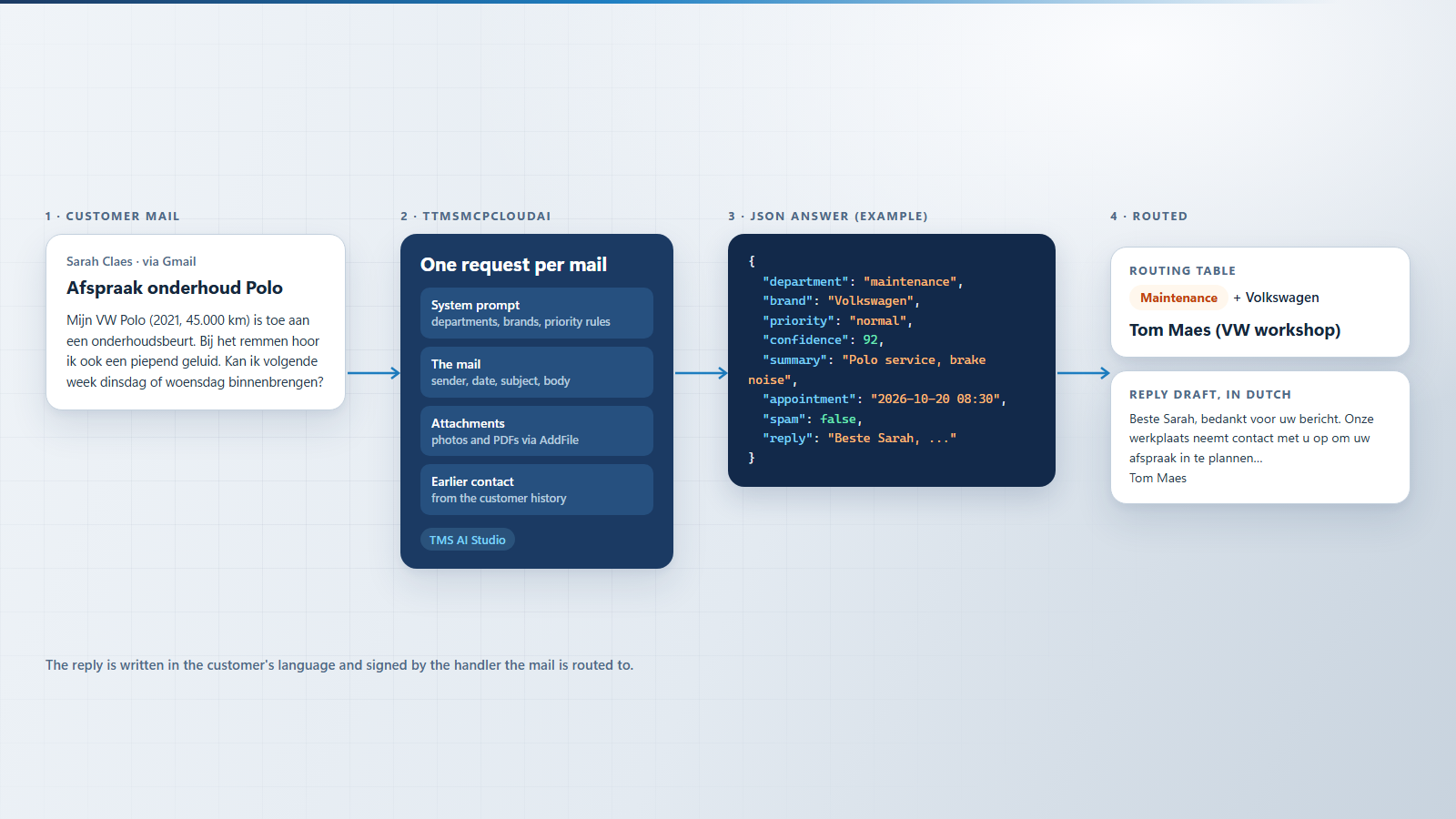
From a Dutch customer mail to a routed mail with a reply draft, in one AI request.
Fetching Mail from Gmail and Outlook
TTMSFNCCloudGoogleGmail and TTMSFNCCloudMicrosoftOutlookMail handle OAuth, token refresh and the REST APIs. After the first login in a browser, the tokens are stored and the server reconnects by itself. Fetching the inbox is one call per mailbox:
FGmail.GetMails('INBOX', AMax, False);
FOutlook.GetMails('Inbox', AMax);
When the mails arrive, each Cloud Pack message is mapped to a small TTriageMail object that the rest of the system understands: sender, subject, plain-text body, original HTML, the IDs needed to reply in the same thread, and local copies of any photos or PDFs. HTML mails are reduced to plain text for the AI, while the original HTML is kept for forwarding.
One Request per Mail
TTMSMCPCloudAI is TMS AI Studio's component for talking to LLM services. Switching between OpenAI, Claude, Gemini, Mistral, DeepSeek or a local Ollama model is a matter of changing Service; the rest of the code stays the same.
The triage sends one request per mail. The system prompt describes the departments, the brands the dealership sells and the priority rules; the context holds the mail itself:
TTMSMCPCloudAI returns one JSON objectFAI.SystemRole.Text := BuildSystemPrompt(FRouting); FAI.Context.Text := BuildMailPrompt(M); FAI.Execute(M.ID.ToString);
The mail ID is passed as the request ID and comes back in OnExecuted, so the answer is always matched to the right mail, even when several requests are on their way.
Ask for JSON, Not Prose
The prompt asks the model for a single JSON object with fixed fields. That makes the answer easy to check and turns a language model into a predictable classifier:
{"department":"sales|accessories|maintenance|finance|secondhand|other",
 "brand":"<brand or Other>",
 "priority":"low|normal|high|urgent",
 "confidence":<integer 0-100>,
 "summary":"<one short sentence in English for the handler>",
 "reason":"<short explanation of the classification>",
 "reply":"<draft reply to the customer>",
 "appointment":"<YYYY-MM-DD HH:MM or empty>",
 "attachments":"<what the attached photos or documents show>",
 "spam":true|false, "spam_reason":"<why, or empty>"}
A few rules in the prompt do most of the work. Models sometimes wrap JSON in a code fence or add a sentence, so the parser simply takes the outermost object and is forgiving about synonyms such as "service" or "workshop" for maintenance.
[SIGNATURE] placeholder.A Routing Table, Not Hard-Coded Rules
The AI decides what a mail is about; the routing table decides who handles it. Each rule maps a department and a brand to a handler, and a * brand acts as the fallback for a department:
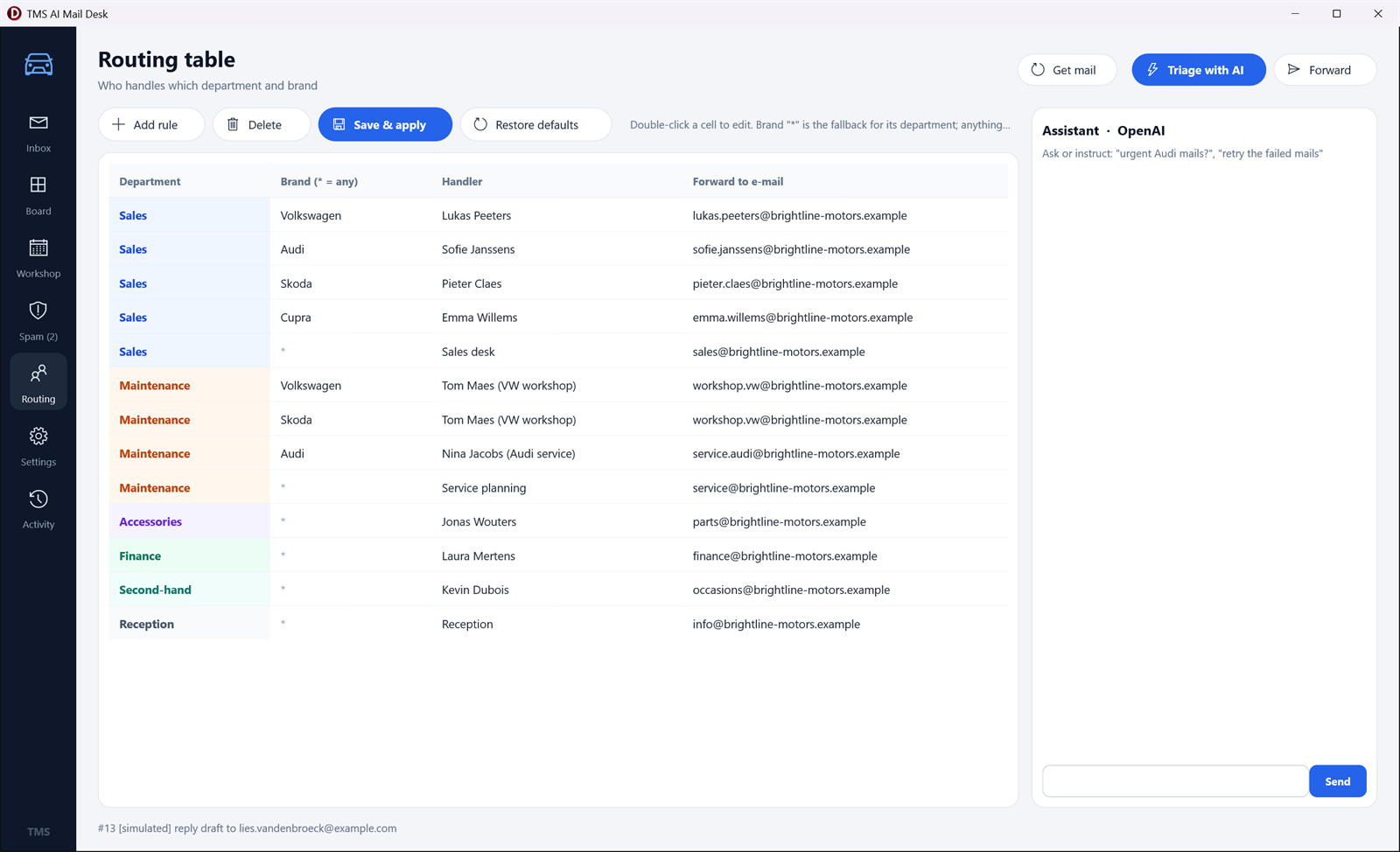
Department plus brand decides the handler. Brand * is the fallback for a department.
Because the brands in the routing table are also part of the system prompt, the AI can only answer with a brand the dealership actually knows. The handler's signature replaces [SIGNATURE] in the reply, so when a person re-routes a mail to another department, the signature follows automatically.
Confidence and the Human in the Loop
Every result carries a confidence score, shown as a data bar in the inbox grid. Nothing leaves the building on the AI's word alone: the reply is saved as a draft, forwarding starts in dry-run mode, and anyone can re-route a mail by dragging its card to another department on the handler board (or by asking the dashboard's assistant), which recalculates the handler and the signature.
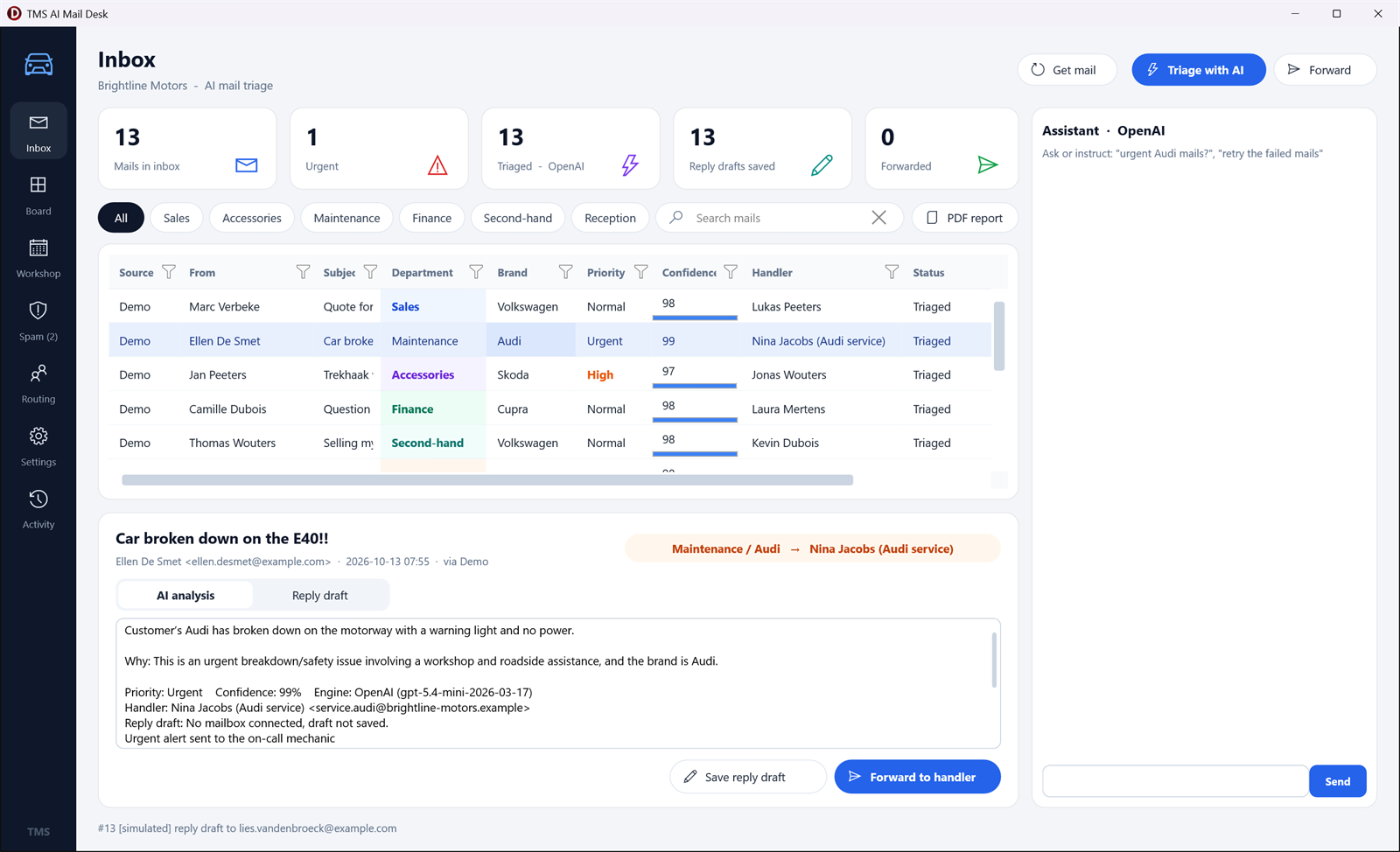
Department, brand, priority and confidence at a glance, with the analysis of the selected mail below.
Works Offline Too
Without an API key the demo falls back to simple keyword rules in four languages. That is deliberately basic: it shows the complete flow without an AI service, and it shows why an LLM is the better classifier. A mail that says "my car makes a noise when braking" in Dutch is easy for a model and hard for a keyword list.
"The AI decides what a mail is about; the routing table decides who handles it."
Conclusion
The pattern is short: fetch with TMS FNC Cloud Pack, ask TTMSMCPCloudAI for a fixed JSON shape, and let a routing table you control turn that answer into a person. In the next post, the AI gets more to work with: the photos and PDFs attached to a mail, the customer's history, and a verdict on whether the mail is spam.
uTriageAI.pas and uRouting.pas.TMS AI Studio is the complete toolkit for bringing AI and the Model Context Protocol to your Delphi applications. Build MCP servers and clients, connect Claude and other assistants to your own tools and data, and add cloud AI to your VCL and FMX apps, all in native Delphi. Discover TMS AI Studio.
TMS FNC Cloud Pack connects your Delphi applications to cloud services such as Gmail, Outlook, Google Calendar, Outlook Calendar, Pushover and many more, with the OAuth sign-in handled for you. Discover TMS FNC Cloud Pack.
Bradley Velghe
Related Blog Posts
-
Building an AI Mail Desk for a Car Dealership with Delphi
-
Classify and Route Customer Mail with AI in Delphi
-
AI That Reads Attachments, Remembers Customers and Catches Spam

This blog post has not received any comments yet.
All Blog Posts | Next Post | Previous Post