Blog
All Blog Posts | Next Post | Previous Post

 Building a Photo Route Album with TMS FNC Maps, OpenStreetMap and EXIF GPS Data
Tuesday, June 2, 2026

There is something special about looking back at a trip and seeing not only the pictures you took, but also the exact route you followed on a map. In this article, we will build a small free & open source Delphi application that combines:
- GPX route visualization
- Free OpenStreetMap integration
- JPEG photos with embedded GPS EXIF data
- Interactive map markers with image previews
The application is based on TMS FNC Maps and uses a lightweight open source EXIF parser to extract GPS coordinates from JPEG files.
The complete source code is available on GitHub:
https://github.com/tmssoftware/TMSFNCMapsAlbum
and for your convenience, the free compiled app is also included in the repo.
and for your convenience, the free compiled app is also included in the repo.
The project demonstrates how easy it is to combine mapping, GPX loading and EXIF processing into a practical desktop application.
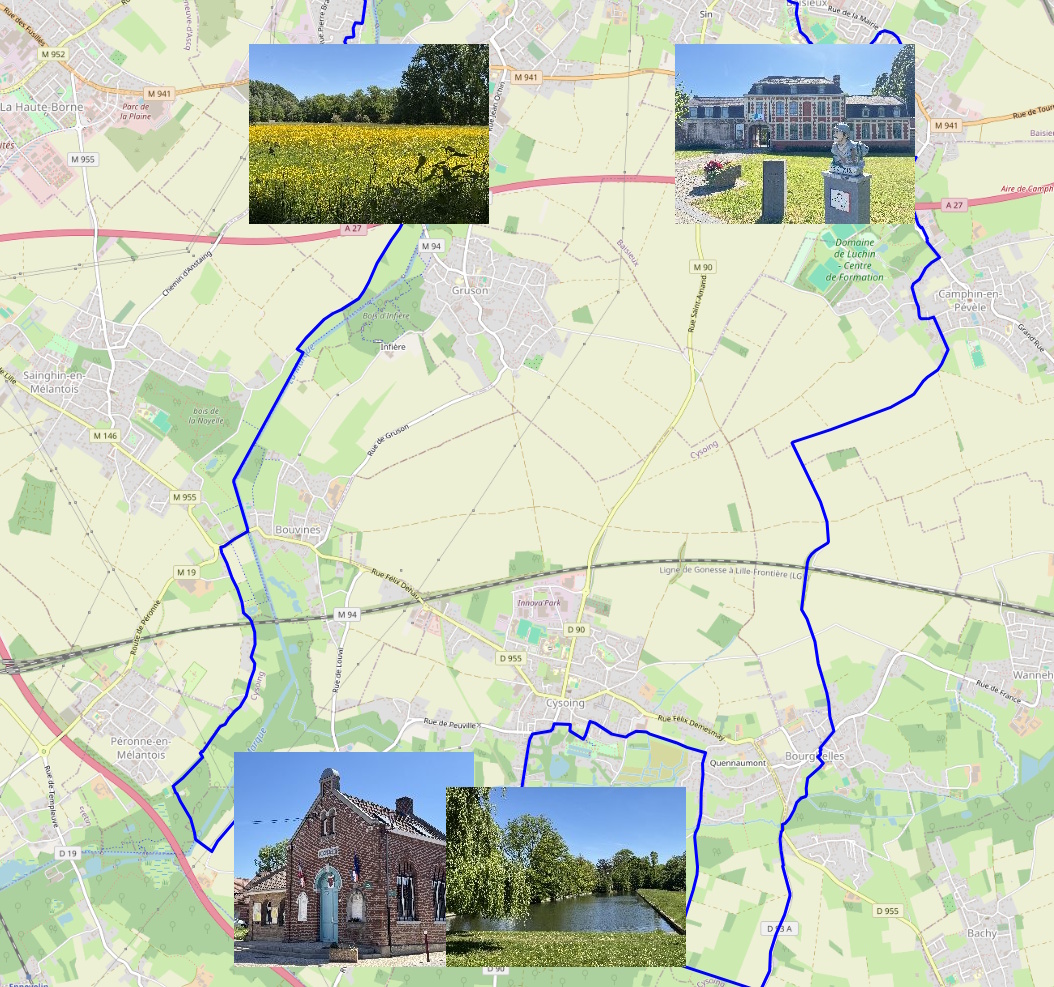
The Result
The application loads:
- GPX routes on top of a free OpenStreetMap layer
- Photos with GPS metadata
- Interactive image markers directly on the map
A typical result looks like this:
The Main Ingredients
The application is intentionally compact and easy to understand.
The core technologies used are:
| Technology | Purpose |
| TTMSFNCMaps | Interactive cross-platform map component |
| OpenStreetMap | Free map tile provider |
| GPX support | Loading hiking/cycling/walking routes |
| EXIF4D parser | Reading GPS metadata from JPEG images |
| Delphi VCL | Building the desktop application |
Using TTMSFNCMaps
The application uses the TTMSFNCMaps component as the central map control. One of the nice things about TMS FNC Maps is that OpenStreetMap support works out of the box. This means you immediately have access to free online maps without requiring any commercial map provider.
Once the map is initialized, it triggers the OnMapInitialized event and it is safe to start working with the map so the application enables all controls:
procedure TMapAlbumForm.TMSFNCMaps1MapInitialized(Sender: TObject);
begin
  btnAddPhotos.Enabled := true;
  btnAddRoutes.Enabled := true;
  btnClear.Enabled := true;
end;
Loading GPX Routes
One of the most powerful features of TMS FNC Maps is the built-in GPX support. The complete GPX loading logic is literally one line of code:
procedure TMapAlbumForm.btnAddRoutesClick(Sender: TObject);
begin
  if openRoute.Execute then
  begin
    TMSFNCMaps1.LoadGPXFromFile(openRoute.FileName, true, true, 3, clrPanel.Color);
  end;
end;
This loads the GPX track and immediately renders it on the OpenStreetMap layer.
The parameters allow you to configure:
- Visibility
- Automatic viewport adjustment
- Line width
- Route color
This makes it very easy to visualize:
- Hiking trails
- Bike rides
- Travel routes
- Running sessions
- Road trips
without writing custom GPX parsing code.
Reading GPS Data from JPEG EXIF Metadata
Modern smartphones and cameras often store GPS coordinates inside the JPEG EXIF metadata. The project uses the open source EXIF4D parser to extract this information.
The key code looks like this:
As a result, the map instantly transforms into a visual travel diary. After all images are processed, the map automatically zooms to the correct region, i.e. the region calculated from all positions of the photes retrieved:
img := TAdvCloudExifImage.Create(MapAlbumForm);

try
  img.AutoLoad := false;
  img.FileName := fname;
  img.LoadData;

  if img.HasGPSData then
  begin
    lon := img.Longitude;
    lat := img.Latitude;
  end;
finally
  img.Free;
end;
This gives direct access to:
- Latitude
- Longitude
- EXIF metadata
- GPS availability
without requiring any external libraries or APIs.
Adding Photos as Interactive Map Markers
Once the GPS coordinates are extracted, creating markers on the map becomes straightforward. The application dynamically adds a marker for each image:
m := Map.AddMarker(lat,lon);
m.IconURL := JpegToBase64(fname, 240);
This is where things become really fun. Instead of using generic map pins, the marker icon itself becomes a thumbnail of the actual photo. The helper function converts the JPEG image into a Base64 encoded image stream:
'data:image/jpeg;base64,' +
TNetEncoding.Base64.EncodeBytesToString(
  OutStream.Memory,
  OutStream.Size
);
TMSFNCMaps1.ZoomToBounds(Coords.NorthEast, Coords.SouthWest);
This creates a very polished user experience with minimal code.
Cross-Platform Possibilities
Because TMS FNC Maps is part of the FNC framework, the same concepts can be reused across:
- VCL
- FMX
- WEB Core
This opens the door to building:
- Desktop travel journals
- Web-based trip viewers
- Mobile activity trackers
- Corporate fleet tracking dashboards
- Asset management applications
using largely the same code base.
Getting the Source Code
The complete free source code of this demo application is available here:
https://github.com/tmssoftware/TMSFNCMapsAlbum
https://github.com/tmssoftware/TMSFNCMapsAlbum
The project includes:
- Full Delphi source code
- EXIF parser integration
- GPX loading example
- Dynamic image markers
- OpenStreetMap integration
Conclusion
TMS FNC Maps makes it remarkably easy to build visually rich mapping applications in Delphi.
By combining OpenStreetMap, GPX route loading, EXIF GPS metadata and Dynamic image markers, we can create an interactive photo route album with very little code.
The demo project shows how powerful the combination of mapping and metadata can be, while still keeping the implementation compact and readable.
If you are building applications involving:
- Geolocation
- Travel logging
- Asset tracking
- Field service visualization
- Tourism
- Outdoor activities
this approach offers an excellent starting point.
Happy coding!
Bruno Fierens

This blog post has not received any comments yet.
All Blog Posts | Next Post | Previous Post