Blog
All Blog Posts | Next Post | Previous Post

 Wrapping Your Own REST API with TMS FNC Cloud Pack
Wednesday, May 27, 2026
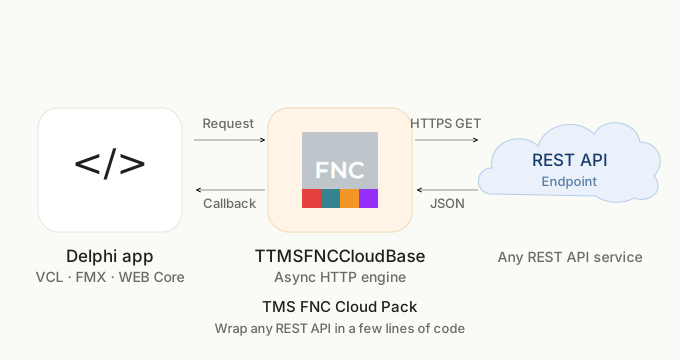
TMS FNC Cloud Pack is well known for its ready-made components to services like Google Drive, Microsoft Outlook Mail. What is often overlooked is that the same package also gives you a lightweight, asynchronous HTTP engine called TTMSFNCCloudBase. With just a few lines of code, this engine lets you talk to any REST API, even when there is no pre-built wrapper available.
In this blog post we will show how easy this is by building a working currency converter from scratch in a short time. Thanks to the FNC framework, the same code runs on VCL, FMX, and TMS WEB Core.
Picking an API
If you are looking for a free API to experiment with, Free Public APIs is a handy curated directory. For this example we picked UniRateAPI, a currency rate service with a generous free tier and a clean REST interface.
Create a free account at unirateapi.com and copy your API key from the dashboard. One detail to keep in mind right away: the API requires a User-Agent header on every request and will return HTTP 403 if it is missing. We will come back to this in step 3.
The Building Block: TTMSFNCCloudBase
For APIs that authenticate with a simple key (rather than OAuth 2.0), TTMSFNCCloudBase is all you need. The workflow is the same every time. You create an instance, populate its Request object with the host, path, query, headers, and HTTP method, and then call ExecuteRequest with a callback procedure. The call returns immediately and the response arrives on the callback, which keeps the UI fully responsive.
Step-by-Step Implementation
1. Create the instance
procedure TForm1.FormCreate(Sender: TObject);
begin
  FCloudService := TTMSFNCCloudBase.Create;
end;
No setup is needed at construction time. The same instance can be reused for any number of subsequent requests.
2. Build the request
The conversion endpoint is GET /api/rates on https://api.unirateapi.com. The required query parameters are api_key, amount, from, to, and format.
FCloudService.Request.Clear;
FCloudService.Request.Name   := 'GET CURRENCY CONVERT';
FCloudService.Request.Host   := 'https://api.unirateapi.com';
FCloudService.Request.Path   := '/api/rates';
FCloudService.Request.Query  := 'api_key='  + TTMSFNCUtils.URLEncode(edAPIKey.Text)
                               + '&amount=' + edAmount.Text
                               + '&from='   + edFrom.Text
                               + '&to='     + edTo.Text
                               + '&format=json';
FCloudService.Request.Method := rmGET;
TTMSFNCUtils.URLEncode (from TMS FNC Core) safely escapes any special characters in the API key.
3. Add the required User-Agent header
As mentioned earlier, UniRateAPI will reject requests without a User-Agent header. Adding one takes a single line:
FCloudService.Request.AddHeader('User-Agent', 'TMSFNCCloudAPIWrapper');
AddHeader can be called repeatedly to attach any number of custom headers. This is useful whenever an API requires bearer tokens, header-based API keys, or vendor-specific values.
4. Execute asynchronously
FCloudService.ExecuteRequest(DoAPIRequestResult);
The call is non-blocking. The UI thread stays free while the HTTP round-trip completes in the background.
5. Handle the response
The callback receives a TTMSFNCCloudBaseRequestResult record that carries the HTTP status code and the raw response body. When the request succeeds, the JSON payload is parsed with TJSONObject.ParseJSONValue, and the relevant numeric values are extracted and assigned to the TLabel controls on the form so the user sees the converted amount and the exchange rate. The JSON object is freed in a try..finally block to avoid memory leaks.
procedure TForm1.DoAPIRequestResult(
  const ARequestResult: TTMSFNCCloudBaseRequestResult);
var
  LJson: TJSONObject;
begin
  if ARequestResult.ResponseCode = 200 then
  begin
    LJson := TJSONObject.ParseJSONValue(ARequestResult.ResultString) as TJSONObject;
    if Assigned(LJson) then
    try
      lbToAmount.Text := FormatFloat('0.00',
        (LJson.GetValue('result') as TJSONNumber).AsDouble);
      lbRate.Text := FormatFloat('0.00',
        (LJson.GetValue('rate') as TJSONNumber).AsDouble);
    finally
      LJson.Free;
    end;
  end;
end;
A successful response looks like this:
{
  "base": "USD",
  "target": "EUR",
  "rate": 0.9187,
  "amount": 100,
  "result": 91.87
}
The result field holds the converted amount and is assigned to lbToAmount, while the rate field holds the exchange rate used and is assigned to lbRate. Both values pass through FormatFloat with the '0.00' mask so they always display with two decimal places.
6. Clean up
procedure TForm1.FormDestroy(Sender: TObject);
begin
  FCloudService.Free;
end;
Download the complete sample project shown in this post.
Conclusion
With a handful of lines of Delphi code, TMS FNC Cloud Pack gives you access to any REST API. The same TTMSFNCCloudBase class that powers the built-in Google Drive, Microsoft Outlook Mail wrappers is available to you for any service you want to integrate, whether public or in-house. And when an API uses OAuth 2.0 instead of a static key, TTMSFNCCloudOAuth picks up where this example leaves off and handles the full three-step authentication flow for you.
Bart Holvoet

This blog post has not received any comments yet.
All Blog Posts | Next Post | Previous Post