Blog

All Blog Posts  |  Next Post  |  Previous Post

A hands-on AI coding experience and comparison between Claude, ChatGPT and Gemini on a real data backend : StellarDS.io

Today

TMS Software Delphi  Components    TMS Software Delphi  Components   TMS Software Delphi  Components

Most AI coding demos avoid the hard part: integrating with a real cloud backend, with real OAuth, and real data shape inconsistencies. This experiment did the opposite. The experiment was done to learn what AI can already reach today, learn how we can effectively improve the flow ourselves and how we can improve the context we provide to improve the process, because:

We’re entering a phase where developers who understand how to collaborate with AI will move faster, experiment more boldly, and ship more confidently.
Not because AI replaces engineering —
but because it amplifies it.
Goal
  • Build the same responsive JavaScript + Bootstrap multi-tenant TodoList app  
  • Use https://stellards.io as the cloud data backend
  • Authenticate users through https://stellards.io OAuth2
  • List active tasks (Status=0), edit task fields, and create new tasks
  • Use the same initial prompt for all three AI CLI tools : Claude Code, OpenAI Codex and Google's Antigravity each using their latest model offerings.

Original generation prompt

"Create a responsive JavaScript Bootstrap using web client todolist application using StellarDS.io as a backend. You find the StellarDS.io backend REST API swagger at https://stellards.io/Documentation/Swagger. Your REST API key and secret are in keys.txt. This is a multitenant todolist app. Let the user login via the StellarDS.io OAuth access. The main screen should list all active todolist items. The status of a todolist item is set via the Status field. This is an integer field where 0=active and 1=done. On this main screen have an Edit button from where a new page is shown to allow to edit all fields of the todoitem. A dropdown should allow to select the status. Add also a button on the main screen from where a new screen is shown where a new todolist item can be added. The overall UI style should be modern classic Bootstrap business style."

First round

In a first round, we noticed that for all 3 AI providers, there was a considerable struggle to generate the code to use the StellarDS.io REST API based on the Swagger documentation. We noticed that it made too many false assumptions, for example on the meaning of parameter lists and subtle differences in the expected JSON. We were in fact disappointed that each of the AI providers did not seem to come to results. So, we took a step back and decided to improve our StellarDS.io Swagger documentation. We fixed a couple of links and we improved and extended the information available especially for request parameters. After having done that, we erased all history and restarted from scratch. 

Criteria

To make a comparison between the 3 AI providers, a first important KPI is the number of iterations needed to come to a working solution. This is a very objective measurement as all 3 AI solutions start from the exact same prompt and the exact same blank repository. The good and in fact, amazing news is that all 3 providers came to a working solution measured in minutes rather than hours! 

Iteration count (time-to-working)
- Claude Code: 3 iterations
- Gemini: 4 iterations
- OpenAI Codex/ChatGPT: 5 iterations

So, this is the first key signal: all three produced usable apps, but prompt-to-working was not equal. In order for you to have an idea about what the AI did incorrect along the way and thus, what a human needed to steer, here is an overview of the iterations

Claude iterations

Iteration 1

When I login, the login button does not disappear, i see the list of todo items under this login screen. 
Further, when I click on "add new todo" nothing happens. When i click on logout nothing happens as well

Iteration 2

The login screen is still not disappearing after login, secondly the REST API call to create a new todoitem is
wrong. 
The payload should contain a "records" array of todo items, also when only one todo item is inserted. See the
swagger doc at https://api.stellards.io/swagger/v1/swagger.json

Iteration 3

The delete todo item REST API call is wrong, it should be a HTTP DELETE command with query parameter "record"
specifying the ID of the item to delete


Gemini via Antigravity iterations

Iteration 1

You should be able to use callback URL https://www.tmssoftware.com/bruno/todolist/gemini/auth.html

Iteration 2

The list of items displayed shows "untitled" everywhere , it should display the todo item "Name" property. 
Also add on this list the capability to delete an item. First prompt to ask user consent before an item is 
deleted

Iteration 3

The delete REST API is documented at https://stellards.io/Documentation/Swagger, it should use the request 
parameter record=ID to delete the specified record with the HTTP DELETE command

Iteration 4

Your request to delete a todo item was
https://api.stellards.io/v1/data/table?project=a1199fd7-f074-4f8d-7177-08dcc1018cd1&table=523&record=undefined
but the record query param should have the todoitem ID and not "undefined"!

OpenAI Codex iterations

Iteration 1

Your REST API call to create a new todo item is wrong. In the swagger doc https://stellards.io/Documentation/Swagger
it is explain this should be a POST call where the JSON contains the "records" element that is an array of the new
todo items to be created. Please correct accordingly

Iteration 2

The rest api call for editing a single item is also wrong. please refer to swagger https://stellards.io/
Documentation/Swagger for the data GET call where you'll need to use the whereQuery param to specify to get the item
  based on todo item id

Iteration 3

Payload for the updateTodo() function is also not matching the requirement as found in swagger https://stellards.io/
  Documentation/Swagger. Also here, the JSON should have an array of item IDs and a record JSON object containing the
  todo item properties

Iteration 4

ok, finally also add in this list for every item a delete button. When the user clicks the delete button, first
prompt the user to query if it is allowed to continue to delete the item and when answered Yes, then proceed to call
the REST API to delete the selected item

Iteration 5

The REST API call to delete a todo item is wrong. The id of the item to be deleted is passed as query parameter
 "record" of a HTTP DELETE command. See https://stellards.io/Documentation/Swagger


Result comparison

So, let's see now what UI the 3 AI offerings came up with, with an after-all basic prompt instruction about the UI. In other words, the AI had a reasonable freedom to create the UI


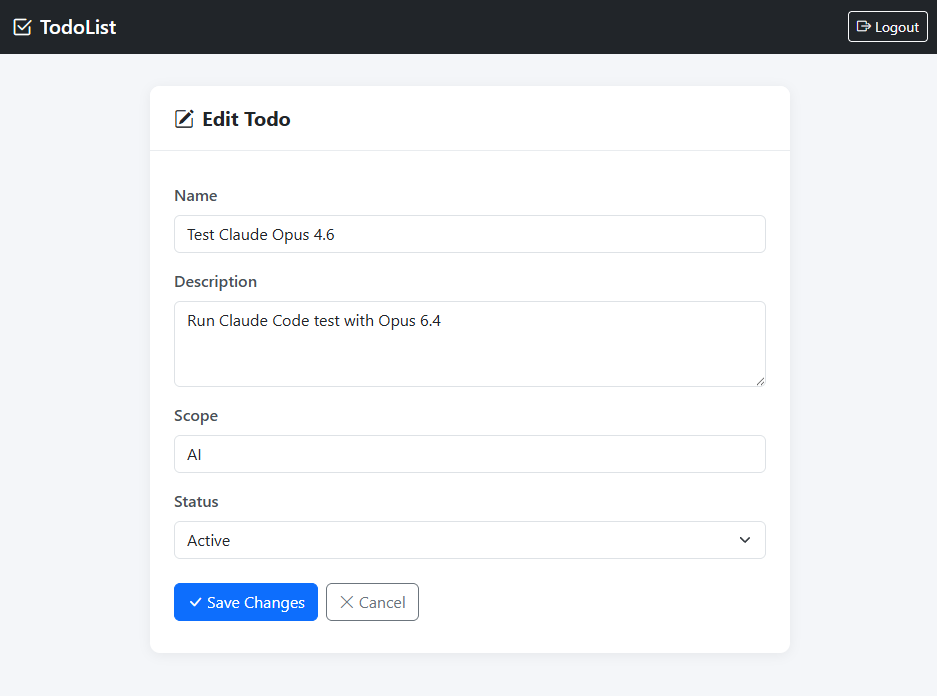
Claude final app
TMS Software Delphi  Components
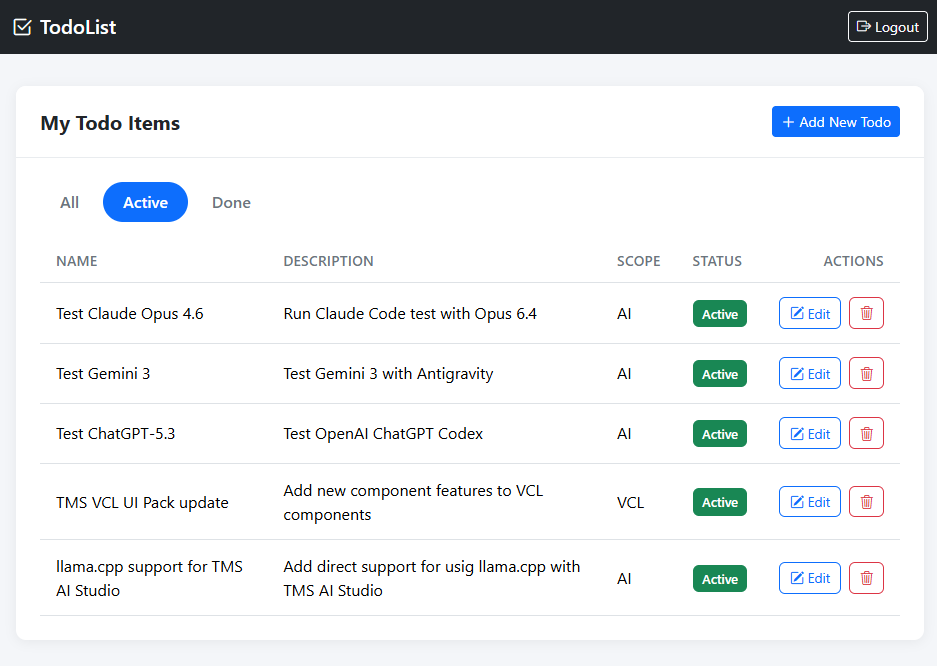
The todolist main screen

TMS Software Delphi  Components
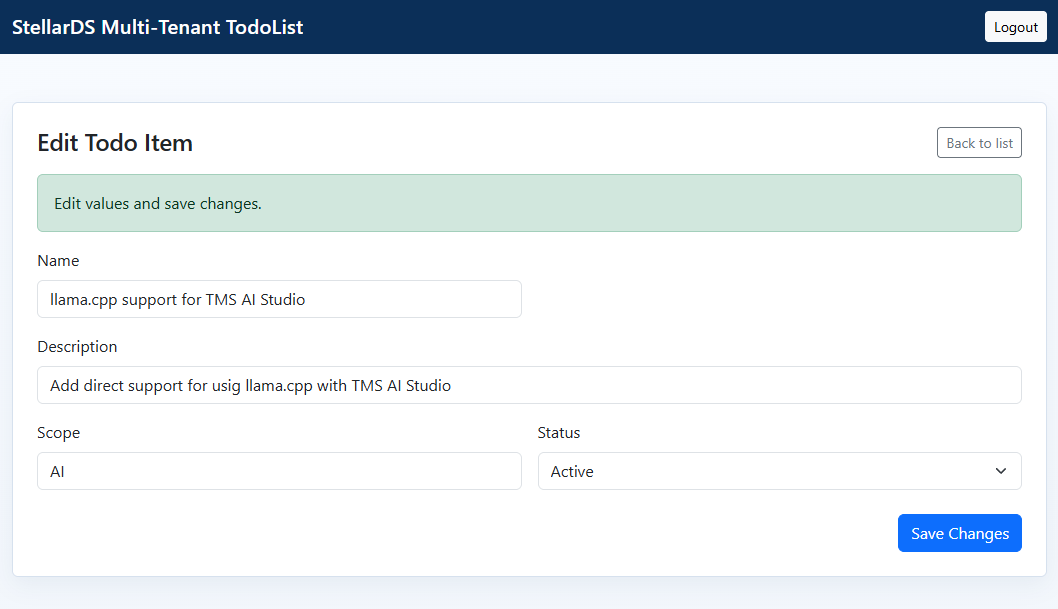
The edit todoitem screen


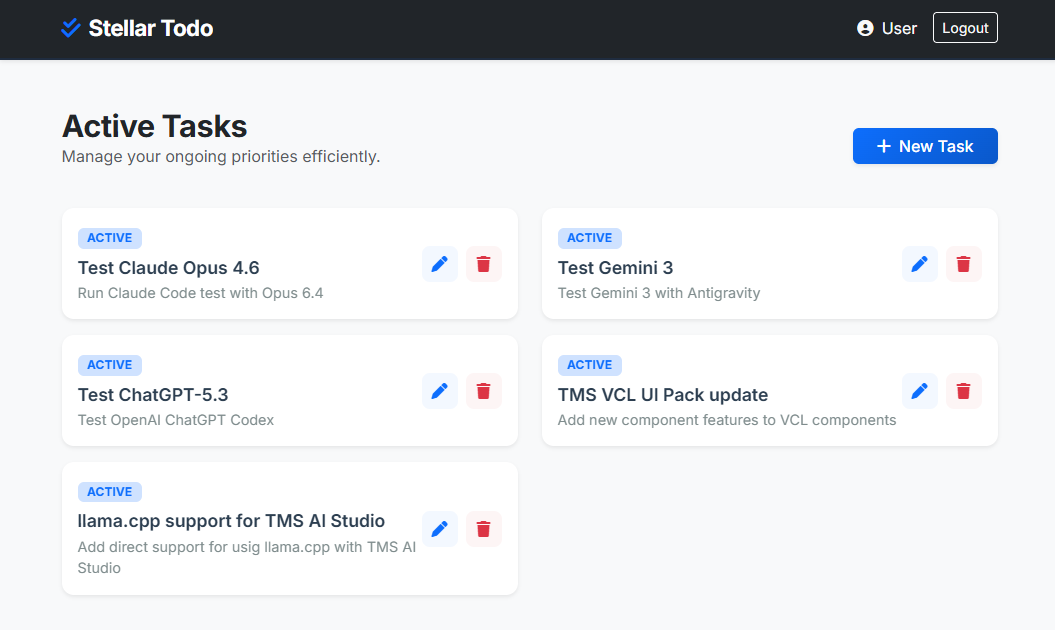
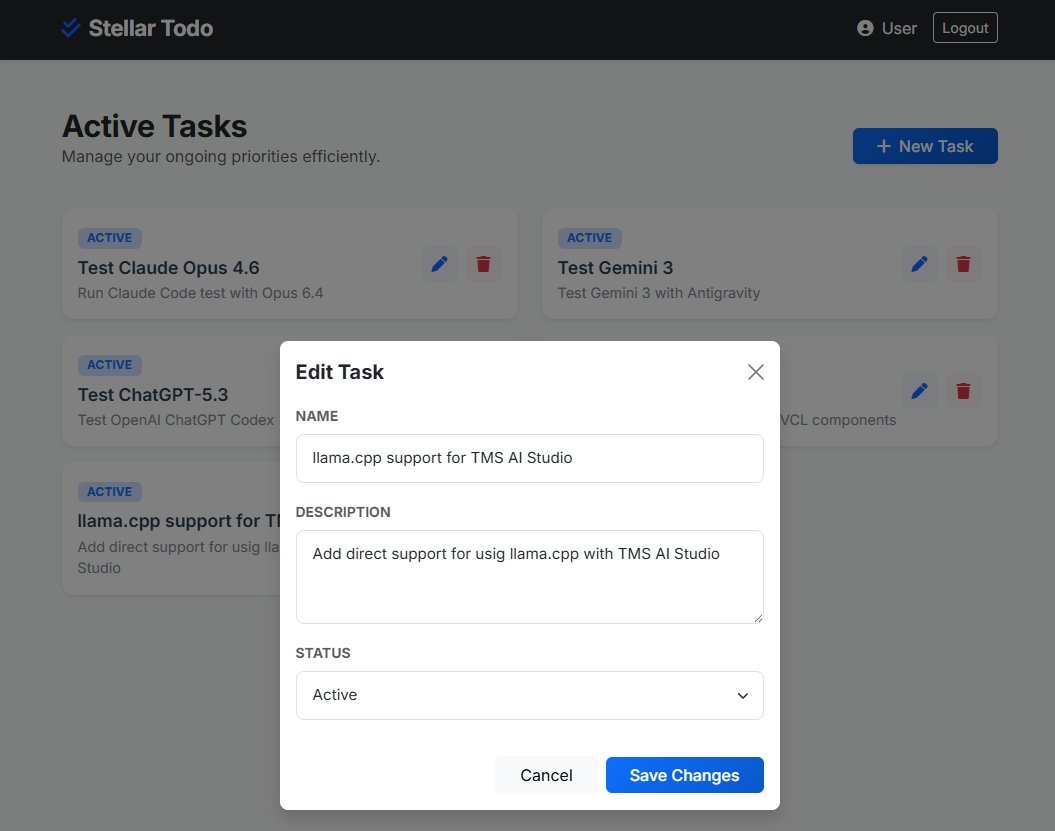
Gemini via Antigravity final app

TMS Software Delphi  Components
The todolist main screen

TMS Software Delphi  Components
The edit todoitem screen

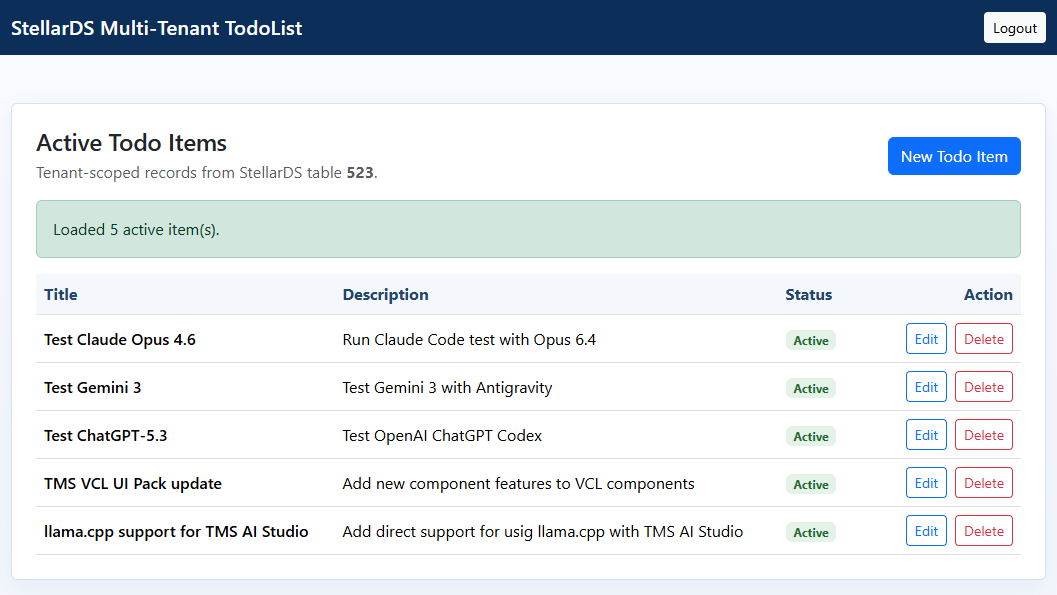
OpenAI Codex app

TMS Software Delphi  Components
The todolist main screen

TMS Software Delphi  Components
The edit todoitem screen


Architecture and UI comparison

What Was Compared
- Architecture and separation of concerns
- OAuth/session handling quality
- REST payload correctness and resilience
- UI output (list + edit screens)
- Practical maintainability

Claude Code

Architecture
- Single-page app with hash routing (`#login`, `#list`, `#add`, `#edit/{id}`)
- Clean module boundaries: `config.js`, `auth.js`, `api.js`, `app.js`
- Toasts, delete confirmation modal, explicit filter tabs (All/Active/Done)

Strengths
- Best structural organization and readability
- Auth flow is explicit and reasonably robust (token refresh path, guard checks)
- Clear UX states (loading, empty, toasts, modal confirmations)
- Lowest iteration count (3): fastest route to working quality

Weak spots
- SPA complexity is higher than needed for a small app
- A little more code volume than the others for equivalent functional scope

UI impression
- Most balanced and production-leaning
- Strong visual hierarchy and polished interaction details without becoming flashy

Gemini

Architecture
- Simpler structure: mostly `index.html` + `app.js` + `auth.html`
- Card-based list layout and modal editing
- Direct imperative flow, less abstraction than Claude and Codex versions

Strengths
- Fast to understand and navigate
- Visually modern, card-centric UI that looks immediately "app-like"
- Lowest code volume; quick to prototype and demo

Weak spots
- Hardcoded redirect URI and credential handling reduce portability
- No refresh-token lifecycle in main app flow; auth robustness is weaker
- API handling is less defensive around backend variations and error paths
- Edit happens in modal rather than separate edit page (deviates from prompt intent)
- Uses same API client IDs at multiple places in code! 

UI impression
- Most modern visual style, least "classic business" style
- Great first-look demo, but less aligned with strict requirements


OpenAI Codex 

Architecture
- Multi-page app: `index.html`, `new.html`, `edit.html`
- JS modules split by concerns: `api.js`, `main.js`, `new.js`, `edit.js`, `config.js`
- Dynamic form generation from backend table field metadata (`getTableFields`) in create/edit flows

Strengths
- Strong API wrapper and explicit auth lifecycle (exchange, refresh, clear, ensure)
- Good defensive normalization for varied response formats (`data`, `records`, plain arrays)
- Dynamic field rendering is the most schema-adaptive approach of the three
- Clean, business-like table UI matching the requested style

Weak spots
- Highest iteration count (5), so the most refinement effort

UI impression
- Most "classic enterprise" interpretation
- Clear list/edit/new pages, conservative styling, straightforward operator workflow


Side-by-side summary

- Fastest to working: Claude (3 iterations)
- Most adaptive to backend schema changes: Codex (dynamic field generation)
- Most polished architecture: Claude
- Most visually modern out-of-the-box: Gemini (subjective)
- Most requirement-aligned edit flow (separate page): Codex and Claude
- Highest reliability risk as-is: Gemini (auth/flow simplifications)


What This Says About StellarDS.io as a Vibe-Coding Backend

Conclusion #1: It works.
StellarDS.io is fully usable as a cloud backend for vibe-coded apps. All three AI tools reached a functioning OAuth + CRUD implementation against the same data table.

Conclusion #2: Backend reality drives iteration cost.
The major friction was not Bootstrap layout; it was OAuth details, payload shape, endpoint/query conventions, and data field casing. This is where iteration count diverged. This was on an already improved Swagger documentation. Further documentation improvements on the StellarDS.io might further reduce iteration count. Something we will look into.

Conclusion #3: Prompt quality is necessary but not sufficient.
Even with a detailed prompt, you still need 3-5 corrective loops for cloud-integrated apps. "One-shot" is unrealistic for non-trivial auth + data workflows.

Conclusion #4: Architecture quality differs more than UI quality.
All three produced acceptable UIs. The meaningful differences were in maintainability and resilience: token lifecycle handling, modular API layers, and tolerance for backend response variation.

Conclusion #5: Human expertise is still required.
We think it is safe to say that in the hands of an experienced software developer, one can come to a usable result. If an experienced developer was not looking over the shoulder of the AI and steer it, we do not think the AI would have come to a working result in less than an hour.  

Conclusion #6: AI is an incredible productivity accelerator.
Hand in hand with an experienced software developer, AI does miracles in productivity. It would have not been imaginable to code a web todolist app with a cloud data backend in less than an hour before the AI age we are in.  


Explore yourself

You can explore the full (JavaScript) source code of the resulting applications here and learn from it. Just apply for a FREE StellarDS.io account. Create a TodoList table and add the NVARChar(255) fields: Name, Description, Scope and the SmallInt field Status. Get your OAuth & application credentials, project ID and TodoList table ID from there and set these into config.js for the Claude and OpenAI example and in app.js for the Gemini example. With this project, you can clone it, run it, improve it, try to break it... We are very curious to hear about your experiences and your feedback & learnings and to find out where we can apply improvements to assist you further in this journey.

           Download
TMS Software Delphi  Components


Bruno Fierens


This blog post has not received any comments yet.


Add a new comment

You will receive a confirmation mail with a link to validate your comment, please use a valid email address.
All fields are required.


All Blog Posts  |  Next Post  |  Previous Post