Blog
All Blog Posts | Next Post | Previous Post

 TMS VCL UI Pack: Installation, Modernized
Tuesday, June 2, 2026
TMS Smart Setup
The installer for TMS VCL UI Pack is getting a major upgrade. Both the trial and the registered editions are moving to a new installation flow — faster to set up, easier to keep updated, and ready for the latest RAD Studio target platforms.

A modern installer experience
The new installers make setup more consistent and easier to use, whether you are evaluating TMS VCL UI Pack with the trial version or installing the registered version as an existing customer.
The migration also updates the underlying installer technology to cover the latest RAD Studio target platforms, including Windows on Arm (Arm64EC).
Installing TMS VCL UI Pack
Registered version (via TMS Smart Setup)
The registered version of TMS VCL UI Pack will be available exclusively through TMS Smart Setup. Before installing please uninstall the classic installation via the control panel.
If you are new to TMS Smart Setup, see the Smart Setup documentation to install the tms command-line tool. Once it is set up, install TMS VCL UI Pack with:
tms install tms.vcl.uipack
Prefer a visual workflow? You can also install the product through TMS Dashboard, a central hub for managing TMS component installations and updates.
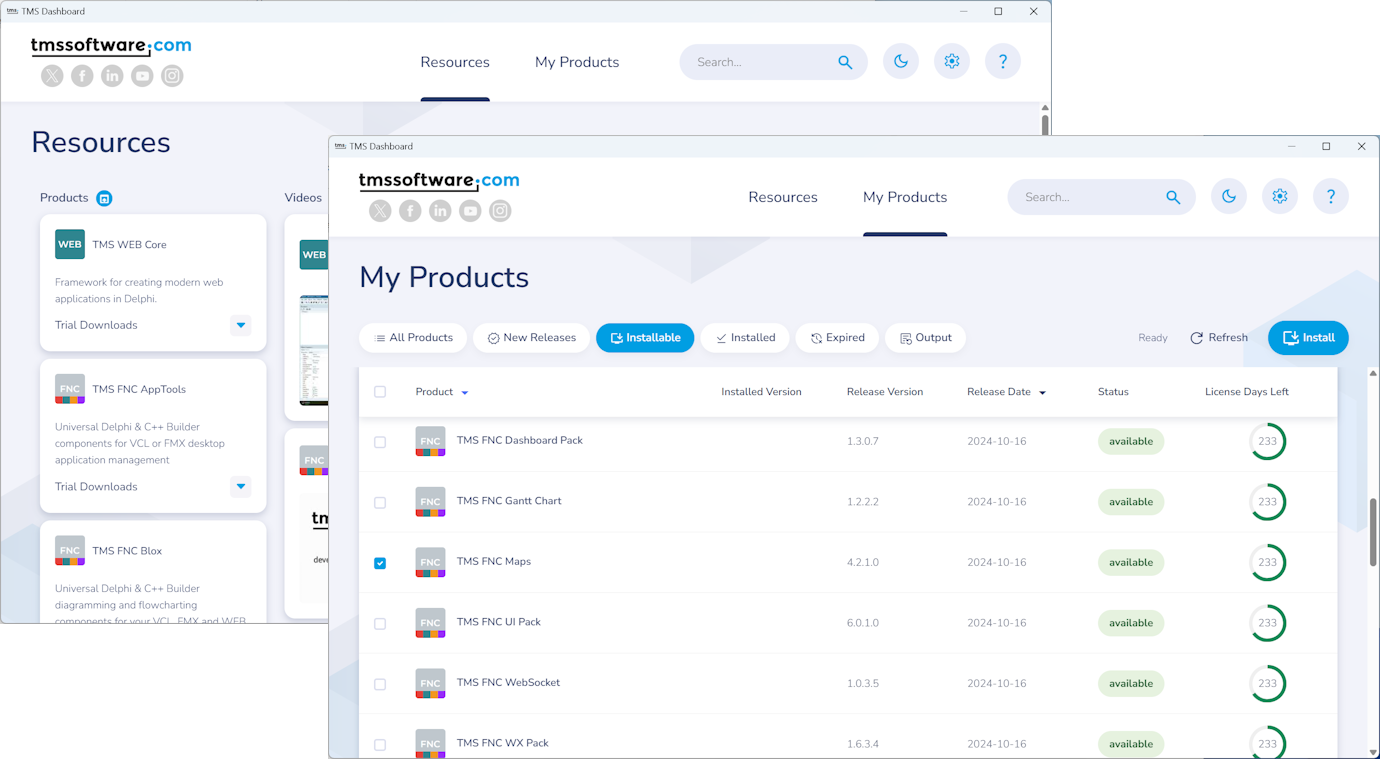
Trial version
Evaluating TMS VCL UI Pack? Download the trial from the TMS VCL UI Pack product page: click Free Trial, enter your email address, and choose your IDE. The trial downloads instantly, and you'll receive a trial key which can be entered during setup.
Moving forward
With this migration, TMS VCL UI Pack gains a cleaner installation experience, tighter alignment with TMS Smart Setup, and better support for today's multi-platform Delphi & C++Builder development workflows.
This is part of a broader move across the entire TMS product portfolio. After TMS VCL UI Pack, the next product family planned for the modernized installer flow is the TMS FNC family.
As always, we welcome your feedback. Try the new way of installing TMS VCL UI Pack and let us know how we can keep improving the setup experience.
Pieter Scheldeman
Related Blog Posts
-
TMS Smart Setup is now Open Source!
-
TMS Smart Setup 2.0 — A Major Leap Forward for Delphi Developers
-
TMS Smart Setup v3.1 brings Delphi 13.1 Arm64EC support to TMS products—and raises the bar for the Delphi ecosystem
-
Announcing TMS Smart Setup 3.0... and 3.1... and 3.2... and 3.3!
-
TMS Dashboard updated with TMS Smart Setup v3.3 support
-
TMS VCL UI Pack: Installation, Modernized
-
TMS FNC Family Updated with a New Install Experience
-
TMS Smart Setup is now the way to install TMS products
-
Install third-party Delphi libraries with TMS Smart Setup

This blog post has received 12 comments.
2. Wednesday, June 3, 2026 at 1:32:46 PM
Greetings from the Czech republic, I would also be in favour of keeping a traditional installer alongside the Smart Setup.
Karel Janecek
3. Wednesday, June 3, 2026 at 2:26:01 PM
Oliver, Karel,While we don''t want to force anybody to use anything different, the reality is that installers take a huge amount of work to maintain due to all Delphi versions and configurations out there. They also take a disproportionate amount of support time, time that we would rather expend improving the components themselves.
To give you an idea, this is a support question from today, about issues in D2007: https://support.tmssoftware.com/t/cannot-install-tms-vcl-uipack-13-6-4-0-in-d2007/27020
This particular one is about smartsetup, but we get similar ones all the time with the traditional installers. And the advantage of smartsetup is, that once we fix it, we fix it for all installers of all tms products, not just VCL UI Pack or FNC Pack or whatever.
Traditional installers of VCL UI Pack are already falling behind (they don''t support for example windows on arm) and they will likely only get more behind as time passes and newer Delphi versions arrive.
So it would be interesting to hear what things you think we could improve and would make you be happy to switch, if there is such thing. Some ideas below:
1.
> it looked too much like a black box that could make unwanted changes to your setup
It is the opposite. We are geeks, and we tend to show the most complex/difficult stuff because that''s the most interesting, so maybe you got the wrong impression in lille. But in reality, smartsetup is much less of a black box than previous installers (and that was one of the things we had in mind when we did it). Somehow I believe that the name "smart" didn''t help, and many people believes it tries to do all kind of crazy stuff because it is "smart". Smart is just a marketing name, it doesn''t mean anything.
* A "smart setup bundle" is just a zip file with the .pas, .dproj, etc files that you need to build the component. So if you want to not use smartsetup at all, just get tms.exe ( a portable file that needs no installation), and then write `tms fetch product`. That is it. You will get a zip with all the files which you can open in Delphi and install yourself. You couldn''t do this with the traditional installers, you always had to run setup.exe to get the files.
* If you prefer to install, you can call `tms build` and it will call build all projects it downloaded with `tms fetch`, then register them in the IDE. Or just call `tms install` which does `tms fetch` + `tms build`. That''s it. No unwanted changes at all. Again, much cleaner than the traditional installers. Traditional installers would register them in the Windows uninstall system, add some extra registry keys, etc. They made more changes in your system than smartsetup does.
* You can combine the steps. You can fetch the bundle (a zip file) in one machine, then call tms build in a different machine without internet connection.
* You can also tell smartsetup to just build, but not register the components, and again, this will make zero changes in your project. Or you can selectively choose what to register, say register the library path, but not the help in the IDE.
* SmartSetup doesn''t write any single file outside the folder it is in, and doesn''t change any single registry key except the ones it needs to register the components in Delphi. If we could make it even more "clean" we would, but it is as clean as I believe it is possible.
2. Another thing I hear frequently is about backups. You could backup old installers and use them 10 years from now. Well, backing up smartsetup isn''t much more difficult: You just backup the "Downloads" folder, which contains all the "bundles", which as said, are just zip files with the pas files. You can then build those bundles with tms build, without any internet connection. Or build them from the IDE if you prefer. And while I strongly recommend you keep backups of everything, in most cases, you will likely not even need them (as you needed before), because with smartsetup now you can install older versions. Do you need vcl ui pack 13.1.10? Do a `tms install tms.vcl.uipack:13.1.10`
3. I understand that some people like the simplicity of a single exe file, which is simpler to backup and also to run, without me writing all the explanation above. So a question for you and anyone willing to leave feedback: Would a "setup.exe" which internally has a tms.exe and a smartsetup bundle be ok for your case? We are already doing so for FlexCel distros, and I believe most people who wanted standalone setups are happy with them. They aren''t the "traditional installers", but they look and work like them. For us they are simple to maintain (because all the heavy lifting is done by tms.exe inside setup.exe), and if enough people feels like this is a good solution, we can see if it is feasible to keep "traditional installers" which are just a wrapped smartsetup inside, but look and feel like the old installers
Adrian Gallero
4. Wednesday, June 3, 2026 at 3:25:26 PM
We open-sourced TMS Smart Setup: https://www.tmssoftware.com/site/blog.asp?post=1360so, there is nothing black box to it
Bruno Fierens
5. Wednesday, June 3, 2026 at 4:36:14 PM
MS Smart Setup was a smart move by TMS to phase out their legacy installers. The product works well, and I honestly don''t understand the complaints — so, in my humble opinion, you''re heading in the right direction.As for the "black box" criticism: that label might have applied to the old installers, but it certainly doesn''t apply to Smart Setup. The Git repository is publicly available — just clone it and build it yourself.
Last but not least, you can also use Smart Setup to deploy your own custom components, which adds even more value to the tool.
stephane.wierzbicki
 6. Wednesday, June 3, 2026 at 4:44:16 PM
Thanks Stephane,
6. Wednesday, June 3, 2026 at 4:44:16 PM
Thanks Stephane,Good summary indeed of our goals with all the work that went into TMS Smart Setup. It''s open source, it can''t be more transparent.
Bruno Fierens
7. Thursday, June 4, 2026 at 8:32:00 AM
Hi Adriano, hi Stephane, thank you for your opinios. There were no complaints from me, I only voiced an opinion and I do not insist on keeping the traditional setups:-)As for Adriano''s question (Would a "setup.exe" which internally has a tms.exe and a smartsetup bundle be ok for your case?)¨: Yes, it would be a good option for me.
However, if it proved to be exacting and/or awkward, I''m ready to switch to TMS Smart Setup.
By all means, thank you for superb products and packages!
Karel Janecek
8. Friday, June 5, 2026 at 12:56:17 PM
I was really sceptical at first. But I’ve now taken the time to test TMS.EXE and see what goes on ‘behind the scenes’ and how it works.Very good, I like it. I can definitely do without the traditional installer. In my opinion, there’s no need for a SETUP.EXE that runs TMS.EXE internally either. You have excellent control over everything.
The only thing I didn’t quite get was ‘tms credentials’. I created my credentials using “tms credentials -email:user@example.com -code:XXXX-XXXX-XXXX-XXXX”, but when I run “tms credentials -print”, I only see the most recently entered code. Perhaps there are a few more available at https://doc.tmssoftware.com/smartsetup/reference/tms-credentials.html. That would be helpful.
Michael Schendel
9. Tuesday, June 9, 2026 at 7:29:59 PM
It''s been a real nightmare for me trying to install the latest versions of components using TMS "smart...." setup having previously used the stand-alone installers. The smart setup does not recognise any old TMS component installations on the machine and will happily install everything alongside, then we end up with a total mess of registry keys, PATH variable overrides in various places and multiple copies of TMS bpls all over the place, in app data, documents, Embarcadero install location, and whatever path tmssartsetup was running from....
I hope this new approach will be good for everyone going forward, but I don''t think you''ve done a good job so far with helping people to migrate from the old approach to the new.... and I understand why people are requesting for you to continue providing the old installers based on this.
Jotham Phil
10. Tuesday, June 9, 2026 at 7:36:05 PM
I lost count on how many times and in how many places we have repeated that FIRST old classic installer based versions need to be UNINSTALLED before starting with TMS Smart Setup
Bruno Fierens
11. Friday, October 16, 2026 at 1:42:16 PM
We use a build server and keep all sources (including the sources of third-party components) in an internal svn repository. Everything is built from source and dependencies are pulled in as externals during the build process. Can we still do that with Smart Setup?
Hoornweg Arthur
12. Friday, October 16, 2026 at 2:10:03 PM
I don''t see anything in your use case that you wouldn''t be able to do with smartsetup. You can go as far as you want to:1. Minimal: Just do a "tms fetch product.id" from the command line (you can write this in a script). This will download a zip file to <install dir>\Downloads and unzip it in <install dir>\Products\product.id. That''s it, you can then copy those files to svn and do whatever you want to do with them.
2. You can also use tms to build the components. Edit the configuration file (tms.config.yaml) and set "skip register" to true. Or if you want a one-liner for a script:
tms config-write -p:"configuration for all products:options:skip register=true"
This will ensure that tms builds but doesn''t register or change any environment. Then write:
tms build
And it will generate all dcus/bpls/etc. from the components. Nothing will be installed in the IDE, no environment will be altered. You can pass the path where the dcus are to your msbuild command.
3. You can go full-in, and compile not only tms components, but your app and components from others with smartsetup. That''s what I do internally here with my own personal apps, and I would really hate to have to compile with msbuild ever again. But setting this up is more complex, and if you already have your build system working and you are fine with it, likely not worth. Still, by switching to smartsetup you get dependency management (your own internal components can depend in others that depend in others), a way faster build (because smartsetup builds everything in parallel), and error recovery (if a build fails at the middle, you can just run tms build again, and it will keep going from where it was, instead of compiling everything again. Everything is protected with hashes, so you know it won''t use a partially built result. There are some docs on how to setup this here: https://doc.tmssoftware.com/smartsetup/guide/continuous-integration.html
Adrian Gallero
All Blog Posts | Next Post | Previous Post
I saw the 2024 demo of the Smart Installer in Lille and it looked too much like a black box that could make unwanted changes to your setup.
I prefer some control on changes to my Delphi system.
Olivier Beltrami