Blog
All Blog Posts | Next Post | Previous Post

 GeoTIFF Support in TMS FNC Maps for Delphi
Friday, February 6, 2026
We're excited to announce a powerful new feature in TMS FNC Maps that brings geospatial imaging to your Delphi applications: GeoTIFF layer support in the TTMSFNCOpenLayers component.
What is GeoTIFF?
GeoTIFF is the industry standard format for storing georeferenced raster imagery. It's widely used in satellite imagery, aerial photography, elevation data, and scientific mapping applications. From Sentinel satellite data to custom drone surveys, GeoTIFF files contain both image data and precise geographic coordinates, making them invaluable for GIS applications.
Seamless Integration with TTMSFNCOpenLayers
 With the latest update to TMS FNC Maps, adding GeoTIFF layers to your maps is remarkably straightforward. The TTMSFNCOpenLayers component now exposes the powerful GeoTIFF rendering capabilities of the OpenLayers API through an intuitive Delphi interface, eliminating the need for complex JavaScript coding or manual API integration.
Notes:
- GeoTIFF layer support is currently exclusive to the TTMSFNCOpenLayers component.
- The component handles rendering and display, but the actual GeoTIFF imagery is not generated or provided by OpenLayers or TMS Software. You'll need to source the GeoTIFF files from satellite data providers, aerial surveys, or create them yourself.
Getting Started: A Simple Example
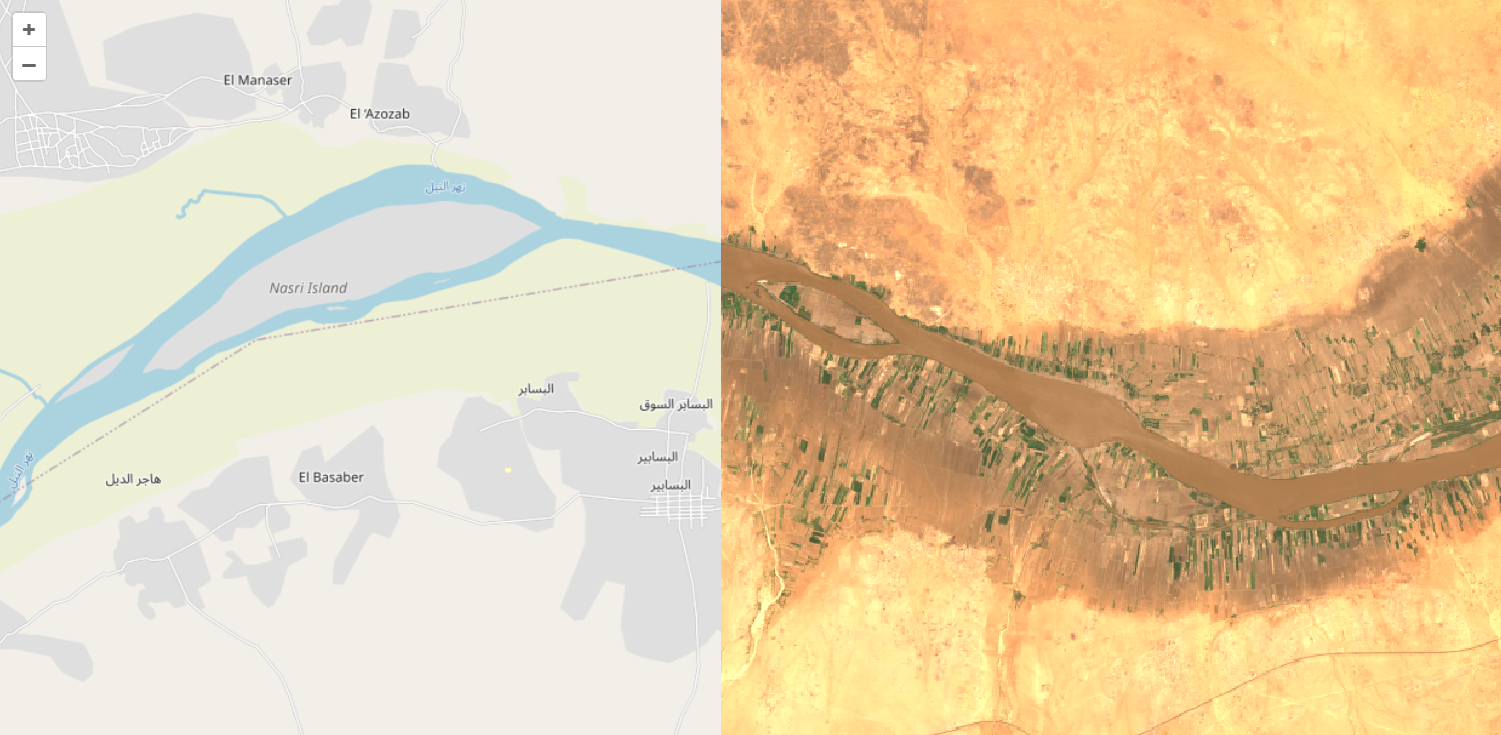
Here's how easy it is to display satellite imagery on top of the default map using the new GeoTIFF layer feature:
var
  layer: TTMSFNCOpenLayersTileLayer;
begin
  TMSFNCOpenLayers1.BeginUpdate;
  TMSFNCOpenLayers1.Options.DefaultLatitude := 16.71;
  TMSFNCOpenLayers1.Options.DefaultLongitude := 33.51;
  TMSFNCOpenLayers1.Options.DefaultZoomLevel := 9;
  layer := TMSFNCOpenLayers1.TileLayers.Add;
  layer.Source := tlsGeoTiff;
  layer.URL := 'https://sentinel-cogs.s3.us-west-2.amazonaws.com/sentinel-s2-l2a-cogs/36/Q/WD/2020/7/S2A_36QWD_20200701_0_L2A/TCI.tif';
  TMSFNCOpenLayers1.EndUpdate;
end;
This code snippet demonstrates loading a satellite image. Simply set the source type to tlsGeoTiff, provide the URL to your GeoTIFF file, and the component handles the rest.
Cloud-Optimized GeoTIFF Support
The component works seamlessly with Cloud-Optimized GeoTIFF (COG) files, such as those available from public data sources like the Sentinel-2 archive on AWS. COGs enable efficient streaming of large imagery datasets, loading only the portions and resolutions needed for the current map view. This makes them perfect for responsive web and desktop mapping applications.
Why This Matters
Previously, incorporating GeoTIFF data into Delphi mapping applications meant either writing complex JavaScript code to interact with mapping APIs directly or implementing server-side processing pipelines. With the new GeoTIFF layer wrapper in TMS FNC Maps, you can now:
- Access OpenLayers' robust GeoTIFF support through familiar Delphi properties and methods
- Load GeoTIFF files directly from URLs with minimal code
- Combine multiple GeoTIFF layers with traditional map tiles
- Build sophisticated geospatial applications without JavaScript expertise
Cross-Platform Excellence
Like all TMS FNC components, the GeoTIFF feature works across multiple platforms (VCL, FMX and web with TMS WEB Core) from a single codebase.
Get Started Today
The new GeoTIFF layer support is available now in TMS FNC Maps. Whether you're building environmental monitoring tools, agricultural management systems, or any application that needs to visualize georeferenced imagery, this feature provides the foundation you need.
Explore the possibilities of professional geospatial visualization in your Delphi applications with TMS FNC Maps and the TTMSFNCOpenLayers component.
Bart Holvoet
Related Blog Posts
-
GeoTIFF Support in TMS FNC Maps for Delphi
-
Unlock PDF Interactivity in Delphi with TTMSFNCPDFLib Form Fields
-
TMS Custom Consultancy Projects

This blog post has received 1 comment.
All Blog Posts | Next Post | Previous Post
Ebi Ere