Blog
All Blog Posts | Next Post | Previous Post

 Parliamo italiano! Delivering localization and language support for TWebDataGrid in TMS WEB Core
Wednesday, January 7, 2026
Ciao! TWebDataGrid in TMS WEB Core has just added additional localization support with built-in regional languages and formatting.
When it
comes to implementing internationalization in your own software, there are many
aspects to localization beside being able to offer multiple language
translations for text displayed.
Date/time formatting, number formatting, currency formatting, collation
and sort order also play important roles just to name a few things. The TWebDataGrid is able to handle most of
these localization capabilities built-in while offering the ability for you to
customize them if your requirements exceed that of the built-in functionality.
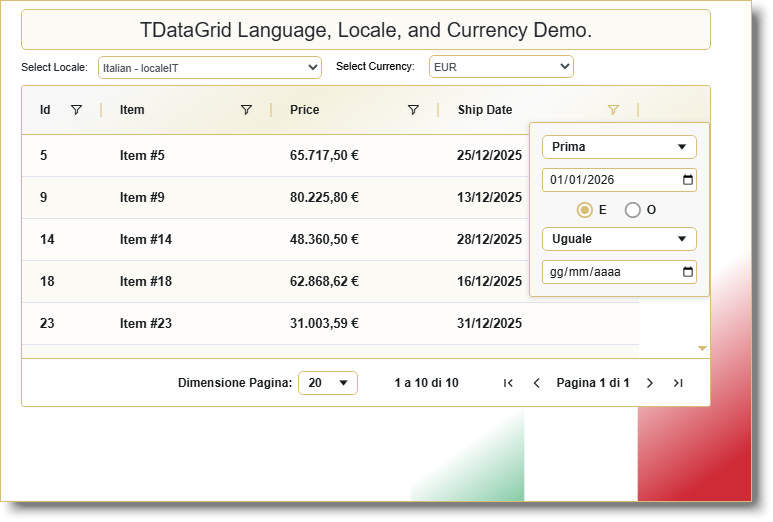
Modern day web browsers all come with various locale and language support. Since the TWebDataGrid was designed to run on web browsers, it too can make use of this browser localization functionality. You can get the browser's current locale by using TMS WEB Core's built-in GetBrowserLocale function in the WEBLib.WebTools unit. Optionally, you can directly access the same information from calling the JavaScript function window.navigator.language which is also available through Delphi Object Pascal in the TMS WEB Core development environment. It should noted that in both cases, the language tag returned is in the BCP47 format. Please reference the support question here for details.
Language Support
By default, the TWebDataGrid's Locale value
is set to localeNone and language translation is not used in the grid. To enable localization for the TWebDataGrid,
simply change the grid's Locale setting either under the Object Inspector or in
your code.
WebDataGrid1.Locale := localeIT;
This will not only change the language used by the grid but also override the browser default locales for any cell renderers in use. The TWebDataGrid will set the underlying AG-Grid's localeText to one of its built-in localization translations. The following locale settings are currently supported by the underlying AG-Grid:
None - localeNone
Bulgarian - localeBG
Portuguese (Brazil) - localeBR
Chinese Simplified (China) - localeCN
Czech - localeCZ
German - localeDE
Danish - localeDK
Arabic (Egyptian) - localeEG
English - localeEN
Spanish - localeES
Finnish - localeFI
French - localeFR
Greek - localeGR
Chinese Traditional (Hong Kong) - localeHK
Croatian - localeHR
Hungarian - localeHU
Hebrew - localeIL
Persian - localeIR
Italian - localeIT
Japanese - localeJP
Korean - localeKR
Dutch - localeNL
Norwegian - localeNO
Urdu (Pakistan) - localePK
Polish - localePL
Portuguese - localePT
Romanian - localeRO
Swedish - localeSE
Slovak - localeSK
Turkish - localeTR
Chinese Traditional (Taiwan) - localeTW
Ukrainian - localeUA
Vietnamese - localeVN
Once the TWebDataGrid.Locale has been changed, any text used within the TWebDataGrid will also change.
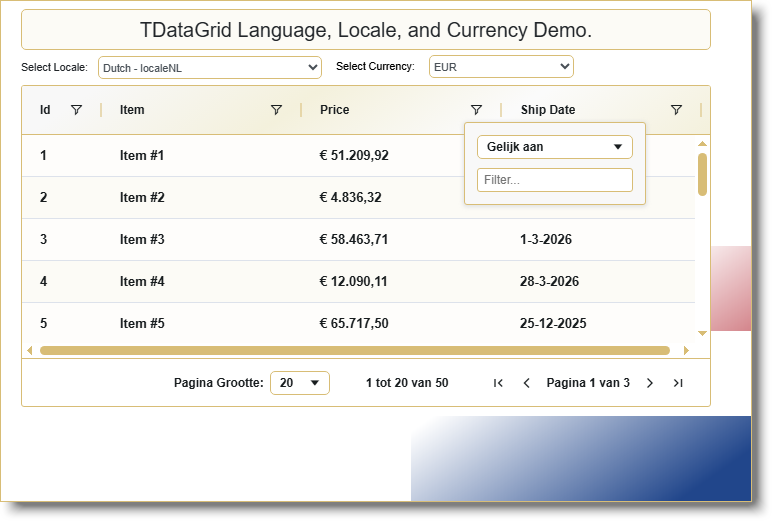
It should be noted that the underlying
AG-Grid uses the web browser's date picker so the date format that the browser
date editor uses is not affected by the changes in the grid's locale, but it is
governed by the browser's locale settings regardless of the TWebDataGrid.Locale
value. If your locale or language is not
one of the ones listed above, or if you didn't like the translations provided,
you can also use the OnGetLocaleText event provided by the TWebDataGrid to
change the text translation to whatever you prefer.
The OnGetLocaleText is an event that can be customized for every ColumnDefs item. So every column defined can be assigned a different handler. The following is an example of an OnGetLocaleText handler where you can implement your own customizations:
function WebDataGrid1GetLocaleText(Params: TJSGetLocaleTextParams): String
begin
  // Implement your customization here
  Result := Params.DefaultValue;
end;
The above function just returns the default value from the Params object passed to it, so the text that gets displayed in the grid will be the same as if we didn't implement the handler. The Params object also contains a Params.Key which contains the name of the translation required.
For instance, for the grid to display the text "Pagina 1 di 2" (Page 1 of 2 in Italian), it would call the OnGetLocaleText event (at least) twice, once with the Params.Key = 'page' and once with the Params.Key = 'of'. By implementing your own OnGetLocaleText event handler for example:
function WebDataGrid1GetLocaleText(Params: TJSGetLocaleTextParams): String
begin
  // Per esempio
  if Params.Key = 'page' then
    Result := 'Pagina'
  else if Params.Key = 'of' then
    Result := 'di'
  else if …
end;
You can effectively produce your own translations by implementing a handler for this event. While the Italian language translation has been provided and has been built into the TWebDataGrid, other languages may not be. The OnGetLocaleText allows you to implement other languages not included such as Hindi to produce "पेज 1 का 2" for example. To get a list of the available keys needed by the underlying AG-Grid, please examine the list of translations provided in Github here (https://github.com/ag-grid/ag-grid/tree/v32.0.2/community-modules/locale/src).
Date Formatting
Another aspect of localization involves date
format differences. While in the United
States, it is common to use the month followed by day followed by year
(MM/DD/YYYY), the same is not true for many European countries. For instance, in the United Kingdom, it is
common to use day followed by month followed by year (DD/MM/YYYY). In addition to the regional formatting,
different languages may often be used as well.
For instance, in Italian, the corresponding translation for the English
word "day" is "giorno", for "month" is "mese", and for "year" is
"anno", so the denotation for DD/MM/YYYY will also become
GG/MM/AAAA. When developing software
with localization, it is important to understand these nuances and make your
application more user friendly for end-users from different cultural
backgrounds.
Traditionally, to provide date formatting in Delphi, a developer would customize the FormatSettings then call one of the date formatting functions like DateTimeToString or FormatDateTime. But since modern browsers already comes with more optimized built-in internationalization functionality like with Intl.DateTimeFormat(), the TWebDataGrid currently leverages this browser built-in mechanism to efficiently format any date and/or time into a localized format. By choosing the crtLocaleDateString of the ViewModeType within the ColumnDefs, the column will automatically be formatted using the browser's Intl.DateTimeFormat().format() function.
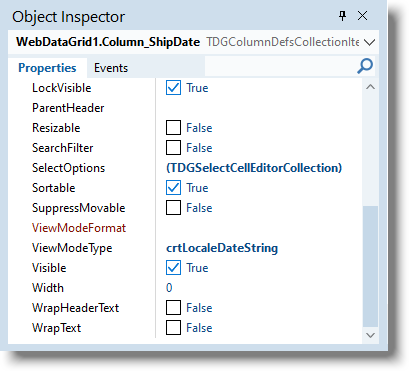
It should be noted
that the use of crtLocaleDateString expects the date string to be in the
ISO-8601 format. If the column value is
not in the ISO-8601 format, you may encounter unexpected behavior.
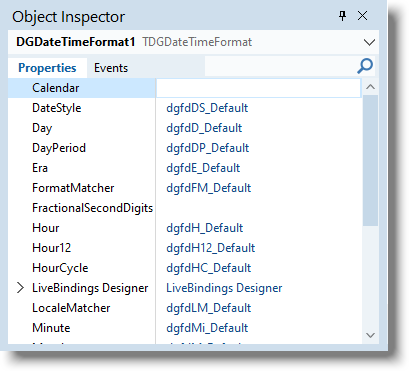
Additionally, you may want to further customize the default format provided by using the TWebDGNumberFormat componet and linking it to the column using the ViewModeFormat property (shown as empty / unlinked in the above image). Many of the functionality doucmented here can be easily customized through the Delphi Object Inspector as you can see in the following screenshot:
Number Formatting
Number formatting also differ in various regions. Even when dealing with Roman numerals, different regions use either commas (,) as digit group separators and periods (.) for the decimal place, or vise versa. So where someone in Canada would write 1,234,567.89 for one million, two hundred and thirty-four thousand, five hundred and sixty-seven point eight nine, the same will be represented by 1.234.567,89 in Belgium or even 123,4567.89 in some parts of China. Offering the ability to display numbers in different formats based on their region is also important to help make your software more user friendly.
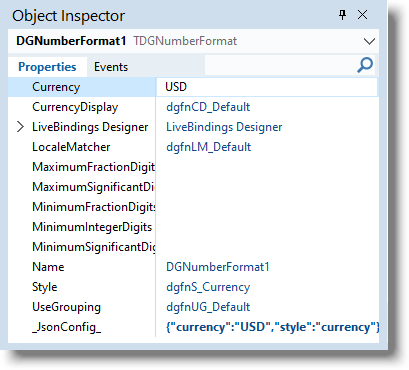
Similar to the date formatting mentioned above, traditionally, devlopers would customize the FormatSettings then call one of the number formatting functions like Format or FormatCurr. But since modern browsers already comes with built-in internationalization functionality like with Intl.NumberFormat(), the TWebDataGrid uses the browser built-in mechanism to efficiently format numbers and currencies into a localized format. By choosing the crtLocaleNumber of the ViewModeType property within the ColumnDefs, the column will automatically be formatted using the browser's Intl.NumberFormat().format() function.
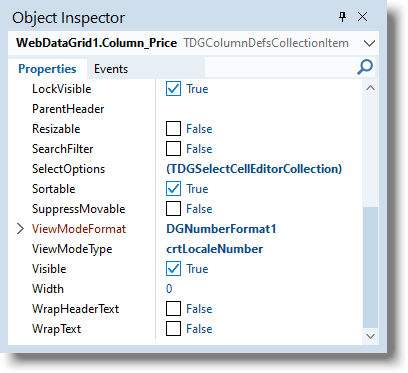
Just as you can with date formatting, a TWebDGNumberFormat can be used to customize the options for the browser built-in number formatter.
Sorting and Collation
One of the aspect of providing locale support that is sometimes missed involves sorting and collation. According to Wikipedia: Collation is the assembly of written information into a standard order. Many systems of collation are based on numerical order or alphabetical order, or extensions and combinations thereof. Collation is a fundamental element of most office filing systems, library catalogs, and reference books. Collation differs from classification in that the classes themselves are not necessarily ordered.
From the perspective of providing collation for different languages, one must be aware that even the same characters in the alphabet can ordered differently between languages. For instace, in German, the letter "ä" sorts with the letter "a" and therefore comes before the letter "z". However, the same is not true in Swedish, where the same letter "ä" comes after letter "z". As such, your sorting algorithm must be aware of the locale information in order to properly sort data columns in the grid.
The latest version of TWebDataGrid provides a built-in mechanism handling collation from different locales by using the browser Intl.Collator() object. You can activate this functionality by setting the TWebDataGrid.Localization.SortByCollator to true.
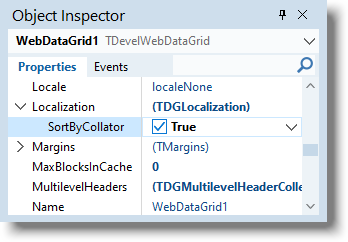
The column's
CellDataType determines if the column values should be fed through the collator
or compared directly as in the case of numeric values.
Additionally, an event called OnSortCompare to allow you to provide customized sorting when the ServerDataAdapter is not in use. This event gets called whenever the grid needs to compare two strings and passes them as parameters to the event handler that you can implement. By returning either a negative one, zero or positive one, you have the option to tell the grid whether ValueA comes before ValueB (-1), ValueA is the same as ValueB (0), or ValueA comes after ValueB (1). This enables you to produce your own collation if there is a need for it.
function TForm1.WebDataGrid1Column_columnSortCompare(ValueA, ValueB: TJSValue;
  RowNodeA, RowNodeB: TJSRowNode; IsDescending: Boolean): Integer;
begin
  // Implement your custom sorting comparison code here...
end;
The TWebDataGrid can help you build your own
web based localized applications quickly and easily, powered by the flexibility
of TMS WEB Core along with it accompanying components. The screenshots for this blog was taken off
of a demo program that is shipped with the latest version of TMS WEB Core. Make sure to update to the latest version as this demo relies on the latest version of TWebDataGrid in TMS WEB Core.
If you have any suggestions or requests,
please leave your comments below. We
want to hear from you and would like to make our products easier for you to
use.
Bruno Fierens

This blog post has received 1 comment.
All Blog Posts | Next Post | Previous Post
Stefano Monterisi