VCL
TDBPlanner
Flexible & powerful day/month/week/multi-day/multi-resource/timeline & custom scheduling user interface components
Feature overview
- DB-aware and non DB-aware version included
- Modes through TDBDaySource, TDBMonthSource & TDBPeriodSource
- Tested with (but not limited to) following databases : dBase, Paradox, DBIsam, Access, Apollo, Interbase, SQL server 2000, TurboDB, FlashFiler,FireDac
- Items that can be resized /moved
- Inplace multiline editable items or rich text editable items
- Items with multiple imagelist images
- Items with caption time indication
- Readonly items
- Inplace forms
- Various display modes : day (5,6,10,15,30,60 min), week, month, day period, half day period & custom grid displays
- Multi day / resource view & multi resource / day view
- Controllable active day start, active day end, day start, day end
- Events for insert, delete, left click, right click of items
- Overlapped / non overlapped items
- HTML export
- Save to streams
- Item hints
- Rich text items
- Skinned items
- Printing
- 12/24 hrs display
- Internationalization capabilities
- Header with alignment, images, events
- Printing
- Layer support
- Linked items
- Alarms through various add-on alarm handler components
- Interfacing to spell checkers, including direct support for Addict Spell Check
- mini HTML formatted text in items item exchange components
- Built-in recurrency support for data-aware planner
- Special monthview and data-aware monthview
- Support for VCL styles
Highly configurable components for interactive planning & scheduling applications
Highly configurable month calendars and datepickers that can be used with the TMS Planner components
Included components:- TPlannerCalendar : highly configurable non DB-aware calendar component
- TDBPlannerCalendar : DB-aware calendar component that can automatically show events from a TMS Planner events database
- TPlannerCalendarGroup : multimonth calendar component
- TPlannerDatePicker : datepicker with highly configurable calendar dropdown
- TDBPlannerDatePicker : DB-aware datepicker with calendar dropdown that can automatically show events from a TMS Planner events database
- TDBPlannerMaskDatePicker : masked DB-aware datepicker with calendar dropdown that can automatically show events from a TMS Planner events database
- TPlannerDBDatePicker : single DB-field DB-aware datepicker with support for null-date entry
- TPlannerDBMaskDatePicker : masked single DB-field DB-aware datepicker with support for null-date entry
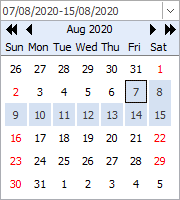
- TPlannerRangeSelector : control to input a date range, going from a start date to an end date
Additional tools and information:
- List of add-on tools for TPlanner : TPlanner add-on utilities
- Use custom TPlannerItem classes in descendent TPlanner class with this example
- Make TPlanner scriptable with TPlannerScript and TatPascalScripter
- Use customizable Pascal scripts as item alarms with TAlarmScript and TatPascalScripter
- Sample for configuring and triggering an alarm
- Additional sample application showing drag & drop interoperability with TDBTodoList
- Import or export Planner items to Google Calendar or Windows Live Calendar with TPlannerGCalendarExchange and TPlannerLiveCalendarExchange
TMS planning components take you to any platform: Windows & web applications
Day mode view
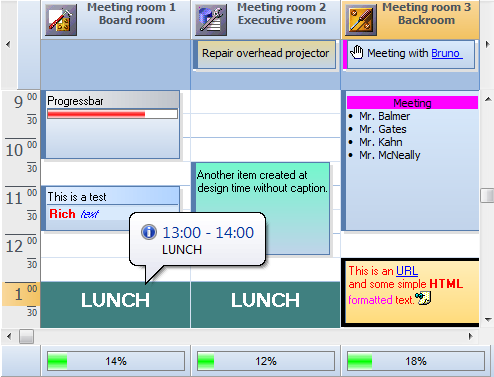
Month mode view
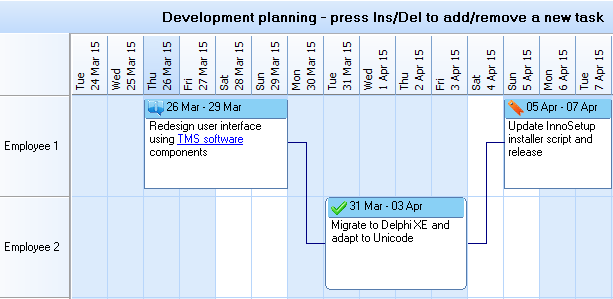
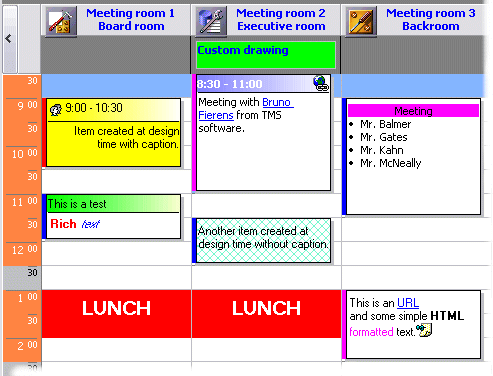
Multi day / resource view
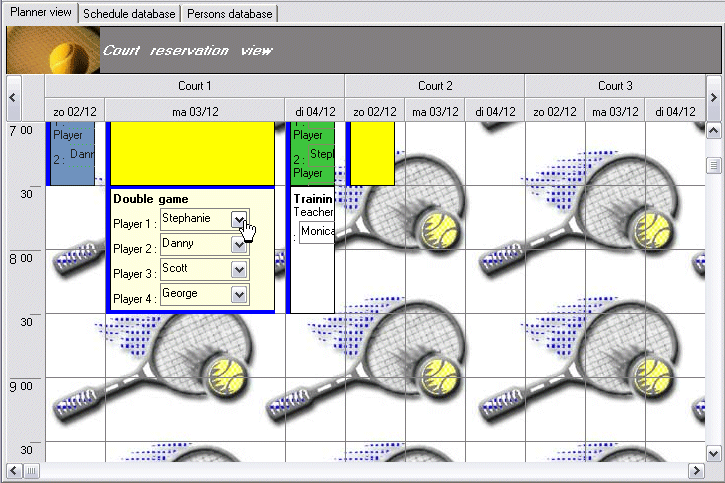
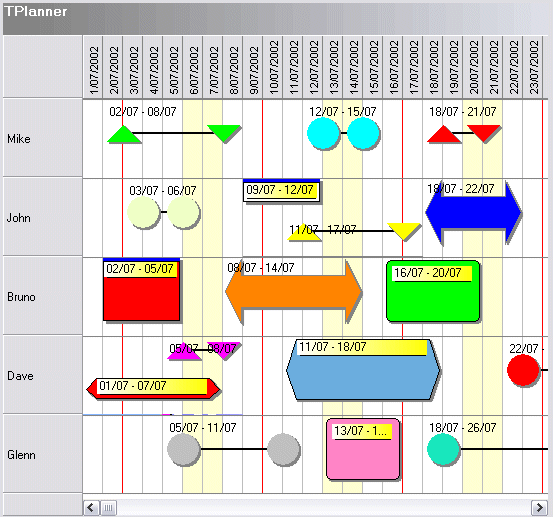
Horizontal view with custom draw handler
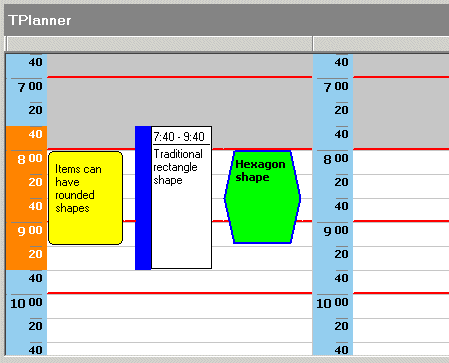
Planner shapes and sidebar view
Sample applications
Demo folder |
Description |
| Demo1 | Overview demo : non DB aware Planner with horizontal & vertical day mode + month mode |
| Demo2 | Overview demo : DB aware master Planner in daymode with slave Planner reflecting automatic changes in database in planner view (BDE) |
| Demo3 | Demo showing HTML forms usage in non DB-aware Planner |
| Demo4 | Demo showing popup event editors and event shapes in Planner |
| Demo5 | Demo showing HTML forms usage in DB-aware Planner |
| Demo6 | Demo showing various user interface events in Planner |
| Demo7 | Demo showing custom time axis usage in Planner |
| Demo8 | Demo showing inter Planner drag & drop |
| Demo9 | Demo showing a simple Planner alarm handler |
| Demo10 | Demo showing disjunct selection in Planner and multiple event creation on disjunct selected timeslots |
| Demo11 | Demo showing drag & drop between Planner and PlannerWaitList |
| Demo12 | Demo showing drag & drop between normal Planner items and all-day Planner events in header |
| Demo13 | Demo showing custom draw tools for custom Planner event drawing and popup event editors |
| Demo14 | Demo showing multimonth mode with PositionProps based selection control |
| Demo15 | Demo showing Planner - Outlook import / export |
| Demo16 | Overview demo DB-aware Planner for Access (ADO) |
| Demo17 | Overview demo DB-aware Planner for Apollo |
| Demo18 | Overview demo DB-aware Planner for DBIsam |
| Demo19 | Overview demo DB-aware Planner for Interbase |
| Demo20 | Demo showing how to setup 2 full linked items in the Planner |
| Demo21 | Demo showing how to prevent creating overlapped events with a DB-aware planner |
| Demo22 | Demo showing a planner with a custom TPlannerItem class |
| Demo23 | Demo showing a TDBPlannerMonthView |
| Demo24 | Demo showing drag & drop between TPlannerWaitList and TPlannerMonthView |
| Demo25 | Demo showing a custom TMyMonthPlannerView with a custom TMyMonthPlannerItem |
| Demo26 | Demo showing a multiresource Planner with resource database table |
| Demo27 | Demo showing TDBPlanner's built-in recurrency support |
| Demo28 | Demo showing a full SQL command based DB-aware DBPlanner implementation |
| Demo29 | Demo showing custom printing from the Planner |
| Demo30 | Demo showing performance of the Planner creating 1200 events |
| Demo31 | Demo showing performance of the DBPlanner with 1200 events / 200 resources |
... |
You have an interesting suggestion for a new demo to show a Planner, PlannerWaitList, PlannerMonthView feature, let us know, we'll add it here ! |
Download all sample applications for Delphi
Pricing
Single Developer License
Small Team License
Site License
TMS VCL UI Pack
€ 395
€
175
yearly renewal
license for 1 developer
Includes
check
Full source code
check
Access to the TMS Support Center
check
Free updates and new releases
MOST POPULAR
TMS VCL Subscription
€ 895
€
450
for a 2 year renewal
license for 1 developer
Includes
check
Full source code
check
Access to the TMS Support Center
check
Free updates and new releases
check
TMS VCL UI Pack
check
All TMS VCL products
more_horiz
Discover more
BEST VALUE
TMS ALL-ACCESS
€ 1,795
€
595
yearly renewal
license for 1 developer
Includes
check
Full source code
check
Access to the TMS Support Center
check
Free updates and new releases
check
TMS VCL UI Pack
check
All TMS VCL products
check
All TMS products
more_horiz
Discover more
All prices excl. VAT. Renewal price is subject to change and only valid up to 30 days after license has expired. After renewal period a discount price is offered to renew the license.
Free Trial
Start a free TMS VCL UI Pack evaluation today!Please enter a valid email address
Download started. Your trial key will be provided by email!
By entering your email address you agree to receive email messages from TMS Software.
 RAD Studio
Note that the TMS VCL UI Pack replaces the TMS Component Pack. Both products can't be installed simultaneously. Therefore TMS Component Pack must first be uninstalled before installing the TMS VCL UI Pack