VCL
TPlannerCalendar
9 highly configurable month calendars, datepickers for use with or without TMS TPlanner
Feature overview
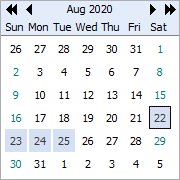
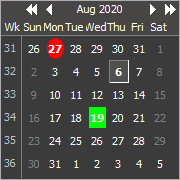
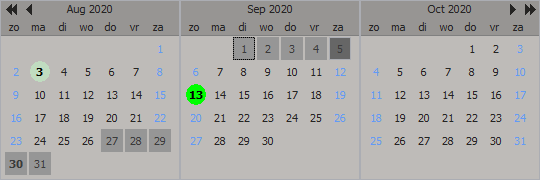
Highly configurable month calendars and datepickers that can be used with or without the TMS Planner component.
Included components:- TPlannerCalendar : highly configurable non DB-aware calendar component
- TDBPlannerCalendar : DB-aware calendar component that can automatically show events from a TMS Planner events database
- TPlannerCalendarGroup : multimonth calendar component
- TPlannerDatePicker : datepicker with highly configurable calendar dropdown
- TDBPlannerDatePicker : DB-aware datepicker with calendar dropdown that can automatically show events from a TMS Planner events database
- TDBPlannerMaskDatePicker : masked DB-aware datepicker with calendar dropdown that can automatically show events from a TMS Planner events database
- TPlannerDBDatePicker : single DB-field DB-aware datepicker with support for null-date entry
- TPlannerDBMaskDatePicker : masked single DB-field DB-aware datepicker with support for null-date entry
- TPlannerRangeSelector : control to input a date range, going from a start date to an end date
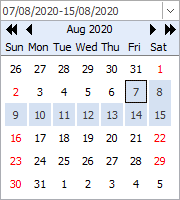 Features:
- Set all colors and fonts of days
- Configurable start day of the week
- Show weeknumber and control on which day of year week counting should start
- Keyboard support : up/down/left/right arrows change day resp. +7/-7 -1/+1 day
- PgUp and PgDn changes month resp. +1/-1 month
- Enable or disable month selection
- Customizable highlights and hints for special days, selectable color and shape for each event
- Multi selection or single selection
- Wallpaper background
- Min. & max selectable days
- DB-aware version included for linking with TMS TDBPlanner or as standalone DB datepicker (Shows automatically all days as events that have planner items in the database)
- Possibility for gradient planner background and caption
- Multimonth calendargroup can be automically sized vertically or horizontally at runtime with mouse
- VCL styles support
Pricing
Single Developer License
Small Team License
Site License
TMS VCL UI Pack
€ 435
€
205
yearly renewal
license for 1 developer
Includes
check
Full source code
check
Access to the TMS Support Center
check
Free updates and new releases
MOST POPULAR
TMS VCL Subscription
€ 995
€
515
for a 2 year renewal
license for 1 developer
Includes
check
Full source code
check
Access to the TMS Support Center
check
Free updates and new releases
check
TMS VCL UI Pack
check
All TMS VCL products
more_horiz
Discover more
BEST VALUE
TMS ALL-ACCESS
€ 1,995
€
695
yearly renewal
license for 1 developer
Includes
check
Full source code
check
Access to the TMS Support Center
check
Free updates and new releases
check
TMS VCL UI Pack
check
All TMS VCL products
check
All TMS products
more_horiz
Discover more
All prices excl. VAT. Renewal price is subject to change and only valid up to 30 days after license has expired. After renewal period a discount price is offered to renew the license.
Free Trial
Start a free TMS VCL UI Pack evaluation today!Please enter a valid email address
Download started. Your trial key will be provided by email!
By entering your email address you agree to receive email messages from TMS Software.
 RAD Studio
Note that the TMS VCL UI Pack replaces the TMS Component Pack. Both products can't be installed simultaneously. Therefore TMS Component Pack must first be uninstalled before installing the TMS VCL UI Pack
Supported Development Environments
 RAD Studio 13 Florence
RAD Studio 12 Athens
RAD Studio 11 Alexandria
RAD Studio 10.4 Sydney
RAD Studio 10.3 Rio
RAD Studio 10.2 Tokyo
RAD Studio 10.1 Berlin
RAD Studio 10 Seattle
RAD Studio XE8
RAD Studio XE7
RAD Studio XE6
RAD Studio XE5
RAD Studio XE4
RAD Studio XE3
RAD Studio XE2
RAD Studio XE
RAD Studio 2010
RAD Studio 2007
Delphi 7
RAD Studio 13 Florence
RAD Studio 12 Athens
RAD Studio 11 Alexandria
RAD Studio 10.4 Sydney
RAD Studio 10.3 Rio
RAD Studio 10.2 Tokyo
RAD Studio 10.1 Berlin
RAD Studio 10 Seattle
RAD Studio XE8
RAD Studio XE7
RAD Studio XE6
RAD Studio XE5
RAD Studio XE4
RAD Studio XE3
RAD Studio XE2
RAD Studio XE
RAD Studio 2010
RAD Studio 2007
Delphi 7