Blog Options
Archive
<< June 2026 >>-
Wednesday 24
- The full power of TMS ALL-ACCESS is within your reach! -
Friday 19
- Mapping in Delphi with TMS FNC Maps -
Thursday 18
- Filtering in Delphi: From Strings to Structured Logic -
Wednesday 17
- Free native Barcode & QR Code Generation in VCL Applications -
Thursday 11
- Custom Cell Rendering in TMS WEB Core TWebDataGrid -
Tuesday 9
- From Sensor to Dashboard with StellarDS -
Monday 8
- TMS Scripter 8.0: A Sharper, More Modern Scripting Engine for Delphi -
Friday 5
- Dynamic cell style and cell data formatting in TWeb(DB)DataGrid -
Tuesday 2
- TMS VCL UI Pack: Installation, Modernized -
Monday 1
- TMS Scripter 8 drops legacy Delphi support
- SVG Export in TMS FNC Chart
- Building a Photo Route Album with TMS FNC Maps, OpenStreetMap and EXIF GPS Data
Authors
- Bernard Roussely (3)
- Wagner Landgraf (101)
- Dennis Röhner (1)
- Roman Yankovsky (2)
- Bart Holvoet (45)
- Aaron Decramer (84)
- Pieter Scheldeman (139)
- Nancy Lescouhier (32)
- Adrian Gallero (35)
- Bruno Fierens (459)
- Marcos Douglas B. Santos (5)
- Bernard (4)
- Bradley Velghe (36)
- Andrew Simard (86)
- Holger Flick (15)
- Gjalt Vanhouwaert (45)
- Tunde Keller (38)
- Masiha Zemarai (117)
Blog
All Blog Posts | Next Post | Previous Post

 Get device independent, put your settings in the iCloud
Thursday, February 6, 2014
On the road, we carry a smartphone, in a couch we grab the tablet and in the office we sit behind the desk and use a desktop computer. In all scenarios though, we want to use applications that give us access to the same data and functions. Therefore, it is also logical that when we change our parameters for access to this data and functions via the desktop machine application, these same parameters and settings will be reflected (automatically) when we use the smartphone or tablet specific application and vice versa. In the Apple world, the answer to this scenario is persisting our parameters / settings on the iCloud.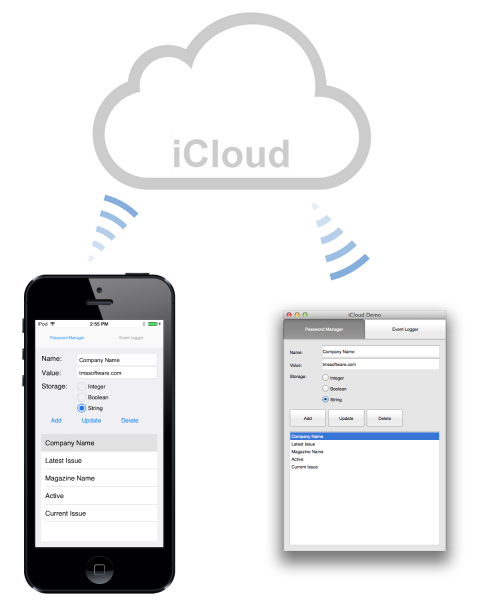
As a Delphi developer, we typically like it when we can persist this information with a minimum amount of code so we can focus on the business logic instead of all technical complexities of using the iCloud. Delivering this promise, we've now released two new non-visual components: TTMSFMXNativeiCloud and TTMSFMXNativeMaciCloud. With these components, putting key/value pairs on the iCloud and retrieving them becomes as simple as using a method
procedure AddKey(AKeyName: String; AKeyValue: TValue);
property KeyValues[AKeyName: String]: TValue
So, when in one application, the user would change a setting, this can be done with:
var
  FName: strring;

FName := 'TMS';
TMSFMXNativeiCloud.KeyValues['MyAmount'] := 1234;
TMSFMXNativeiCloud.KeyValues['MyName'] := FName;
procedure TMSFMXNativeiCloud.KeyUpdate(Sender: TObject; AKeyName: String; APreviousValue, ACurrentValue: TValue);
begin
   if (AKeyName = 'MyName') then
     FName := ACurrentValue;
end;TTMSFMXNativeiCloud is available now in the newest TMS iCL update and TTMSFMXNativeMaciCloud is available now in the newest TMS mCL. A FireMonkey iOS demo in TMS iCL and a FireMonkey Mac OS-X demo in TMS mCL demonstrate this concept by having a customizable set of key/value pairs shared via the iCloud between these applications as shown in the screenshot above.
Bruno Fierens

This blog post has not received any comments yet.
All Blog Posts | Next Post | Previous Post