Blog
All Blog Posts | Next Post | Previous Post

 Introducing WebMCP support in TMS WEB Core
Today

With AI increasingly finding its way into our daily software development activities, an interesting new possibility is emerging: what if an AI assistant could not only answer questions about your web application, but actually interact with it and perform operations on behalf of the user?
This is exactly what WebMCP aims to make possible. And with the new TWebMCP component in TMS WEB Core, Delphi developers can now prepare their web applications for this new way of interacting with software, entirely from Pascal code!
What is WebMCP?
WebMCP, or Web Model Context Protocol, is an emerging web technology that allows web applications to expose their functionality to AI agents through a standardized interface.
Traditionally, a user interacts with a web application by navigating through menus, entering values in forms, clicking buttons, selecting items in grids, etc.
When an AI agent needs to interact with such an application, it typically has to interpret the HTML document, identify the appropriate controls and simulate the necessary user interactions.
WebMCP introduces a different approach:
Instead of having an AI agent figure out how to operate the user interface, the web application explicitly exposes its available functionality as tools. Each tool has a name, a description, a definition of the parameters it expects and an implementation that performs the requested operation.
An AI agent supporting WebMCP can discover these tools, understand what they do and invoke them with the appropriate parameters.
For example, consider a customer management application. Instead of navigating to the customer search form and entering several search criteria, the user could simply ask:
"Show me all customers in Germany who placed an order in the last three months."
The AI agent could discover a `searchCustomers` tool, invoke it with the appropriate parameters and retrieve the matching customers.
The interesting part is that the application developer remains in full control of what functionality is exposed to AI agents.
What can WebMCP be used for?
The possibilities are numerous, especially for business web applications.
A few examples:
Customer management
A user asks: "Find all customers who haven't placed an order in the last six months."
The AI agent invokes the customer search functionality exposed through WebMCP and retrieves the requested information.
Order processing
A user asks: "Create an order for customer ABC with five units of product XYZ."
The agent can invoke tools to find the customer, retrieve the product information and create the order.
Business dashboards
A user asks: "Show me the sales figures for the last quarter and compare them with the same period last year."
The AI agent retrieves the required data through WebMCP tools and can present its findings to the user.
Scheduling applications
A user asks: "Find an available meeting slot next Thursday afternoon and schedule an appointment."
The agent can query available appointments and, after the necessary confirmation, create the requested appointment.
Data-driven applications
A user asks: "Find all unpaid invoices older than 30 days."
Instead of manually configuring filters, the user can have the AI agent retrieve the information directly.
The common denominator in all these examples is that the user describes what needs to be done, rather than how to do it.
Introducing TWebMCP in TMS WEB Core
As Delphi developers, we obviously want to take advantage of this technology without having to write JavaScript code or deal with low-level browser APIs.
This is where the new TWebMCP component comes in.
We have added the unit WEBLib.MCP.pas to TMS WEB Core, providing a complete Pascal abstraction around the browser's WebMCP API.
The component allows developers to define WebMCP tools, specify their parameters and implement the tool functionality using regular Delphi event handlers.
In other words, the AI agent can invoke functionality implemented entirely in Pascal!
The TWebMCP component offers:
- A collection of WebMCP tools through the `Tools` property.
- Tool names, titles and descriptions that explain their functionality to AI agents.
- Strongly typed parameter definitions with support for strings, numbers, booleans, objects and arrays.
- Parameter validation, including required parameters, allowed values and numerical constraints.
- A Delphi `OnExecute` event for implementing the actual tool functionality.
- Support for synchronous and asynchronous operations.
- Registration and unregistration of tools.
- Error handling and cancellation support.
- Optional automatic registration of tools.
All this is available through the familiar Delphi component and event-driven programming model.
How does it work?
The architecture is straightforward.
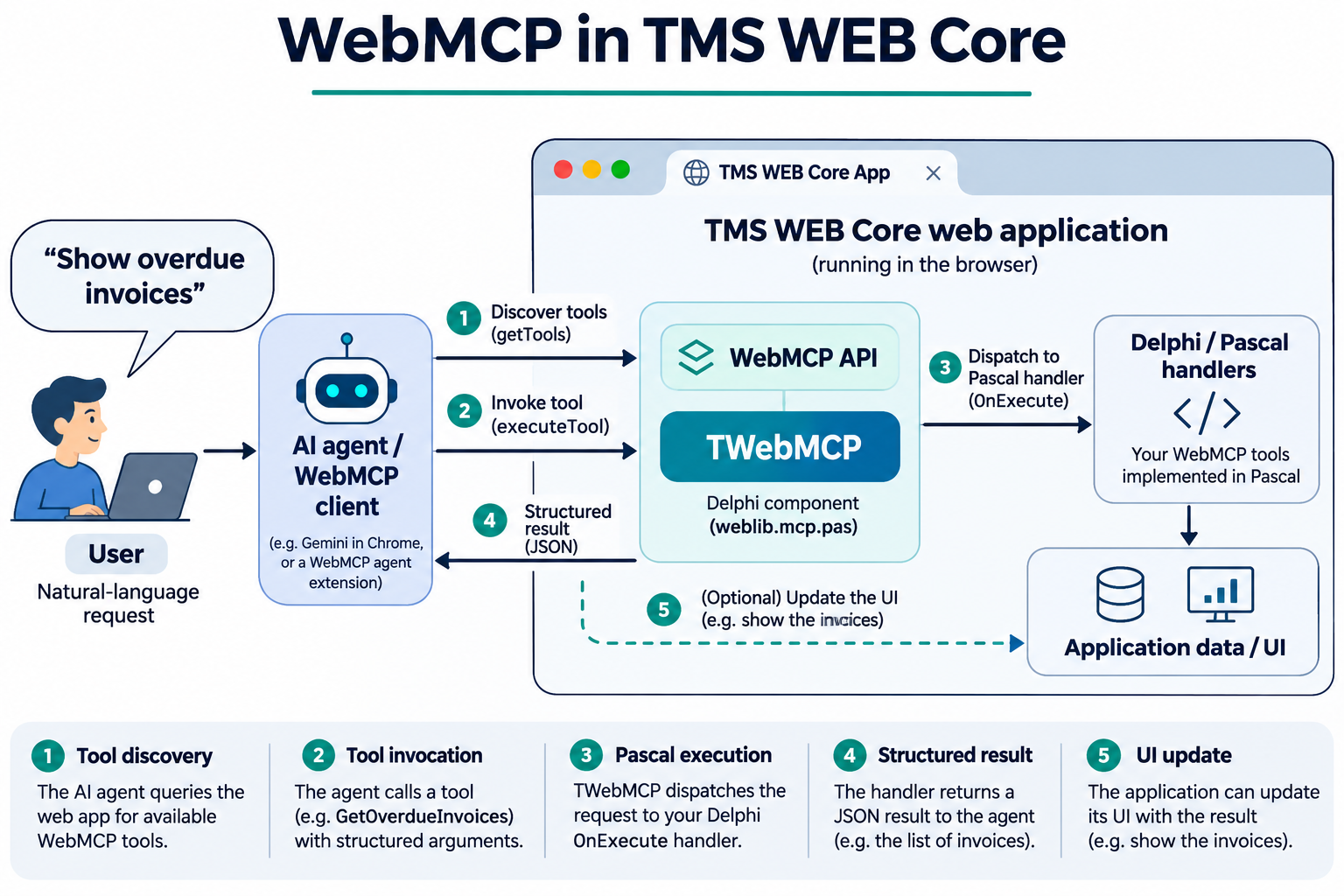
Your TMS WEB Core application runs in the browser as usual. The TWebMCP component registers the tools that the application makes available through the browser's WebMCP interface.
When an AI agent supporting WebMCP interacts with the application, it can discover the available tools and invoke one of them.
The TWebMCP component takes care of receiving the tool invocation, validating its parameters and calling the corresponding Pascal event handler.
The handler performs the requested operation and returns the result to the agent.
All this happens without requiring the developer to implement the underlying JavaScript WebMCP API.
An important detail is that WebMCP is a browser-facing interface. It is not necessary to create a separate MCP server to expose the functionality of your TMS WEB Core application. Of course, if your application accesses backend services or databases, those services remain available to your Pascal tool handlers just as they are to the rest of your application.
A practical example: managing a list with AI
Let's create a simple example to demonstrate how easy it is to expose functionality from a TMS WEB Core application to an AI agent.
Imagine we have a web application containing a `TWebListBox` that displays a list of car brands.
We want an AI agent to be able to add a new brand to this list or retrieve the number of brands currently in the list.
We will expose two WebMCP tools:
- `addCarBrand` — adds a car brand to the list.
- `getCarBrandCount` — returns the number of car brands.
First, add the WEBLib.MCP unit to the form's uses clause.
We can then create and configure the tools programmatically.
Creating the WebMCP tools
In the form, declare the following methods:
procedure AddCarBrandExecute(Sender: TObject; AInvocation: TMCPInvocation);
procedure GetCarBrandCountExecute(Sender: TObject; AInvocation: TMCPInvocation);
In the form's initialization code, create the component and define the tools:
var
  MCP: TWebMCP;
  Tool: TMCPTool;
begin
  MCP := TWebMCP.Create(Self);

  // Tool to add a car brand
  Tool := MCP.Tools.Add;
  Tool.ToolName := 'addCarBrand';
  Tool.Title := 'Add car brand';
  Tool.Description :=
    'Adds a car brand to the list';

  with Tool.Parameters.Add do
  begin
    Name := 'brand';
    ParameterType := mptString;
    Description := 'Name of the car brand';
    Required := True;
  end;

  Tool.OnExecute := AddCarBrandExecute;

  // Tool to retrieve the number of brands
  Tool := MCP.Tools.Add;
  Tool.ToolName := 'getCarBrandCount';
  Tool.Title := 'Get car brand count';
  Tool.Description :=
    'Returns the number of car brands in the list';
  Tool.ReadOnlyHint := True;

  Tool.OnExecute := GetCarBrandCountExecute;

  // Register the tools with WebMCP
  MCP.RegisterTools;
end;
For clarity, this example assumes that WebMCP is supported by the browser and registration succeeds. In a production application, registration errors should be handled using the component's `OnRegisterError` event or the promise returned by `RegisterTools`.
Notice how we define the tools entirely in Pascal.
We specify the name and description of each tool, and for the first tool, we also define a required string parameter named `brand`.
The component will automatically translate this information into the schema expected by the WebMCP API.
Implementing the tool handlers in Pascal
Now comes the interesting part.
The actual implementation of the tools is nothing more than regular Pascal code!
For the first tool, we retrieve the parameter passed by the AI agent and add it to the listbox:
procedure TForm1.AddCarBrandExecute(
  Sender: TObject;
  AInvocation: TMCPInvocation);
var
  Brand: string;
begin
  Brand := AInvocation.Parameters.GetString('brand');

  WebListBox1.Items.Add(Brand);

  AInvocation.SetResult(
    'Car brand ' + Brand + ' added successfully');
end;
For the second tool, we simply return the number of items:
procedure TForm1.GetCarBrandCountExecute(
  Sender: TObject;
  AInvocation: TMCPInvocation);
begin
  AInvocation.SetResult(WebListBox1.Items.Count);
end;
And that's it!
No JavaScript code, no JSON parsing and no manual handling of browser messages.
The TWebMCP component takes care of the communication between the AI agent and our Pascal code.
Interacting with the application
With the tools registered, an AI agent supporting WebMCP could receive the following instruction:
"Add Mercedes to the list of car brands."
The agent discovers the `addCarBrand` tool and invokes it with the parameter:
{
  "brand": "Mercedes"
}
The `AddCarBrandExecute` Pascal event handler is triggered and the new brand is added to the listbox.
The agent receives the result:
Car brand Mercedes added successfully
We can also ask:
"How many car brands are currently in the list?"
The agent invokes `getCarBrandCount` and receives the integer returned by our Pascal event handler.
The important observation is that the AI agent is interacting with the actual application functionality, not simulating clicks on its user interface.
More advanced possibilities
While our example is intentionally simple, the TWebMCP component supports considerably more advanced scenarios.
For example, tool parameters can be defined with validation rules, enumerated values, minimum and maximum values, nested objects and arrays.
This helps the AI agent understand the expected input and ensures that parameters are validated before reaching the Pascal handler.
The component also supports asynchronous tool execution.
This is particularly useful when a tool needs to perform a REST API request, retrieve database information or execute another asynchronous operation.
Using `TMCPInvocation.Defer`, a handler can indicate that the operation will complete asynchronously and subsequently return its result using `SetResult` or report an error using `SetError`.
Alternatively, a JavaScript promise can be supplied directly as the result.
Cancellation support is available through `TMCPInvocation.CancellationToken`, allowing long-running operations to react when an agent cancels a request.
Finally, tools can provide additional information about their behavior, such as whether they are read-only or whether an operation may have consequential effects.
These capabilities make the component suitable not only for simple demonstrations, but also for integration into real business applications.
As always, the application remains responsible for enforcing its authorization rules and validating business operations. Exposing a tool to an AI agent should never bypass the application's normal security mechanisms.
Browser support
WebMCP is an emerging web technology and browser support is still evolving.
At the time of writing, WebMCP can be tested in supported experimental versions of Google Chrome. Developers can use WebMCP-compatible agent extensions to discover and invoke the tools exposed by their applications.
The TWebMCP component includes the `HasWebMCP` method, and the unit also provides the `WebMCPSupported` function to check whether the browser exposes the required API.
This makes it possible to gracefully handle browsers where WebMCP is not yet available.
It is also worth emphasizing that WebMCP does not itself provide an AI model. An AI agent with WebMCP client support is needed to discover and invoke the registered tools.
Get started with TMS WEB Core
With WebMCP support, we are taking another step toward making TMS WEB Core applications ready for the next generation of AI-assisted software.
And the best part is that Delphi developers can take advantage of these capabilities using the programming language, component model and development environment they are already familiar with.
With TMS WEB Core, you can create modern, responsive web client applications from Delphi, entirely in Pascal, and now expose their functionality to AI agents through WebMCP.
If you are already using TMS WEB Core, make sure to get the latest version and start experimenting with the new TWebMCP component.
If you are new to TMS WEB Core, download the fully functional trial version and discover how you can build powerful web applications from Delphi without having to become a JavaScript developer.
Get the latest TMS WEB Core at www.tmssoftware.com/site/tmswebcore.asp
We are very eager to learn what interesting applications and AI-driven workflows you will create with WebMCP and TMS WEB Core. Let us know your experiences and ideas for further extensions in the comments below!
Bruno Fierens

This blog post has not received any comments yet.
All Blog Posts | Next Post | Previous Post