PRODUCTS » Quick Links

FEATURED PRODUCT

The most powerful, fastest & flexible suite for native Excel file manipulation and Excel,PDF,HTML report generation for .NET

License only 125 EUR See More

LOGIN

Customer login to access products, support information & special benefits.

SEARCH

STAY IN TOUCH

Add your e-mail address here to receive the monthly TMS Software alerts.


LINKS

Free Tools

Free: TMS Project Manager

Free IDE plugin to easily ZIP and upload projects.

When installing the package, the project manager gets two new options: ZIP project and ZIP & upload project. The first option will traverse all files in the project and add this to ZIP file and open Windows Explorer in the project folder. The 2nd option will upload the ZIP file to a preset FTP server and put the link to the file on the clipboard. This link can then be pasted in the email to reply to the customer.

Features
  • Configurable upload settings
  • Configurable file mask
  • Create and / or upload projects with 2 clicks
  • Free plugin for Delphi 2010


Free: TMS FlexAnalytics

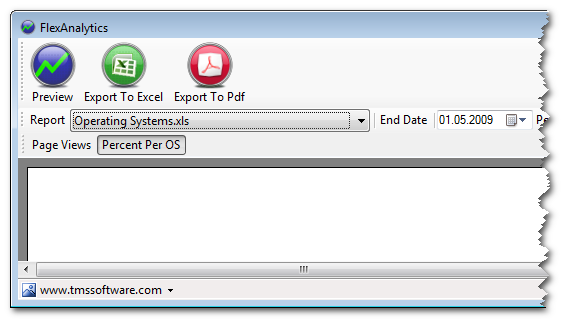
TMS FlexAnalytics is an app to get statistics from google analytics and chart it automatically from a C# app. You will need Visual Studio 2008 and FlexCel.NET to compile the source files.

Free: TMS Sharp File Swap

This is an expert focused on a faster navigation between open units on the IDE.

Tabs get inefficient as soon as you have more than 10 tabs opened. The project manager is better, but it can take you some time to find your file when you have hundreds of them. And both methods make you use the mouse, which is good some times, but not so much others.

The observation that 'inspired' this expert is that you are normally working on the 3-4 last files you accessed. So, this gives you a very fast way to switch between them. Just press Alt-Ctrl-Tab, keep pressing Tab without releasing Alt-Ctrl, and you can select the icon of the file you want to work with. It behaves similar to Alt-Tab on windows, it does not just switch between tabs (like ctrl-tab, or Alt-Tab on win3.1), it shows the icons of the files and lets you choose the one you want. Icons are different for different file types, and files from other projects are shown on black and white.

Bookmars are supported too. You can press '1' to '5' while not releasing Alt-Ctrl, and later you can access that file (even if it is not opened) by pressing Alt-1...Alt-5 Bookmarks are persistent when you close the IDE, so you can use them to mark very used units.

Free: TMS Data Modeler Library

TMS Data Modeler Library (DMLib) is a collection of classes that allows you to read the whole structure of a database (tables, fields, procedures, indexes, etc.) from a Devgems Data Modeler (*) project file, using a Delphi / C++ Builder application. After modeling your database with Devgems Data Modeler, you can use TMS Data Modeler Library classes to have the database structure information available in your Delphi application.

(*) Devgems Data Modeler is a database modeling/design software tool made by Devgems. You can design ER diagrams with it, generate DDL SQL Scripts, compare databases, archive/compare versions, among other tasks. More information at www.devgems.com.

Free: TMS UpdateBuilder

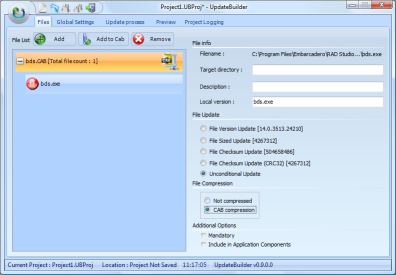
TMS UpdateBuilder is a free time-saving companion utility for the TMS TWebUpdate component. It makes building and uploading updates of your applications easy, reliable and fast. UpdateBuilder can generate the correct .INF file that contains the specification of what parts of the application need to be downloaded and how. It will also compress files if specified or build complete CAB files that contain the updated application. On top of that, it can automatically upload the update to the server.

Free: IDE plugin: TMS Presentation Helper & Clipboard Monitor

IDE plugin to monitor clipboard, track clipboard history and to save & load code snippets for giving presentations with Delphi

Features
  • Code snippet overview to help during presentation
  • Code snippets in the presentation helper can have a title to easily synchronize with presentations
  • Automatic Pascal syntax highlighting on all code snippets
  • Clipboard monitoring, clipboard history tracking
  • Drag-drop support allows to drag code snippets from the presentation helper or clipboard monitor directly to the editor
  • Integrated in Delphi as docking panel in the IDE
  • Double-click or drag-drop code to a source file
  • Easily copy or cut multiple code snippets to the clipboard and recall later
  • Free plugin for Delphi 2006,2007,2009,2010

Free: IDE plugin: "TMS What's New"

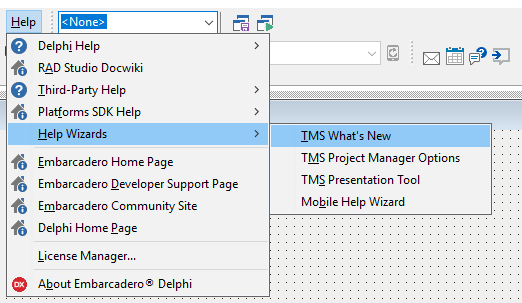
Delphi & C++Builder IDE plugin to keep current with the latest releases, blogs & tweets from TMS software

Features
  • View latest product updates, release history, component descriptions
  • Stay in touch with the latest blog articles as they are written
  • Instantly view TMS tweets
  • Detailed product information with the latest updates
  • Integrated in the Delphi & C++Builder IDE as docking panel within the IDE
  • Free plugin for Delphi 2006,2007,2009,2010

Free: iPhone app: TMS Software News

Stay in touch with the latest developments and releases at TMS software anywhere, anytime with one single iPhone application

Features
  • View latest product updates, release history, component descriptions
  • Stay in touch with the latest blog articles as they are written
  • Instantly view latest TMS tweets
  • Detailed product information with the latest updates
  • Read our blog, check our tweets
  • See what's new, what's improved, what's fixed in our components

Free: FTPUploader: a small free utility for your daily email routine

It becomes increasingly difficult these days to send an email with an attachment. Different email servers implement different filtering techniques for emails with attachments. Especially for support this is quickly becoming frustrating, both for the sender and the receiver. The sender does not know whether an email actually arrived at the receiver or if the email was answered or if the answer simply didn't arrive. A solution is to no longer send the file as attachment but to make it available as download and just send the download link. Now, while convenient for the receiver, it quickly becomes a repetitive annoying and error-prone task for the sender:

  • Locate the file
  • Open an application to connect to an FTP server
  • Remember the corresponding hyperlink to send in the email
A solution: FTPUploader

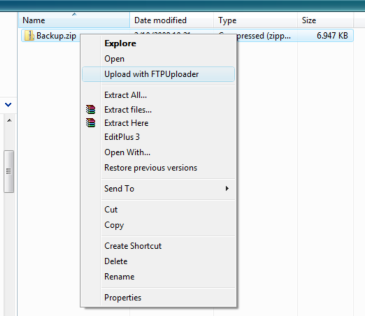
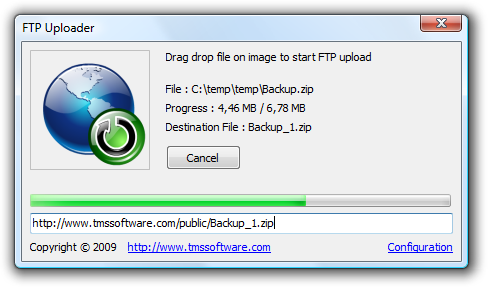
What if a tool existed where you could simply right-click a file and have it sent to some FTP server and have the hyperlink available on the clipboard to paste in the email ? Then comes the power of Delphi and our component TWebCopy! It took less than 15 minutes to configure the TWebCopy component for uploading a file to an FTP server and get and set the settings for the FTP server in the registry. With Delphi, everything is easy and straightforward. By implementing a couple of events, progress feedback can be displayed in the utility as well.

The FTP server information must be configured once by starting the application and clicking the "Configuration" link.
The file can also be uploaded to the FTP server by "drag-dropping" the file on to the icon.
After uploading the file the link is copied to the clipboard.

Free: Reflection Creator: a free utility for creating configurable reflection images


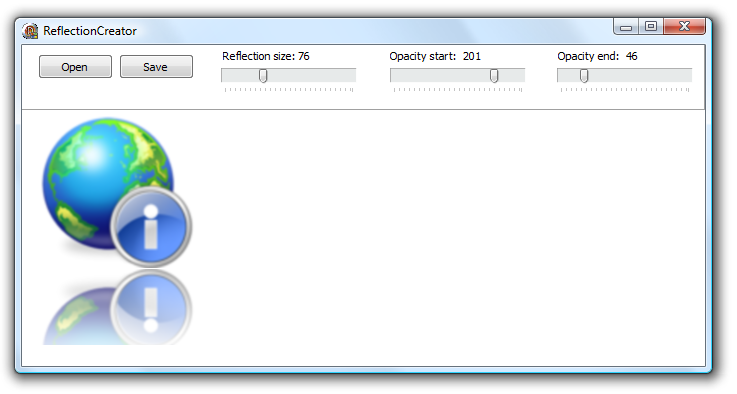
This free tool allows you to create images with a configurable reflection effect starting from existing images. Simply load the image in the reflection creator, set the desired reflection size and reflection offset and save as a new image with reflection.


Copyright © 1995 - 2010 TMS Software v3.3