TMS ASP.NET Component Pack
Over 60 C# ASP.NET components for RAD web application development with Visual Studio .NET 2005, 2008, 2010, 2012.
Also available for:

Feature overview
Product discontinuedThe TMS Components for ASP.NET allow a RAD way of web application development with Microsoft Visual Studio 2005, 2008, 2010, 2012 making web development as easy as dropping components on a form.
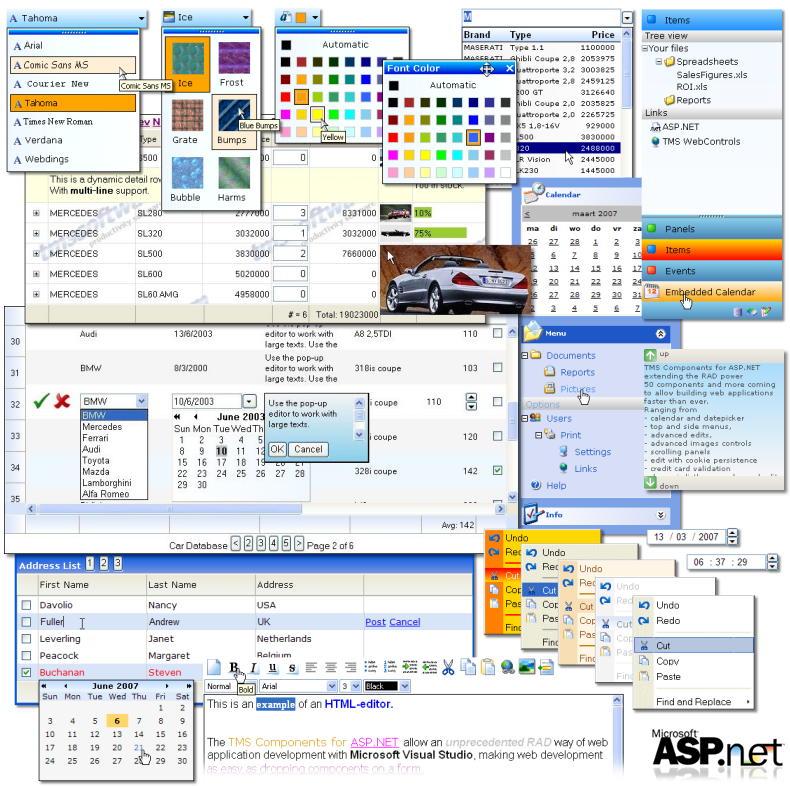
Complete overview of over 60 components for ASP.NET
- AdvEdit
- AdvDateEdit
- AdvImageButton
- AdvLUEdit
- AdvSpinEdit
- AdvTimeEdit
- AdvToolButton
- AdvWebGrid
- AutoFormFill
- CalculatingLabel
- Calendar
- CCExpEdit
- CCNumEdit
- CheckListBox
- CheckListDropDown
- ClickOnceButton
- ClientButton
- ClientCode
- ClientDebugOut
- ClientWatch
- Clock
- ColorComboBox
- ColorPicker
- ComboListLink
- CountryComboBox
- DateLabel
- DatePicker
- DateSelector
- DetailList
- DocumentPopupMenu
- EditListLink
- EMailEdit
- ExchangeBar
- FadeImage
- FilePicker
- GradientLabel
- HelpTip
- HoverImage
- HTMLEdit
- ListLink
- ListOrganizer
- MainMenu
- MultiColumnComboBox
- NoSpamEmailLabel
- OutlookBar
- PersistentEdit
- PopupMenuButton
- PopupMenuLabel
- ScrollBarColors
- ScrollBarPersistence
- ScrollPanel
- SideMenu
- SideNavBar
- SmartPanel
- StateComboBox
- StaticMenu
- TextAreaLimiter
What's new
v2.8.0.1
- Improved: TAB/Arrow keys handling when MouseSelect is set to “Edit” (Direct Edit Mode) in AdvWebGrid
- Fixed: Issue with masterpages in VS2010
v2.8.0.0
- New: IE9 & Firefox 4.0 support added
v2.7.1.0
MainMenu / SideMenu / PopupMenuButton / PopupMenuLabel / DocumentPopupMenu- Fixed: rendering issue when used in combination with MasterPages in Visual Studio 2010
- Fixed: issue with the Text property value not being displayed
- Fixed: issue with posting updated value when using PopupEdit Column.Editor
- Fixed: issue with setting Column.Title propery in a non-databound grid with 3 columns.
- Fixed: issue where browser page is scrolled to top when helptip link is clicked
- Fixed: No page refresh when an item is clicked and no ItemClick event is assigned
- Fixed: ItemSelected index not set correctly after page refresh
v2.7.0.0
General- Improved: Replaced WebDings font dependency for arrows & symbols with cross browser compatibile unicode characters in AdvWebGrid, AdvDateEdit, AdvTimeEdit, AdvSpinEdit, Calendar, DatePicker, AdvSelector, OutlookBar, MainMenu, SideMenu, PopupMenuButton, PopupMenuLabel, DocumentPopupMenu, ExchangeBar, MultiColumnComboBox
- New: FooterHeight property
- Improved: column percentage width issue with scrolling enabled and width = 100%
- Fixed: column width when using percentage widthtype with scrolling enabled.
- Fixed: StateSaving issue
- Fixed: issue with column hiding when Column.Alignment is set to Center/Right
v2.6.6.0
General- New: Support for Visual Studio 2010 added
- Improved: IE 8 compatibility
- New: Added Items.Value property (can be used to store a record ID when adding items from a database)
- New: Added EnablePopUp property (enable or disable the button)
- Fixed: Setting width property did not work
- Fixed: Issue in Firefox when Enabled = false, checkboxes where not disabled.
- Fixed: dropdown was relatively positioned causing other elements to move up or down when it's displayed / hidden (Only when control is positioned relatively)
- Fixed: problem with submitting list of selected items
- Fixed: When assigning a gallery style to the grid the DataField, Title and SubTitle properties where reset for the first Column.
- Fixed: problem with the default-columns re-appearing when the ColumnCount < 3
- Fixed: Issue in Firefox with Insert Image command
- Fixed: Issue in Firefox with minus character when editType = string
- Fixed: Problem with dropdown position when control is positioned
- Fixed: "Controls Selector" dialog was not displayed for existing items in the collection
- Fixed: "Controls Selector" dialog was not displayed for existing items in the collection
- Fixed: "Controls Selector" dialog was not displayed for existing items in the collection
v2.6.5.0
AdvWebGrid- New: Added AfterPostRowEvent event
- Improved: rendering of ComboBox editor with large amounts of items
- Improved: Direct Edit mode: default height set for ColumnEditor.Memo if RowHeight = 0
- Improved: When an EditRowFontColor is set, the text in the ColumnEditors is also displayed in the correct color.
- Fixed: Direct Edit mode: datepicker is no longer hidden if browse month/year is clicked more than once
- Fixed: When changing the RowCountSelect value the grid automatically returns to the first page (when pagecount changes, an empty grid could be displayed)
- Fixed: CheckBox / SelectCheckBox columntype not aligned correctly
- Fixed: JS error under specific conditions in Firefox when using the SpinEdit editor
- Fixed : Firefox issue with Button position: SpinEdit, AdvDateEdit, AdvTimeEdit, DynDateEdit, DynTimeEdit, TimeEdit, DateEdit
- Fixed: JS error when used inside user control
- Fixed: JS error when used in masterpages
- New: Added state-saving support
- Improved: GlyphImages properties now accept paths with backslash (previously only forward slash was accepted)
- Fixed: AJAX: Possible JS error when hiding/displaying the control
- New: Added state-saving support
- Improved: GlyphImages properties now accept paths with backslash (previously only forward slash was accepted)
- Fixed: JS error when used in masterpages
v2.6.3.0
- New: Added "allow" parameter to PostRow event in AdvWebGrid to block the database update and keep the row in edit mode
- Fixed: issue with clientEvent DateClick parameters (day, month, year) in Calendar component
v2.6.2.0
- Various smaller fixes & code improvements. See included history.txt file for details
v2.6.1.0
- New : ExchangeBar : property added: Item.NodeMargin
- New : ExchangeBar : property added: Item.NodeAction
- New : ExchangeBar : SpaceSaver.Expanded property exposed
- New : ExchangeBar : Added JS function " ExchangeBarExpand(Obj,IsExpanded)"
- New : MainMenu / SideMenu / PopupMenuLabel / PopupMenuButton / DocumentPopupMenu : Added CheckedItemGlyph property
- New : AutoFormFill : Tab key selects an item on the dropdown (similar as pressing enter)
- Various smaller fixes & code improvements
- Various cross browser compatibility improvements
v2.6.0.0
- New : support for Visual Studio 2008
- Various smaller fixes & code improvements
v2.5.3.0
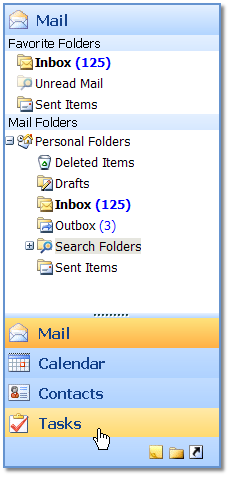
- New : ExchangeBar : Navigational control similar to Microsoft online web email access
- New : AutoFormFill : automatic form persistence & auto form completion based on persisted values
- New : ClientEvent property added in AdvImageButton
- New : Delphi 2007 for .NET support added
- Improved : DatePicker design time rendering of button
- Improved : AdvSpinEdit spin button positioning
- Improved : speed of MultiColumnComboBox
- Various smaller fixes & code improvements

v2.0.0.6
- New : full support for Microsoft AJAX
(only with Visual Studio .NET 2005 & registered version) - New : support for using the new .NET 2.0 DataSourceID
- New : AdvWebGrid : DataSourceID added for easier databinding with .NET 2.0
- New : DetailList : DataSourceID added for easier databinding with .NET 2.0
- New : MultiColumnCombobox : DataSourceID added for easier databinding with .NET 2.0
- Improved : Visual Studio 2005 DOCTYPE handling in all components
- Improved : cross browser compatibility
- Improved : demos
- Fixes : lots of smaller fixes
Help
Trial Downloads
Product discontinued.