TAdvStringGrid
Example 63 : Using subgrouping with TAdvStringGrid
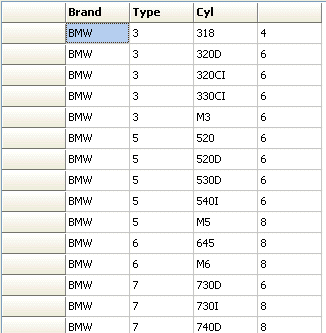
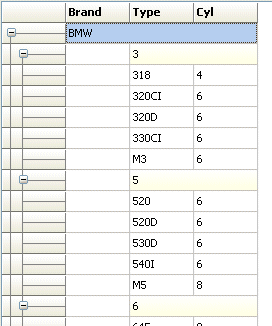 With the TAdvStringGrid method
grid.Group(column) it is possible to let the grid perform an automatic grouping
on a column in the grid. In addition to the Group() function, it is possible to
let the grid automatically add sub groups with the method grid.SubGroup(column).
This subgrouping can be done for multiple columns but it is important that the
successive columns for subgroups are right from the last subgroup.
To ungroup groups or subgroups, the methods grid.UnGroup() and grid.SubUnGroup()
can be used respectively.
This code snippet demonstrates how grouping and
one subgroup is applied to a grid that loads a CSV file:
With the TAdvStringGrid method
grid.Group(column) it is possible to let the grid perform an automatic grouping
on a column in the grid. In addition to the Group() function, it is possible to
let the grid automatically add sub groups with the method grid.SubGroup(column).
This subgrouping can be done for multiple columns but it is important that the
successive columns for subgroups are right from the last subgroup.
To ungroup groups or subgroups, the methods grid.UnGroup() and grid.SubUnGroup()
can be used respectively.
This code snippet demonstrates how grouping and
one subgroup is applied to a grid that loads a CSV file:
procedure TForm1.InitGrid;
begin
  advstringgrid1.Grouping.MergeHeader := true;
  advstringgrid1.Grouping.HeaderColor := clWhite;
  advstringgrid1.Grouping.HeaderColorTo := clInfoBk;
  advstringgrid1.SaveFixedCells := false;
  advstringgrid1.LoadFromCSV('.\cargroups.csv');

  advstringgrid1.Group(1);
  advstringgrid1.SubGroup(1);
  advstringgrid1.ContractAll;
  advstringgrid1.Cells[1,0] :='Brand';
  advstringgrid1.Cells[2,0] :='Type';
  advstringgrid1.Cells[3,0] :='Cyl';
end;
Delphi project & source files for downloading included in the main demos distribution for Delphi.
×
![]()