| PRODUCTS » VCL COMPONENTS » TADVSTRINGGRID |
v4.0.6.3 (Jun 22, 2008)
|
TRIAL DOWNLOADS
- Delphi 5 (3.68 MB)
- Delphi 6 (3.96 MB)
- Delphi 7 (3.92 MB)
- Delphi 2005 (6.76 MB)
- Delphi 2006 (9.13 MB)
- Delphi 2007 (9.13 MB)
- C++Builder 5 (4.56 MB)
- C++Builder 6 (4.86 MB)
- C++Builder 2006 (9.13 MB)
- C++Builder 2007 (9.13 MB)
TAdvStringGrid
The high productivity & feature-packed grid control
Feature overview
FLEXIBLE PRINTING
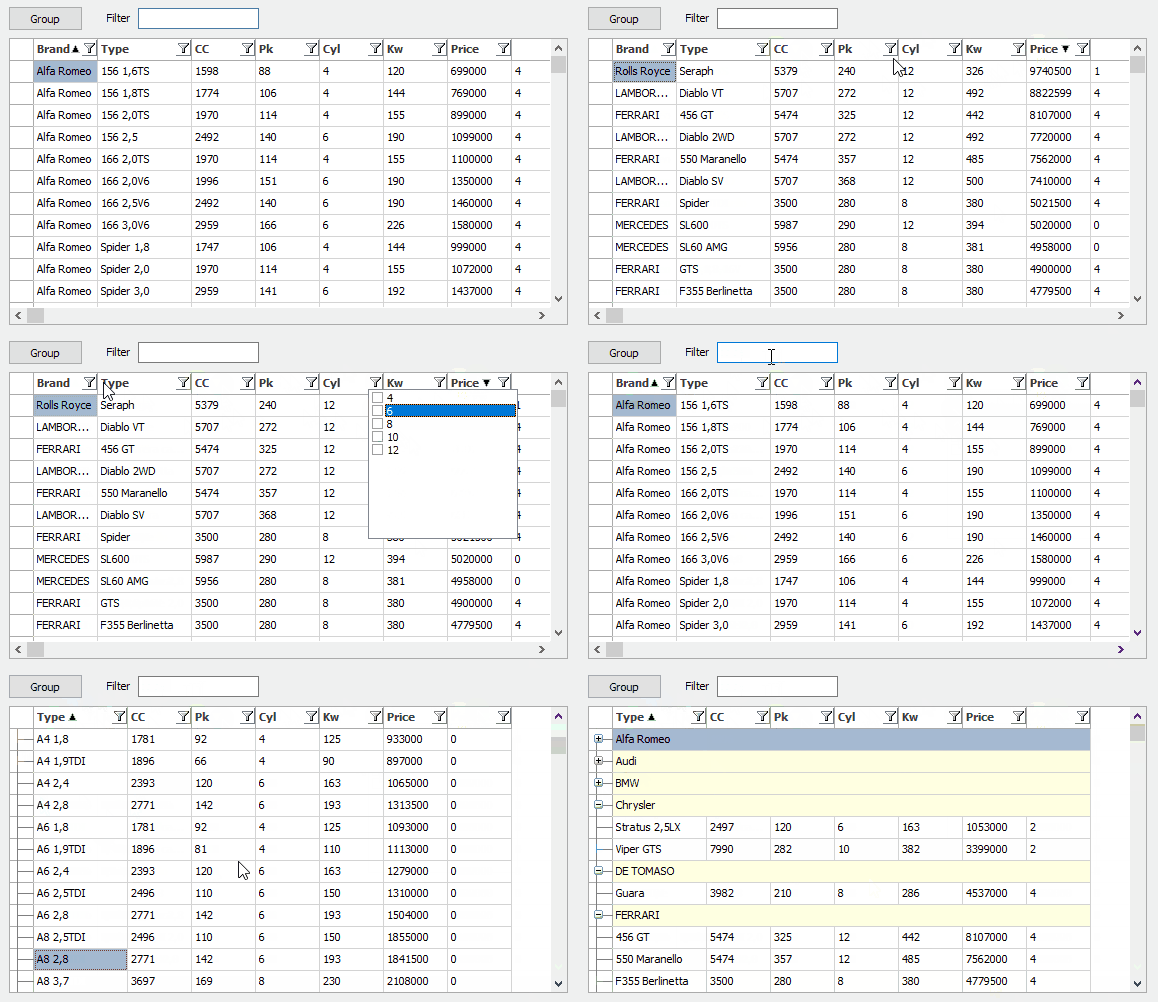
Through properties you can have : ENHANCED DISPLAY
EASY NAVIGATION
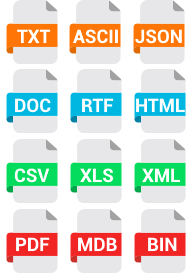
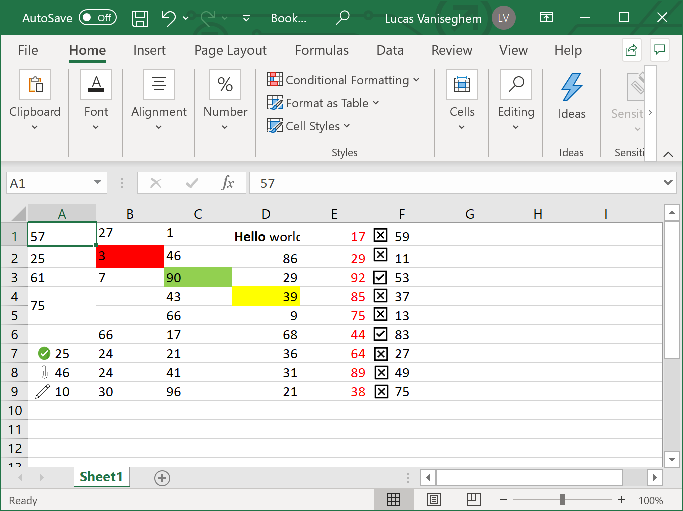
FLEXIBLE FILE INPUT OUTPUT
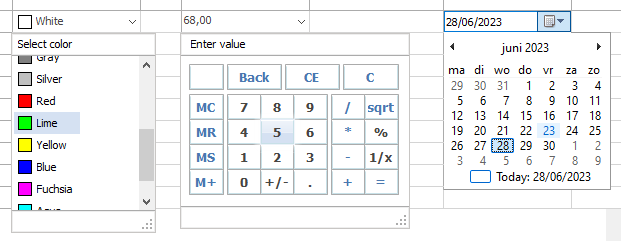
ADVANCED EDIT CONTROLS
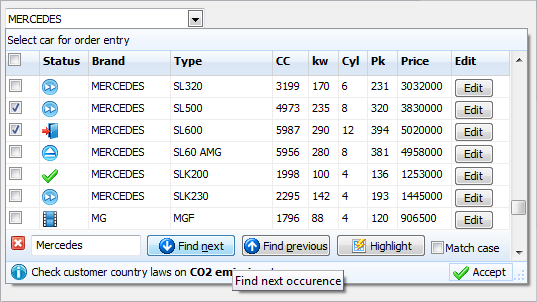
Have your choice of edit controls
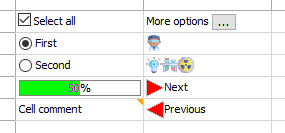
HAVE GRAPHICS EVERYWHERE
Add images to your cells
3rd PARTY SUPPORT
All kinds of codeless extra features
AND MORE ...
Free Updates & support
Registered users receive license for commercial use and source code. All source code updates for a full version cycle are free. First class support for registered users within 24hrs except on holidays.
What's new
v4.0.6.3
- New : OnWideEllipsClick event added
- New : OnOleDropURL event added, DragDropSettings.OleAcceptURLs added
- New : MouseActions.EditOnDblClickOnly property added
- Various smaller fixes & improvements
v4.0.3.0
- New : Navigation.MoveScrollOnly property added to always only perform scrolling and no selection change when pressing Up/Down/Next/Prior/Home/End
- New : public property grid.XMLEncoding to specify code table for XLM export
- New : 3 articles on usage of TAdvStringGrid
- Improved : AdvGridFindDialog.Dialog & AdvGridReplaceDialog.Dialog exposed
- Various smaller fixes & improvements
v4.0.0.0
We are pleased to announce the new version v4.0 with tons of new features and improvements !
- New : CSV import dialog
- New : support for parenthesis in filter spec
- New : translucent cell display during column or row moving
- New : translucent cell display during drag & drop
- New : support for Unicode hints
- New : IgnoreColumns property for AutoSizeRows, Sort, Find control
- New : 4 sample applications
- New : edDateTimeEdit editor type added
- New : GroupCustomCalc method & OnGroupCalc event added
- New : UnSelectRows, UnSelectCols method added
- New : SaveWithRTF public property added
- New : SearchFooter.SearchMatchStart property added
- New : GotoCell() method added
- New : OnColumnSizing, OnRowSizing events added
- New : MaxRows & DoTrim default parameter on LoadFromFixed added
- New : Hover/down complex gradients on fixed rows
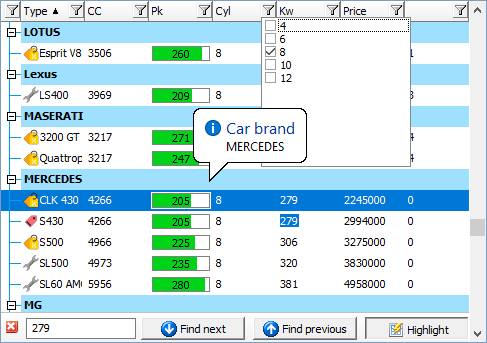
- New : Fixed row dropdown menu
- New : Automatic Group count display with Group count format
- New : Grouping.AutoSelectGroup, to automatically select all rows in a group by clicking the group header
- New : OnCustomStrToDate event added
- New : global grid Modified property added
- New : OnColumnSizing, OnRowSizing events
- New : MaxComboLength property added
- New : with goTabs, AdvanceInsert = true & TabToNextAtEnd = false, row is inserted on tab at last cell
- New : OnSearchFooterClose event added
- New : MouseActions.DirectComboClose, MouseActions.DirectDateClose properties added
- New : SelectionMirrorColor/SelectionMirrorColorTo added for Vista style gradients on selected cells
- New : Internal atScientific type added for auto text alignment / formatting / sorting
- New : Navigation.CursorWalkAlwaysEdit property added
- New : Navigation.LeftRightRowSelect property added
- New : New : fnSelectedCells option added for Find function
- New : exposed hilight button in searchfooter via grid.SearchPanel.HiliteButton
- New : event OnSearchFooterAction added
- New : support for MaxLen attribute for HTML cell forms
- New : support for masked & password editors for HTML cell forms
- New : fnIncludeHiddenRows in Find parameters option added to search in rows hidden by nodes
- New : OnFooterCalc event added for custom footer calculations
- Improved : extended developers guide / updated help files
- Improved : float spinedit inplace editor behaviour with Page Up/Down keys
- Improved : OnGetEditorProp also called from normal inplace editor
- Improved : ColumnSize.SynchWithGrid behavior
- Improved : HTML control drawing with XP themes
- Improved : scope option to search in selected cells added in TAdvGridFindDialog, TAdvGridReplaceDialog
- Improved : perform auto scroll when dropped over first row during OLE drag & drop
- Improved : RowModified[] can be used also when visible modified row indication is disabled
- Improved : LoadFromFixed handles out of order column indexes
- Fixed : issue with tab edit for special combinations of fixed cells
- Fixed : issue with OnButtonClick for fixed cells and FixedAsButtons = true
- Fixed : issue with AutoNumAlign and thousand separators
- Fixed : issue with getting checkbox state for data checkboxes with hidden rows
- Fixed : issue with Title attribute case sensitivity in hyperlinks on HTML formatted text
- Fixed : issue with clicking on header checkbox & sorting
- Fixed : issue with AddAdvProgress and Min,Max different from 0,100
- Fixed : issue with SortOnVirtualCells & custom sorting
v3.5.3.1
- New : support for Delphi 2007 added
- New : methods ColumnStatesToString, StringToColumnStates
- New : methods ColumnPosition, ColumnAtPosition
- New : OnEllipsClick event triggered on F4 key in edEditBtn editor
- New : fcCalculated setting for filter data to filter in TAdvSpreadGrid on results
- New : OnEditCellDone event added
- New : Extra MaxRows parameter for functions LoadFromCSV, InsertFromCSV
- New : OnDatePickerCloseUp event added
- New : AutoFitColumns added
- New : 2 sample applications for using OnPrintNewPage event and using Unicode features
- New : OnSearchEditChanged event added
- New : exposed MatchCase checkbox in search footer via Grid.SearchPanel.MatchCase
- Improved : OnClick, OnClickCell event triggered for click on floating footer cells
- Lots of smaller code improvements & fixes
v3.4.8.9
- New : Select method added to programmatically perform select on the default cell
- Improved : added support for export grids with empty cells to XML
- Improved : behaviour of OnEditChange
- Fixed : issue with shift column selection
- Fixed : issue with center alignment & haBeforeText, haAfterText images
- Fixed : issue with InsertRows & CellControls
v3.4.8.6
- New : added support to sort cells with scientific notation, ie. X,YE+Z
- New : filter based on cells with stripped HTML tags
- Improved : SmartClipboard resize with editing enabled
- Improved : scientific type detection
- Improved : AdvanceOnEnter, OnCellValidate behaviour with custom inplace editors
- Improved : fnAutoGoto search in disjunct row select mode
- Improved : AdvGridReplaceDialog shows modified rows when enabled
- Fixed : issue with disjunctrowselect
- Fixed : issue with SaveFixedCells & SaveToAscii
- Fixed : issue with dbl click & MouseActions.RangeSelectAndEdit = true
- Fixed : background color issue with checkboxes on gradient grid
- Fixed : issue with RangeSelectAndEdit and popup menus
- Fixed : issue with client-alignment, stretchcolumn
- Fixed : issue with RemoveChildRow()
- Fixed : issue with Undo for data checkboxes
- Fixed : issue with combination of RangeSelectAndEdit, goColMoving = true, SelectionResizer
- Lots of smaller code improvements
v3.0.0.0
Read more details about all v3.0 enhancements in this document:
- New : AppendToDoc method, export by appending to existing MS Word DOC file with insert at bookmark option
- New : AppendToAscii method, export by appending to existing ASCII file
- New : CopyToClipboardAsHTML method, copies grid as HTML on the clipboard
- New : Balloon hints for cells
- New : Support for multi column sorting in grouped grid
- New : SubGroup method to add subgroups in grouped grid
- New : RangeIndicator cell type
- New : Automatic modified row indication in fixed column
- New : Wordwrap control per cell
- New : Firefox style search pane
- New : XML Import
- New : Built-in Hotmail style row selection
- New : Active row indication for full row
- New : Sort styles ssAlphaNumeric, ssAlphaNumericNoCase
- New : edUniEditBtn Unicode inplace editor with embedded button
- New : Always visible vertical, horizontal or both scrollbars
- New : OnAutoAdvance event to control advance on enter behaviour
- New : Support for background display over full background, also non cell grid background and background gradient
- New : InsertNormalRow, RemoveNormalRow methods to insert/remove non-child rows in a grid with nodes
- New : Progress bar with formatted display of value and non percentage values
- New : Keyboard left/right arrow to open/close nodes in grid
- New : RemoveAllComments, RemoveAllMarkers added
- New : Support for hints on floating footer added
- New : Custom floating footer painting support added with OnFooterPaint event
- New : OnFindDOne, OnReplaceDone, OnDialogKeyDown events added in TAdvGridFindDialog, TAdvGridReplaceDialog
- New : MouseActions.SizeFixedRow added to enable sizing of fixed rows
- New : MouseActions.NoScrollOnPartialRow property added to prevent auto scroll on partial visible row click
- New : Grid gallery of visual appearance settings
- New : Gradient selection color capability
- New : Filter selection to filter on virtual cell text or grid cells text
- New : property DefaultEditor
- New : OnSelectionResized event added
- New : Title attribute support for anchors added for setting custom hints for HTML hyperlinks
- New : EditLink.PopupLeft, EditLink.PopupTop properties added to control popup editor position
- New : TMemoEditLink.SelectAll property added to control selection in inplace memo editor
- New : Public property PrintSettings.FixedCellsAlways to print fixed cells in case of PrintSelectedRows, PrintSelectedCols
- Improved: BidiMode RightToLeft support
- Improved: XML export
- Improved: HTML export optimized with use of CSS
- Improved: Optimized DFM property storage
- Improved: tab key handling in grid with readonly cells
- Improved: disjunct selection with shift/non shift Home/End key
- Improved: grouping summary & header display with additional underline capability
- Improved: HintShowLargeText functionality
- Improved: Navigation.AllowInsertRow, Navigation.AllowDeleteRow support for grids with nodes
- Improved: Navigation.AutoGotoincremental behaviour with timer based lookup reset
- Improved: Print option added to print with default paper orientation instead of forced orientation
- Improved: Shift row selection now possible with MouseActions.RowSelect = true
- Improved: Row / column moving for multiple fixed rows / columns
- Improved: Node display
- Improved: Grouping with group row merging & column merge combined
- Fixed: issue with drag & drop arrow color on Windows XP themed apps
- Fixed: issue with column & row moving in small grids
- Fixed: issue with SelectionTextColor for fixed right columns
New gallery of styles makes it easier and faster to choose a visually appealing look for your application:
Developers guide
A 80 page PDF developers guide is available for registered users.
The developers guide can be obtained after login on our website with the registration email & registration code.
Frequently asked questions about TAdvStringGrid
Selection of questions and answersSamples
Download pack of all sample projects for Delphi 5,6,7,2005,2006,2007
- example application 1 : printing with TAdvStringGrid
- example application 2 : setting colors with TAdvStringGrid (see also sample application 51)
- example application 3 : navigation in TAdvStringGrid
- example application 4 : general demo of TAdvStringGrid
- example application 5 : comboboxes, lookupediting & imagelist images in TAdvStringGrid.
- example application 6 : sorting, including custom sorting in TAdvStringGrid
- example application 7 : C++Builder demo showing setting of cell color, alignment and sorting styles.
- example application 8 : rich text capabilities in TAdvStringGrid
- example application 9 : using bitmaps for printing headers & footers
- example application 10 : demonstration of some new features
- example application 11 : node expand / contract functions
- example application 12 : radiobutton inplace editors
- example application 13 : combining the versatility of TAdvStringGrid and TWebData to build a stock quote downloader.
- example application 14 : demonstrating the TAdvStringGrid grouping features
- example application 15 : rich text drag & drop, printing and enhanced row and column moving
- example application 16 : using the printsettings dialog & print preview dialog
- example application 17 : load a MS Access table into TAdvStringGrid through ADO
- example application 18 : using custom sort sequences
- example application 19 : using the new edUnitEditBtn for split physical value editing in C++Builder
- example application 20 : using the new HTML formatting capabilities
- example application 21 : C++Builder version of the main demo
- example application 22 : using the new filtering capabilities
- example application 23 : an image catalogue program exploring the new support for TPicture in cells
- example application 24 : using other TMS edit controls as inplace editors in TAdvStringGrid
- example application 25 : printing multiple grids on a single page
- example application 26 : using the ESBPCS edit controls as inplace editors in TAdvStringGrid
- example application 27 : using the JPMOPen font and color combobox as inplace editors in TAdvStringGrid
- example application 28 : using row, cell, cell ranges and column drag & drop
- example application 29 : adding a field chooser to TAdvStringGrid
- example application 30 : using an inplace rich editor in TAdvStringGrid
- example application 31 : using TAdvStringGrid with TChartLink
- example application 32 : using the TImagePicker as inplace editor for TAdvStringGrid
- example application 33 : a scriptable grid : TGridScript unleashes the power of TatPascalScripter for TAdvStringGrid
- example application 34 : using Addict Spell Checker with TAdvStringGrid
- example application 35 : using a ColumnComboBox as inplace editor
- example application 36 : using the new ControlLook property to select different inplace editor control looks
- example application 37 : sorting on selected fixed rows of choice
- example application 38 : grouping and merged group headers in TAdvStringGrid
- example application 39 : merged cell access, merge cell printing and HTML export
- example application 40 : sort independent cell access
- example application 41 : virtual cells and disjunct row selection
- example application 42 : merged cell printing
- example application 43 : advanced border control
- example application 44 : floating footer usage
- example application 45 : virtual cell sorting
- example application 46 : various new TAdvStringGrid features
- example application 47 : using the new capability to load data from MDB files
- example application 48 : disjunct cell selection
- example application 49 : automatically calculating fixed floating footer cells
- example application 50 : (ab)using TAdvStringGrid : console app based sorting & fileformat conversion
- example application 51 : cell property access, clipboard persistent cell properties and binary save
- example application 52 : custom drawing and custom drawing printing support
- example application 53 : inplace memo and popup memo editor
- example application 54 : using mini HTML forms in TAdvStringGrid cells
- example application 55 : almost codeless interface to use any TWinControl as inplace editor for TAdvStringGrid
- example application 56 : using the new TAdvGridExcelIO for reading / writing Excel files directly with TAdvStringGrid
- example application 57 : using cell controls to show a grid inside a grid
- example application 58 : using TAdvGridWorkbook
- example application 59 : using TAdvGridWorkbook with the new TAdvGridExcelIO to load/save multisheet XLS files
- example application 60 : using data-dependent images
- example application 61 : some combobox tricks with TAdvStringGrid
- example application 62 : checkbox-based disjunct row selection
- example application 63 : subgrouping with TAdvStringGrid
- example application 64 : using TAdvGridRTFIO for native RTF export
- example application 65 : using TAdvGridCSVPager for using large CSV files with paging
- example application 66 : using OnPrintNewPage to start a new page for new data in a column
- example application 67 : using the Unicode features of TAdvStringGrid
- example application 68 : persisting column states
- example application 69 : using Windows Vista style column header dropdown menus
- example application 70 : custom group calculation
- example application 71 : using the TAdvGridImportDialog
- example application 72 : using the ICellGraphic interface for cells
- example application 73 : using a lookup combobox in TAdvStringGrid
- example application 74 : embedding charts in TAdvStringGrid
- example application 75 : automatically connect TAdvStringGrid to TAdvChartView with TAdvChartLink
Buy online

free updates for a full version cycle (from current version to v4.9) and free priority support:
75 EUR
for Delphi 5, 6, 7, 2005, 2006, 2007, C++Builder 5, 6, 2006, 2007, (Supports : Standard / Pro / Enterprise / Architect versions and VCL & VCL.NET from Delphi 2005)

free updates for a full version cycle (from current version to v4.9) and free priority support:
120 EUR
for Delphi 5, 6, 7, 2005, 2006, 2007, C++Builder 5, 6, 2006, 2007, (Supports : Standard / Pro / Enterprise / Architect versions and VCL & VCL.NET from Delphi 2005)

free updates for a full version cycle (from current version to v4.9) and free priority support:
295 EUR
for Delphi 5, 6, 7, 2005, 2006, 2007, C++Builder 5, 6, 2006, 2007, (Supports : Standard / Pro / Enterprise / Architect versions and VCL & VCL.NET from Delphi 2005)
This product is also available in TMS Component Pack.
Copyright © 1995 - 2008 TMS Software

ONLINE ORDERS
Subscribe to RSS Feed