TAdvStringGrid
Example 62 : Checkbox based disjunct row selection
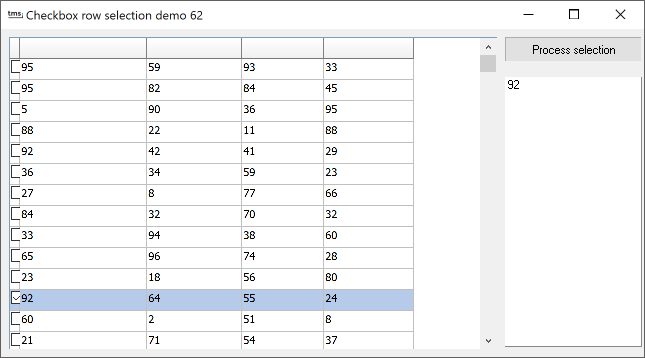 With this sample project, it is demonstrated how the checkboxes can be used to
perform a disjunct row selection in the grid. This is done by adding a column of
checkboxes in the grid and from the checkbox click event control the disjunct
row selection state of the rows clicked.
With this sample project, it is demonstrated how the checkboxes can be used to
perform a disjunct row selection in the grid. This is done by adding a column of
checkboxes in the grid and from the checkbox click event control the disjunct
row selection state of the rows clicked.
The grid is initialized with the code:
var
  i: integer;
begin
  advstringgrid1.FixedCols := 0;
  advstringgrid1.ColWidths[0] := 20;
  advstringgrid1.Options := advstringgrid1.Options + [goRowSelect, goEditing];
  advstringgrid1.RowCount := 20;
  advstringgrid1.ShowSelection := false;
  for i := 1 to advstringgrid1.RowCount -1 do
    advstringgrid1.AddCheckBox(0,i,false,false);
  advstringgrid1.RandomFill(false,100);
end;
This code adds a checkbox in the first column for every row in the grid.
To let the row selection state reflect the checkbox state, the OnCheckBoxClick is implemented as:
procedure TForm1.AdvStringGrid1CheckBoxClick(Sender: TObject; ACol,
  ARow: Integer; State: Boolean);
begin
  advstringgrid1.RowSelect[Arow] := State;
end;
Finally, to obtain all selected rows and possibly perform some processing on these rows, this is done with:
var
  i: Integer;
  state: boolean;
begin
  Listbox1.Items.Clear;

  for i := 1 to AdvStringGrid1.RowCount - 1 do
  begin
    if Advstringgrid1.GetCheckBoxState(0,i,state) then
    begin
      if state then
      begin
        AdvStringGrid1.SetCheckBoxState(0,i,false);
        ListBox1.Items.Add(AdvStringgrid1.Cells[1,i]);
      end;
    end;
  end;
  if listbox1.Items.Count = 0 then
    ShowMessage('No items selected');
  AdvStringGrid1.Invalidate;
end;
Delphi project & source files for downloading included in the main demos distribution for Delphi.
×
![]()