TAdvStringGrid
Example 57 : using cell controls to show a grid inside a grid
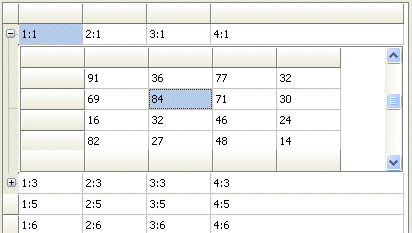 With improved cell controls support, it is now
possible to do something like using a grid inside a grid.
With improved cell controls support, it is now
possible to do something like using a grid inside a grid.
To start with, using cell controls is simple. Any TWinControl descendent can be hosted inside TAdvStringGrid. This is done by assigning the control to the grid.CellControls[col,row]: TWinControl property.
Example:
To have a button displayed in cell 2,5 you can use:
grid.CellControls[2,5] := button1;
The same technique can be applied to put a grid inside a grid. Here some additional features will be used. First of all, the grid will be placed in a merged cell. Secondly, the merged cell will be put in a node span to allow collapsing and expanding the row with the secondary grid.
The setup is done by putting the main grids and two secondary grids on a form. With the following code, the secondary grids are bound in the merged expandable rows of the main grid:
procedure TForm1.FormCreate(Sender: TObject);
begin
  advstringgrid1.LinearFill(false);
  advstringgrid1.AddNode(1,2);
  advstringgrid1.RowHeights[2] := 128;
  advstringgrid1.MergeCells(1,2,4,1);
  advstringgrid1.CellControls[1,2] := advstringgrid2;
  advstringgrid1.AddNode(3,2);
  advstringgrid1.RowHeights[4] := 128;
  advstringgrid1.MergeCells(1,4,4,1);
  advstringgrid1.CellControls[1,4] := advstringgrid3;
  advstringgrid1.ContractNode(1);
  advstringgrid1.ContractNode(3);
end;
As the secondary grids are placed on the form, all features and capabilities of TAdvStringGrid can be used on the main grid as well as on the secondary grids.
Delphi project & source files for downloading included in the main demos distribution for Delphi.
×
![]()