TAdvStringGrid
Example 53 : inplace memo and popup memo editor
As it was much requested to have a cell inplace editor that has vertical and horizontal scrollbars, this sample application shows how the MemoEditLink component can be used to attach a TMemo control as inplace editor in TAdvStringGrid. For more in detail information on how to use custom inplace editors in TAdvStringGrid, we refer to the discussion of sample application 24.The TMemoEditLink component that is included default with TAdvStringGrid has 2 styles : EditStyle = esPopup and EditStyle = esInplace. The effect of these choices is obvious and can be see here:
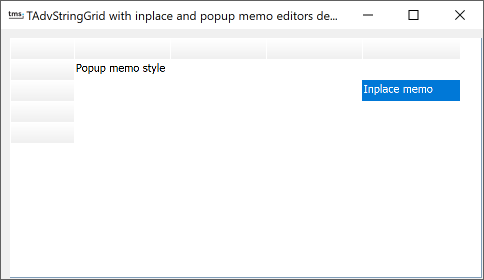 As the TMemoEditLink is ready and
available, it is just a matter of using these in
TAdvStringGrid.This is done by dropping 2 instances of
TMemoEditLink on the form, set the EditStyle to esPopup for one
TMemoEditLink and set it to esInplace for the other
TMemoEditLink. TAdvStringGrid is told to use these custom editors
with
As the TMemoEditLink is ready and
available, it is just a matter of using these in
TAdvStringGrid.This is done by dropping 2 instances of
TMemoEditLink on the form, set the EditStyle to esPopup for one
TMemoEditLink and set it to esInplace for the other
TMemoEditLink. TAdvStringGrid is told to use these custom editors
with
procedure TForm1.AdvStringGrid1GetEditorType(Sender: TObject; ACol, ARow: Integer; var AEditor: TEditorType);
begin
  AEditor := edCustom;
  if ARow <> 2 then
   AdvStringGrid1.EditLink := MemoEditLink1
  else
   AdvStringGrid1.EditLink := MemoEditLink2
end;
So, with dropping the right components on the form and writing just a few lines of code, an inplace memo editor can be used that features scrollbars.
Delphi project & source files for downloading included in the main demos distribution for Delphi.
×
![]()