TAdvStringGrid
Example 49 : auto calculating floating footers
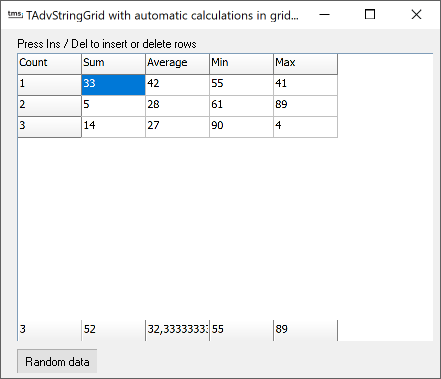 It is now very convenient to show automatically calculated values
in the fixed floating footer of TAdvStringGrid. Automatic
calculations of column sum, column minimum, column maximum,
column average and column rowcount can be easily added. Only 2
steps are required to enable this :
It is now very convenient to show automatically calculated values
in the fixed floating footer of TAdvStringGrid. Automatic
calculations of column sum, column minimum, column maximum,
column average and column rowcount can be easily added. Only 2
steps are required to enable this :
grid.FloatingFooter.Visible := True; // show the floating footer
grid.FloatingFooter.ColumnCalc[colindex] := CalcType; // set the calculation type for the column colindex in the floating footer.
acCount: show rowcount
acSum: show column sum
acAvg: show column average
acMin: show column minimum
acMax: show column maximum
As such, the sample app's setup was done with:
procedure TForm1.FormCreate(Sender: TObject);
begin
 AdvStringGrid1.FloatingFooter.ColumnCalc[0] := acCount;
 AdvStringGrid1.FloatingFooter.ColumnCalc[1] := acSum;
 AdvStringGrid1.FloatingFooter.ColumnCalc[2] := acAvg;
 AdvStringGrid1.FloatingFooter.ColumnCalc[3] := acMin;
 AdvStringGrid1.FloatingFooter.ColumnCalc[4] := acMax;
 AdvStringGrid1.RandomFill(False,100);
 AdvstringGrid1.AutoNumberCol(0);
end;
Whenever a cell changes through editing or through loading, the automatically recalculated value shows in the floating footer.
Delphi project & source files for downloading included in the main demos distribution for Delphi.
×
![]()