TAdvStringGrid
Example 43 : advanced border control
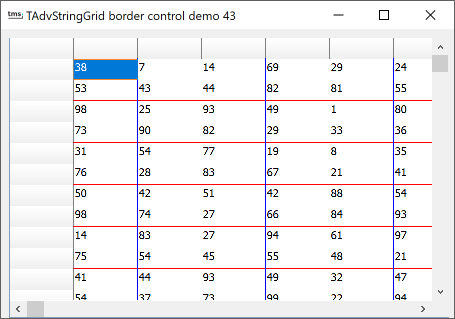 In earlier versions of
TAdvStringGrid, it was not possible to specify different border
colors and widths for a single cell. It was only possible to
specify which border to draw (left, top, bottom, right)
In earlier versions of
TAdvStringGrid, it was not possible to specify different border
colors and widths for a single cell. It was only possible to
specify which border to draw (left, top, bottom, right)
In addition to the OnGetCellBorder event with which you can specify which borders to draw, an extra event is now available, OnGetCellBorderProp through which the pen can be set for the left, top, bottom and right border of the cell.
How the 2 events work together is shown in the following example:
procedure TForm1.AdvStringGrid1GetCellBorder(Sender: TObject; ARow,
  ACol: Integer; APen: TPen; var Borders: TCellBorders);
begin
  if not Odd(ACol) and (ARow > 0) and (ACol > 0) then
  begin
    Borders := [cbLeft];
    APen.Width := 1;
    APen.Color := clBlack;
  end;

  if not Odd(ARow) and (ARow > 0) and (ACol > 0) then
  begin
    Borders := Borders + [cbBottom];
    APen.Width := 1;
    APen.Color := clBlack;
  end;
end;
The above event handler makes sure that a left and bottom border of the cell are only drawn for all even rows. The specify that the left border should be drawn in a blue color and the bottom border in a red color, the OnGetCellBorderProp method is used :
procedure TForm1.AdvStringGrid1GetCellBorderProp(Sender: TObject; ARow,
  ACol: Integer; LeftPen, TopPen, RightPen, BottomPen: TPen);
begin
  LeftPen.Color := clBlue;

  BottomPen.Color := clRed;
end;
Delphi project & source files for downloading included in the main demos distribution for Delphi.
×
![]()