TAdvStringGrid
Example 32 : TAdvStringGrid and TImagePicker inplace editor
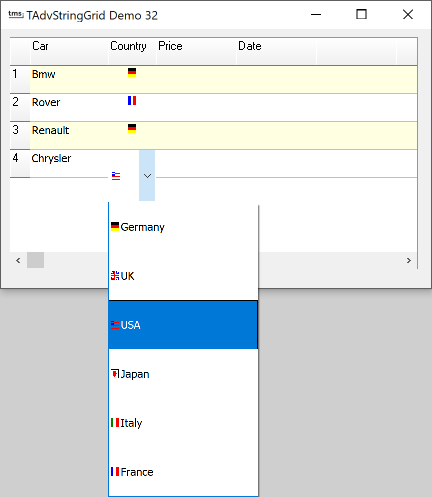 As example 24 explains, the TEditLink provide the capability to
use any type of inplace editor with TAdvStringGrid. In this
example, a TImagePicker control is combined with a TAdvStringGrid
data-image. A data image is an image that reflects a cell value.
The image picker is then used to select this. In the example, a
country is represented by a number which is in turn represented
by an imagelist element.
As example 24 explains, the TEditLink provide the capability to
use any type of inplace editor with TAdvStringGrid. In this
example, a TImagePicker control is combined with a TAdvStringGrid
data-image. A data image is an image that reflects a cell value.
The image picker is then used to select this. In the example, a
country is represented by a number which is in turn represented
by an imagelist element.
The first step to set the grid's images is simple. Set the EnableGraphics property to true, assign an imagelist to the Grid.GridImages property and call Grid.AddDataImage(Col,Row,Idx,Horiz. Align, Vert. Align).
The Idx property is the default index of the image. The image can be changed by setting the Grid.Ints property as well, for example :
Grid.Ints[Col,Row] := 2;
selects image 2 from the imagelist.
The next step is to specify the TImagePicker component as inplace editor for column 2. This is done by the TImagePickerEditLink which is assigned to the Grid.EditLink property in the OnGetEditorType event :
procedure TForm1.AdvStringGridGetEditorType(Sender: TObject; ACol, ARow: Integer; var AEditor: TEditorType);
begin
  if acol=2 then
  begin
    AdvStringGrid1.EditLink := el;
    AEditor := edCustom;
  end;
end;
The contents of the ImagePicker can be set for example in the OnGetEditorProp event. This is the code used:
procedure TForm1.AdvStringGrid1GetEditorProp(Sender: TObject; aCol,
  aRow: Integer; aEditLink: TEditLink);
begin
  case acol of
  2:begin
      with (aEditLink.GetEditControl as TImagePicker) do
      begin
        BeginUpdate;
        Items.Clear;
        with Items.Add do
        begin
          Caption:='Germany';
          ImageIndex:=0;
        end;
        with Items.Add do
        begin
          Caption:='UK';
          ImageIndex:=1;
        end;
        with Items.Add do
        begin
          Caption:='USA';
          ImageIndex:=2;
        end;
        with Items.Add do
        begin
          Caption:='Japan';
          ImageIndex:=3;
        end;
        with Items.Add do
        begin
          Caption:='Italy';
          ImageIndex:=4;
        end;
        with Items.Add do
        begin
          Caption:='France';
          ImageIndex:=5;
        end;
        EndUpdate;
      end;
    end;
  end;
end;
This is all it takes to use the TImagePicker component as inplace editor for TAdvStringGrid and descendant components.
Delphi project & source files for downloading included in the main demos distribution for Delphi.
×
![]()