TAdvStringGrid
Example 27 : Using the JPM Open font & color combobox with TAdvStringGrid
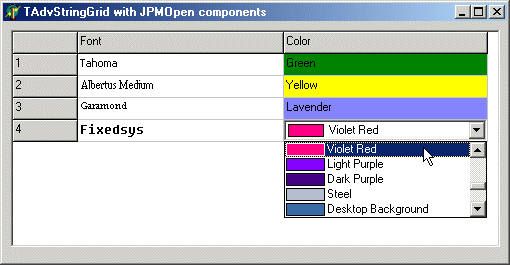 With this sample project and
editlinks file, we show how to use the JPM Open font & color
combobox components in TAdvStringGrid. The JPM Open components is
an initiative towards open source components by J. Peter Mugaas
and can be found at: http://www.esbconsult.com.au/esbpcs/jpmopen.htm
With this sample project and
editlinks file, we show how to use the JPM Open font & color
combobox components in TAdvStringGrid. The JPM Open components is
an initiative towards open source components by J. Peter Mugaas
and can be found at: http://www.esbconsult.com.au/esbpcs/jpmopen.htm
The interfacing between the JPM Open comboboxes and TAdvStringGrid is provided by the unit JPMLINKS.PAS which provides 2 components : TJPMColorComboBoxEditLink and TJPMFontComboBoxEditLink. In addition, the JPMELINKS.PAS unit provides editlinks for the ESBPCS compatible color & font combobox. For a full discussion of the TEditLink capabilities and implementation, see the sample project 24 here invisible EditLink components can be dropped on the form and used in the OnGetEditorType event:
procedure TForm1.asgGetEditorType(Sender: TObject; aCol, aRow: Integer; var aEditor: TEditorType);
begin
  aEditor := edCustom;
  if odd(acol) then
    asg.EditLink := JPMFE else asg.EditLink := JPMCE;
end;
We simply set the editor to the edCustom type and specify the font combobox for the odd column and the color combo for the even column. As we want to take this sample project, one step further, we use the OnGetCellColor event to reflect the selected font and color in the cells of the grid. In case of the font, this is simple as the font name is simply stored in the cell itself. For the colors, there is no simple conversion of the color name to the color value. Therefore, we use the JPMColorComboBox again to do this color name to color value translation.
procedure TForm1.asgGetCellColor(Sender: TObject; ARow, ACol: Integer;
  AState: TGridDrawState; ABrush: TBrush; AFont: TFont);
var
  jpmfc:TJPMColorComboBox;

begin
  if odd(acol) and (asg.Cells[acol,arow]<>'') and (arow>0) then
    AFont.Name:=asg.Cells[acol,arow];

  if not odd(acol) and (asg.Cells[acol,arow]<>'') and (arow>0) and (acol>0) then
  begin
    jpmfc:=TJPMColorComboBox.Create(self);
    jpmfc.width:=0;
    jpmfc.parent:=self;
    with jpmfc do
    begin
      ItemIndex:=Items.IndexOf(asg.Cells[acol,arow]);
      if ItemIndex>=0 then
        abrush.Color:=TColor(Items.Objects[ItemIndex]);
    end;
   jpmfc.Free;
  end;
end;
Here, we simply set the font name to the value found in the cell (if it is not empty) and assign it to aFont. For the colors, a TJPMColorComboBox is created, the index is set to the string value in the cell and the color is retrieved from its Objects property and assigned to aBrush.Color.
Delphi project & source files for downloading included in the main demos distribution for Delphi.
×
![]()