TAdvStringGrid
Example 2 : Dynamic cell colors
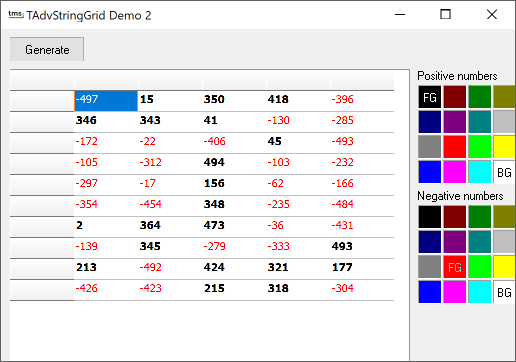 Often, there is a need to draw the attention to special values calculated and
presented in a grid. In this example, attention is drawn to some cells by changing
the cell background and text color depending on the values in the cell. The
grid is filled with random values between -500 and +500. Foreground and background
color of positive and negative numbers can be specified with 2 TColorGrid components.
Setting colors is done in the OnGetCellColor event handler :
Often, there is a need to draw the attention to special values calculated and
presented in a grid. In this example, attention is drawn to some cells by changing
the cell background and text color depending on the values in the cell. The
grid is filled with random values between -500 and +500. Foreground and background
color of positive and negative numbers can be specified with 2 TColorGrid components.
Setting colors is done in the OnGetCellColor event handler : procedure TForm1.AdvStringGrid1GetCellColor(Sender: TObject; ARow, ACol: Integer; AState: TGridDrawState; ABrush: TBrush; AFont: TFont); begin if advstringgrid1.cells[acol,arow]<>'' then if advstringgrid1.ints[acol,arow]<0 then begin abrush.color:=colorgrid2.backgroundcolor; afont.color:=colorgrid2.foregroundcolor; end else begin abrush.color:=colorgrid1.backgroundcolor; afont.color:=colorgrid1.foregroundcolor; afont.style:=[fsBold] end; end;
procedure TForm1.ColorGrid1Change(Sender: TObject);
begin
advstringgrid1.Repaint;
end;
×
![]()