TAdvStringGrid
Example 48 : disjunct cell selection
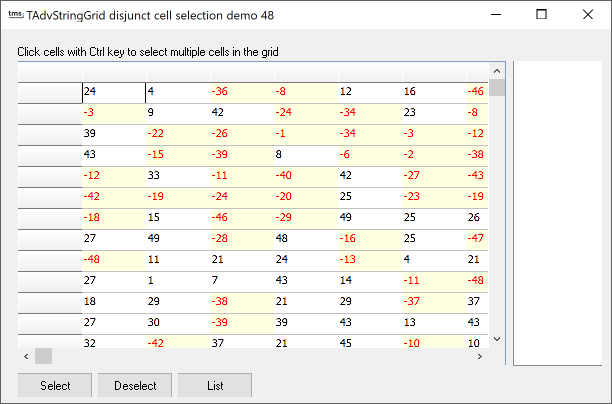 Some new properties enable easy
disjunct cell selections in TAdvStringGrid. The methods and
properties to be used for this are :
Some new properties enable easy
disjunct cell selections in TAdvStringGrid. The methods and
properties to be used for this are :
Grid.MouseActions.DisjunctCellSelect: Boolean; Setting this true enables disjunct cell selection with Ctrl mouse clicks
Grid.SelectedCells[col,row: Integer]: Boolean; Property to allow setting or clearing selection on a single cell
Grid.SelectedCellsCount: Integer; Returns the number of disjunct selected cells (read-only)
Grid.SelectedCell[i: Integer]: TGridCoord; Returns the i'th selected cell grid coordinates (read-only)
Grid.ClearSelectedCells; Clears all disjunct selected cells in the grid
With this interface, handling disjunct cell selections becomes very simple as the sample app shows.
To make a checkerboard disjunct cell selection, following code was written:
var
  i,j: Integer;
begin
  AdvStringGrid1.ClearSelectedCells;
  with AdvStringGrid1 do
    for i := 1 to ColCount - 1 do
      for j := 1 to RowCount - 1 do
        SelectedCells[i,j] := (odd(i) and odd(j)) or (not odd(i) and not odd(j));
end;
This is the method to show a list of selected cells in a listbox:
var
  i: Integer;
  gc: TGridCoord;
begin
  listbox1.Items.Clear;
  listbox1.Items.Add('Nr. of cells : ' + IntToStr(AdvStringGrid1.SelectedCellsCount));
  for i := 1 to AdvStringGrid1.SelectedCellsCount do
  begin
    gc := AdvStringGrid1.SelectedCell[i - 1];
    listbox1.Items.Add(IntToStr(gc.X)+':'+IntToStr(gc.Y));
  end;
end;
Delphi project & source files for downloading included in the main demos distribution for Delphi.
×
![]()