TAdvStringGrid
Example 3 : Flexible navigation in the stringgrid
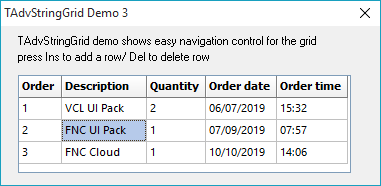 This example shows how you can make it easy to navigate through the grid and
allow fast data entry with a minimum amount of code to write.
This example shows how you can make it easy to navigate through the grid and
allow fast data entry with a minimum amount of code to write. The sample application is supposed to be a very simple order entry program. A user can enter products and due dates that can be forwarded to the planning dept. Entering data can be made much faster with the Navigation property. In this property we set :
AdvanceOnEnter = true : when the user has finished entering a cell, pressing enter will take him to the next cell AdvanceAuto = true : when using masked editors in the grid, advancing to the next cell can be taken one step further, ie, the focus moves automatically to the next cell if the masked editor is completely filled and without pressing enter. AdvanceInsert = true : if data is entered on the last row, a new row is automatically inserted and an event handler is called OnAutoInsertRow. In this event handler, some cells of the new row can preset to certain values. AllowInsertRow = true : the user can press the Insert button to add a row. Again, the OnAutoInsertRow event handler is called.
To show the mechanism, an event handler has been added for both OnGetEditMask and OnAutoInsertRow.
procedure TForm1.AdvStringGrid1GetEditMask(Sender:
 TObject; ACol,
 ARow: Integer; var Value: String);
begin
  case acol of
  0:value:='!000;1;_';
  1:value:='';
  2:value:='!000;1;_';
  3:value:='!99/99/00;1;_';
  4:value:='!90:00;1;_';
  end;
end;
procedure TForm1.AdvStringGrid1AutoInsertRow(Sender: TObject;

 ARow: Integer);
var
   i:integer;
   s:string;
begin
   with advstringgrid1 do
   begin
     s:=cells[0,arow-1];
     while pos(' ',s)>0 do
        delete(s,pos(' ',s),1);
     i:=strtoint(s);
     cells[0,arow]:=inttostr(i+1);
  end;
end;
So, only with a few lines of code and setting some properties, huge improvements in easy grid navigation for fast data entry can be achieved.
Delphi project & source files for downloading included in the main demos distribution for Delphi.
×
![]()