TAdvStringGrid
Example 22 : Using filtering
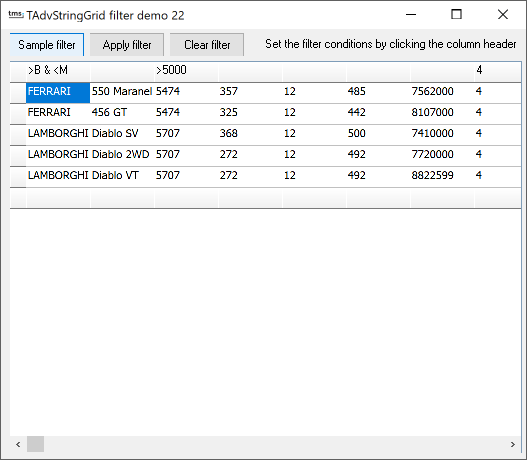 With the new filtering
capabilities in TAdvStringGrid, displaying a selection of the
grid's data is easier than ever. Two properties are used for
filtering. First there is the FilterData property, which is a
TCollection of filter conditions for each column and second is
the property FilterActive through which filtering is performed
when set true.
With the new filtering
capabilities in TAdvStringGrid, displaying a selection of the
grid's data is easier than ever. Two properties are used for
filtering. First there is the FilterData property, which is a
TCollection of filter conditions for each column and second is
the property FilterActive through which filtering is performed
when set true.
Taking a closer look at the FilterDate collection, this is a TCollection of elements with 2 properties, Condition, which is a string and Column which is an integer. The Condition property can contain a condition in following formats :
substring filterting : S*, S? : * or ? denote multi or single character matches >, < , >=, =< : larger than, less than, larger or equal, less or equal (when data is numeric, comparison take place based on numeric data, otherwise on alphabetic comparisons) = , ! : equal or not equal & , ^ : logical AND , logical OR
Thus, an expression : >20 & <30 is a valid filtering expression as well as !A*
In this example, the conditions are set by clicking on the column header and specifying the condition for each column. This is done with the OnClickCell event:
procedure TForm1.AdvStringGrid1ClickCell(Sender: TObject; Arow, Acol: Integer);
var
   s:string;
begin
  if (arow=0) and (acol>0) then
  begin
    s := AdvStringGrid1.Cells[acol,arow];
    if InputQuery('Column ' + IntToStr(acol),'Condition',s) then
      AdvStringGrid1.Cells[acol,arow] := s;
  end;
end;
When the Apply filter button is clicked, the FilterData collection is built from these conditions and FilterActive is set true :
procedure TForm1.CheckBox1Click(Sender: TObject);
var
  i:integer;
begin
  with advstringgrid1 do
  begin
    filteractive:=false;
    filter.Clear;
    for i:=fixedcols to colcount-1 do
    begin
      if (cells[i,0]<>'') then
      with filter.add do
      begin
        condition := Cells[i,0];
        column:= i;
      end;
    end;
    filteractive := True;
  end;
end;
Delphi project & source files for downloading included in the main demos distribution for Delphi.
×
![]()