TAdvStringGrid
Example 19 : using the new UnitEditBtn inplace editors
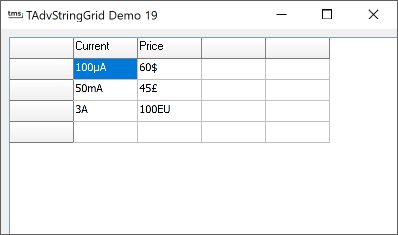 Using the inplace uniteditbtn
inplace editor is straightforward. This special inplace editor to
do a split edit of a physical value and a physical unit, is based
on the fact that such a value is always written as
<value><unit> and that value contains numeric data
only, while the unit is a non numeric string or symbol. So, if a
cell contains some string like : 100µA the inplace unit editor
will automatically allow split editing of value 100 and unit µA.
Only two things are required to get this working. First, you need
to specify the inplace editor through the OnGetEditorType event.
Secondly, all properties of this inplace editor can be accessed
through the TAdvStringGrid BtnUnitEdit property. This BtnUnitEdit
has a stringlist property that contains all possible units. For a
C++ example this translates to:
Using the inplace uniteditbtn
inplace editor is straightforward. This special inplace editor to
do a split edit of a physical value and a physical unit, is based
on the fact that such a value is always written as
<value><unit> and that value contains numeric data
only, while the unit is a non numeric string or symbol. So, if a
cell contains some string like : 100µA the inplace unit editor
will automatically allow split editing of value 100 and unit µA.
Only two things are required to get this working. First, you need
to specify the inplace editor through the OnGetEditorType event.
Secondly, all properties of this inplace editor can be accessed
through the TAdvStringGrid BtnUnitEdit property. This BtnUnitEdit
has a stringlist property that contains all possible units. For a
C++ example this translates to:
void __fastcall TForm1::AdvStringGrid1GetEditorType(TObject *Sender,
int aCol, int aRow, TEditorType &aEditor)
{
if (aCol==1)
{
 AdvStringGrid1->BtnUnitEdit->Units->Clear();
 AdvStringGrid1->BtnUnitEdit->Units->Add("µA");
 AdvStringGrid1->BtnUnitEdit->Units->Add("mA");
 AdvStringGrid1->BtnUnitEdit->Units->Add("A");
 aEditor = edUnitEditBtn;
}
if (aCol==2)
{
 AdvStringGrid1->BtnUnitEdit->Units->Clear();
 AdvStringGrid1->BtnUnitEdit->Units->Add("$");
 AdvStringGrid1->BtnUnitEdit->Units->Add("£");
 AdvStringGrid1->BtnUnitEdit->Units->Add("EU");
 aEditor = edUnitEditBtn;
}
}
In this example, 2 columns use 2 different inplace unit editors, each requiring a different list of units, so this list is set up in the OnGetEditorType event which is called just before the inplace editing starts.
To get this project started, some cells are initialised to values that are valid for split editing in this method :
AdvStringGrid1->Cells[1][1] = "100µA";
AdvStringGrid1->Cells[1][2] = "50mA";
AdvStringGrid1->Cells[1][3] = "3A";
AdvStringGrid1->Cells[2][1] = "60$";
AdvStringGrid1->Cells[2][2] = "45£";
AdvStringGrid1->Cells[2][3] = "100EU";
Delphi project & source files for downloading included in the main demos distribution for Delphi.
×
![]()