TAdvStringGrid
Example 18 : using custom sort sequences
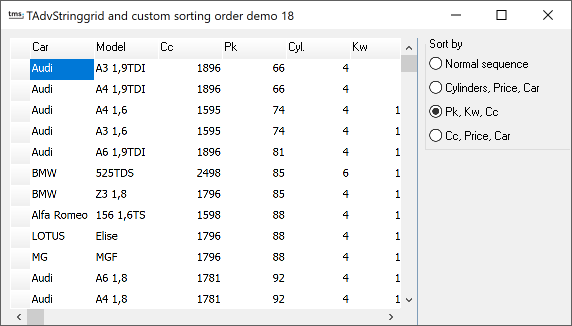 One property and one method make
it possible to change the normal sort sequence, ie. from left to
right, to any sequence you like. When using QSort or when
clicking on a column header, the grid is sorted primarily on the
sortcolumn or the column that is clicked on. When items are equal
in the sorted column, subsorting goes to the second column (on
the right of the primary sort column) etc... Often, this
behaviour is not wanted, and therefore, the method QSortIndex and
the property SortIndexes have been introduced. The SortIndexes is
a list of integers and holds the column index sequence for the
sort. Ie, if primary sort column should be 2 and secondary sort
column 5 and third sort column 1, this list should hold : 2,5,1.
The interface to this list is simple. SortIndexes is derived from
TList, so the methods Clear, Add can be used. Setting the sort
sequence above results in:
One property and one method make
it possible to change the normal sort sequence, ie. from left to
right, to any sequence you like. When using QSort or when
clicking on a column header, the grid is sorted primarily on the
sortcolumn or the column that is clicked on. When items are equal
in the sorted column, subsorting goes to the second column (on
the right of the primary sort column) etc... Often, this
behaviour is not wanted, and therefore, the method QSortIndex and
the property SortIndexes have been introduced. The SortIndexes is
a list of integers and holds the column index sequence for the
sort. Ie, if primary sort column should be 2 and secondary sort
column 5 and third sort column 1, this list should hold : 2,5,1.
The interface to this list is simple. SortIndexes is derived from
TList, so the methods Clear, Add can be used. Setting the sort
sequence above results in:
 AdvStringGrid.SortIndexes.Clear;  //clear any previous sequences
 AdvStringGrid.SortIndexes.Add(2); //set primary sort column
 AdvStringGrid.SortIndexes.Add(5); //set secondary sort column
 AdvStringGrid.SortIndexes.Add(1); //set third sort column
The routine in the sample application, to select a few custom sort sequences results in:
procedure TForm1.sortgroupClick(Sender: TObject);
begin
case sortgroup.itemindex of
0:begin
   advstringgrid1.QSort;
  end;
1:begin
    advstringgrid1.SortIndexes.Clear;
    advstringgrid1.SortIndexes.Add(5);
    advstringgrid1.SortIndexes.Add(7);
    advstringgrid1.SortIndexes.Add(1);
    advstringgrid1.QSortIndexed;
  end;
2:begin
    advstringgrid1.SortIndexes.Clear;
    advstringgrid1.SortIndexes.Add(4);
    advstringgrid1.SortIndexes.Add(6);
    advstringgrid1.SortIndexes.Add(3);
    advstringgrid1.QSortIndexed;
  end;
3:begin
    advstringgrid1.SortIndexes.Clear;
    advstringgrid1.SortIndexes.Add(3);
    advstringgrid1.SortIndexes.Add(7);
    advstringgrid1.SortIndexes.Add(1);
    advstringgrid1.QSortIndexed;
  end;
end;

end;
Delphi project & source files for downloading included in the main demos distribution for Delphi.
×
![]()