TAdvStringGrid
Example 86 : Using the TAdvGridLookupBar
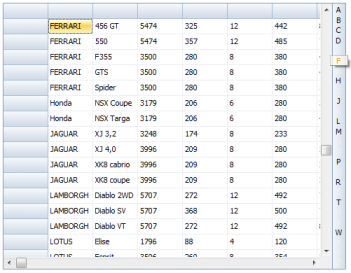 The TAdvGridLookupBar offers an easy to use alphabetical or categorical lookup bar that can be shown on the left or right side of the grid.
In its easiest configuration, the TAdvGridLookupBar retrieves the alphabetical lookup information automatically from the assigned grid column.
The lookup highlights in the alphabet or categories for which items data is available in the grid and when clicked, automatically moves the
focus to the first item belonging to the clicked letter or category.
The TAdvGridLookupBar offers an easy to use alphabetical or categorical lookup bar that can be shown on the left or right side of the grid.
In its easiest configuration, the TAdvGridLookupBar retrieves the alphabetical lookup information automatically from the assigned grid column.
The lookup highlights in the alphabet or categories for which items data is available in the grid and when clicked, automatically moves the
focus to the first item belonging to the clicked letter or category.
Using TAdvGridLookupBar with alphabetic lookup
Drop the TAdvGridLookupBar on the form next to a TAdvStringGrid. Assign the grid to AdvGridLookupBar.Grid and set the column from where the lookup items need to be retrieved.
In code, loading the grid and initializing the lookup bar is done with:
begin
  AdvStringGrid1.SaveFixedCells := false;
  AdvStringGrid1.LoadFromCSV('c:\tmssoftware\cars.csv');
  AdvStringGrid1.SortSettings.Column := 1;
  AdvStringGrid1.QSort;

  AdvGridLookupBar1.Grid := AdvStringGrid1;
  AdvGridLookupBar1.Column := 1;
end;
Using TAdvGridLookupBar with custom category lookup
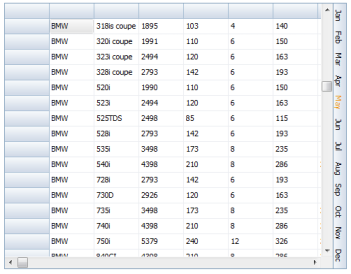 When AdvGridLookupBar.CategoryType is set to Custom, the lookupbar is filled with categories as defined in the collection AdvGridLookupBar.Categories. Each category
has a display text, a lookup text and a Tag that holds the grid record number where the first entry matching the category is found. Optionally, an imagelist image
can be used as well and this is configured with the category ImageIndex.
When AdvGridLookupBar.CategoryType is set to Custom, the lookupbar is filled with categories as defined in the collection AdvGridLookupBar.Categories. Each category
has a display text, a lookup text and a Tag that holds the grid record number where the first entry matching the category is found. Optionally, an imagelist image
can be used as well and this is configured with the category ImageIndex. This sample code snippet shows how to initialize the lookup with the 12 months of the year as category and with the category text rotated in the lookupbar:
var
  i: integer;
begin
  AdvGridLookupBar1.Categories.Clear;
  AdvGridLookupBar1.CategoryType := custom;
  AdvGridLookupBar1.Rotated := true;

  for i := 1 to 12 do
  with AdvGridLookupBar1.Categories.Add do
  begin
    Text := ShortMonthNames[i];
    Tag := GetGridRowOfMonth(i);
  end;

  AdvGridLookupBar1.InitLookupBarCategories;
end;
Important note: it is important that the categories are added in the sequence of increasing row numbers.
Delphi project & source files for downloading included in the main demos distribution for Delphi
×
![]()