TAdvStringGrid
Example 39 : merged cell access and merged cell printing and HTML export
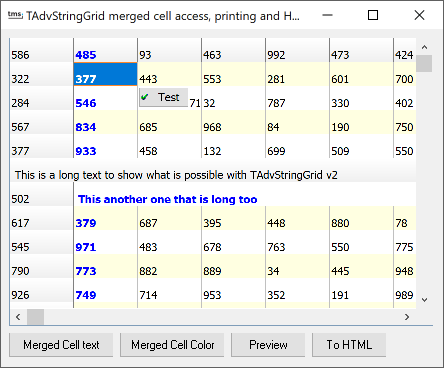 This demo app demonstrates the
behaviour of merged cells. The access and settings that affect
the merged cells are all done through the base cell, ie. the top
left cell. This includes setting of cell content as well as
performing cell settings through events. Cell merging is started
with the call grid.MergeCells(ACol,ARow,SpanX,SpanY: Integer).
ACol,ARow indicate the base cell, while SpanX, SpanY indicate the
number of cells to merge horizontally and vertically. It is
evident that the minimum values for SpanX, SpanY are 1 (that is
no merging)
This demo app demonstrates the
behaviour of merged cells. The access and settings that affect
the merged cells are all done through the base cell, ie. the top
left cell. This includes setting of cell content as well as
performing cell settings through events. Cell merging is started
with the call grid.MergeCells(ACol,ARow,SpanX,SpanY: Integer).
ACol,ARow indicate the base cell, while SpanX, SpanY indicate the
number of cells to merge horizontally and vertically. It is
evident that the minimum values for SpanX, SpanY are 1 (that is
no merging)
Example :
To set a long text in 10 horizontally merged cells you can:
AdvStringGrid1.MergeCells(1,6,10,1);
AdvStringGrid1.Cells[1,6] := 'This another one that is long too';
The background color of this merged cell can be set by changing the background color of the base cell, ie :
AdvStringGrid.Colors[1,6] := clLime;
To reapply the default color, use :
AdvStringGrid.Colors[1,6] := clNone;
If you want to use the OnGetCellColor event to set colors, it is sufficient to handle the base cell color setting, for example in this way:
procedure AdvStringGrid1GetCellColor(Sender: TObject; ACol,ARow: Integer; AState: TGridDrawState; ABrush: TBrush; AFont: TFont);

begin
  if ACol = 1 then
  begin
    AFont.Color := clBlue
    AFont.Style := [fsBold];
  end;
end;
Delphi project & source files for downloading included in the main demos distribution for Delphi.
×
![]()